
AI's Role in Reducing Admin Costs for SMBs
Published: June 27, 2026 · 10–11 min read
TL;DR:
- AI reduces admin costs by automating repetitive tasks and redesigning workflows for efficiency. Proper implementation involves process redesign and structured human oversight to maximize savings and scalability. Starting with narrow, measurable workflows ensures measurable ROI and sustainable operational improvements.
AI's role in reducing admin costs is defined by two forces working together: automating repetitive tasks and redesigning the workflows those tasks live inside. Businesses that treat these as separate problems miss the bigger opportunity. IBM's AI-enabled HR chatbot resolved over 90% of HR inquiries and cut HR operating expenses by 40%. That result did not come from the chatbot alone. It came from rethinking how HR work was structured around it. This article breaks down exactly how AI achieves those savings, where most SMBs go wrong, and how to build a practical path to measurable results.
How does AI automation cut routine admin tasks and processing time?
AI automation reduces administrative costs by removing human effort from high-volume, repetitive work. The savings are not marginal. A published MDPI study found that embedding an LLM-enabled workflow reduced total document processing time from 15 minutes to 4 minutes per document and cut human-in-the-loop time from 15 minutes to 3 minutes. That translated to roughly 66 hours saved per month in administrative tasks alone. For a small business paying a staff member $25 per hour, that is over $1,600 in monthly labor savings from a single workflow change.

Invoice processing is one of the clearest examples of AI cost reduction in practice. Manual invoice handling typically costs between $12 and $15 per invoice. Automated invoice processing drops that cost to $2–$4 per invoice and can free the equivalent of 3.5 full-time employees in labor for SMB-sized volumes. That is not a rounding error. For a business processing 500 invoices per month, the annual savings can exceed $60,000.
Here are the administrative task categories where AI delivers the fastest and most consistent time reductions:
- Document classification and data extraction: AI reads, sorts, and pulls key fields from forms, contracts, and invoices without manual entry.
- Scheduling and calendar management: AI tools handle meeting requests, reminders, and follow-up communications automatically.
- Customer and employee inquiry handling: Chatbots and virtual assistants resolve standard questions without routing to staff.
- Reporting and compliance documentation: AI replaces periodic manual reporting with always-on data workflows, with cycle time reductions of up to 90%.
Each of these categories shares a common trait: the work is rule-based, high-volume, and predictable. That is exactly where AI performs best.
Pro Tip: Start by listing every task your admin staff repeats more than ten times per week. Those are your highest-priority automation candidates.
Why is workflow redesign the real driver of AI cost savings?
Automating admin tasks without redesigning the workflow around them is one of the most common and costly mistakes SMBs make. BCG research is direct on this point: simply layering AI over existing workflows without redesign can leave costs unchanged or even higher due to added complexity. The AI creates capacity, but if the surrounding process still requires the same approval layers and handoffs, that capacity disappears into existing inefficiency.
The math behind this is straightforward. If your invoice approval process has five steps and AI automates step two, you still have four manual steps. The bottleneck moves, but the cost does not fall. BCG's analysis of leading companies shows that 70% of AI value in admin cost reduction comes from process redesign, not from the technology itself. That is a significant finding. It means the tool is less important than the process change surrounding it.
For SMBs, workflow redesign does not require a consultant or a six-month project. It requires asking three questions about every admin process you plan to automate:
- Which steps exist only because a human had to do them manually?
- Which approval layers exist because of past errors, not current risk?
- Which handoffs between people or departments can be collapsed into one step?
Answering these questions before deploying AI is what separates businesses that cut costs from those that simply add a new tool. Leading companies using this approach have reduced General and Administrative costs to 3–5% of revenue, down from an industry average of 8%.
Pro Tip: Map your current workflow on a whiteboard before touching any AI tool. Mark every step that exists only because a human was doing the previous step. Those are the steps you eliminate, not automate.
What is the role of human-in-the-loop in ai-driven admin processes?
Human-in-the-loop (HITL) oversight is the mechanism that keeps AI-driven admin processes accurate and trustworthy. Without it, errors accumulate silently and create a new category of administrative work: fixing what the AI got wrong. The goal is not to eliminate human review entirely. The goal is to make human review exception-driven rather than routine.
The MDPI research on LLM-enabled workflows demonstrates how this works in practice. The system was designed with two phases: structured output extraction by the AI, followed by human validation only on flagged exceptions. This design is what produced the 80% reduction in HITL time. Staff reviewed only the cases the system was uncertain about, rather than every document. The result was faster processing and lower oversight burden at the same time.
Defining a clear output contract for each AI task is the structural key to making this work. An output contract specifies exactly what the AI must produce, in what format, and under what conditions a human review is triggered. Clear output contracts limit rework and prevent AI output variability from creating new admin burdens. Without this structure, staff end up spending as much time checking AI outputs as they previously spent doing the work manually.
The table below shows how a well-designed HITL model compares to a poorly designed one across key performance dimensions:
| Dimension | Poorly Designed HITL | Well-Designed HITL |
|---|---|---|
| Review trigger | Every AI output reviewed | Only flagged exceptions reviewed |
| Staff time on oversight | High, often exceeds savings | Low, focused on edge cases |
| Error correction burden | Frequent and unpredictable | Rare and structured |
| Cost outcome | Costs stay flat or rise | Costs fall measurably |
| Scalability | Limited by review capacity | Scales with AI volume |
A university survey of 230 administrative staff found that ease of AI use correlated positively with sustainable admin performance. That finding points to a practical truth: if your staff find the AI system difficult to work with or hard to override, adoption will stall and oversight will become a burden rather than a safeguard.
How can smbs implement AI to reduce admin costs with measurable ROI?
SMBs get the best results from AI when they start narrow, measure carefully, and scale only what works. The biggest implementation mistake is choosing a broad platform and expecting it to transform multiple workflows at once. That approach produces unclear results and makes it hard to identify what is actually saving money.
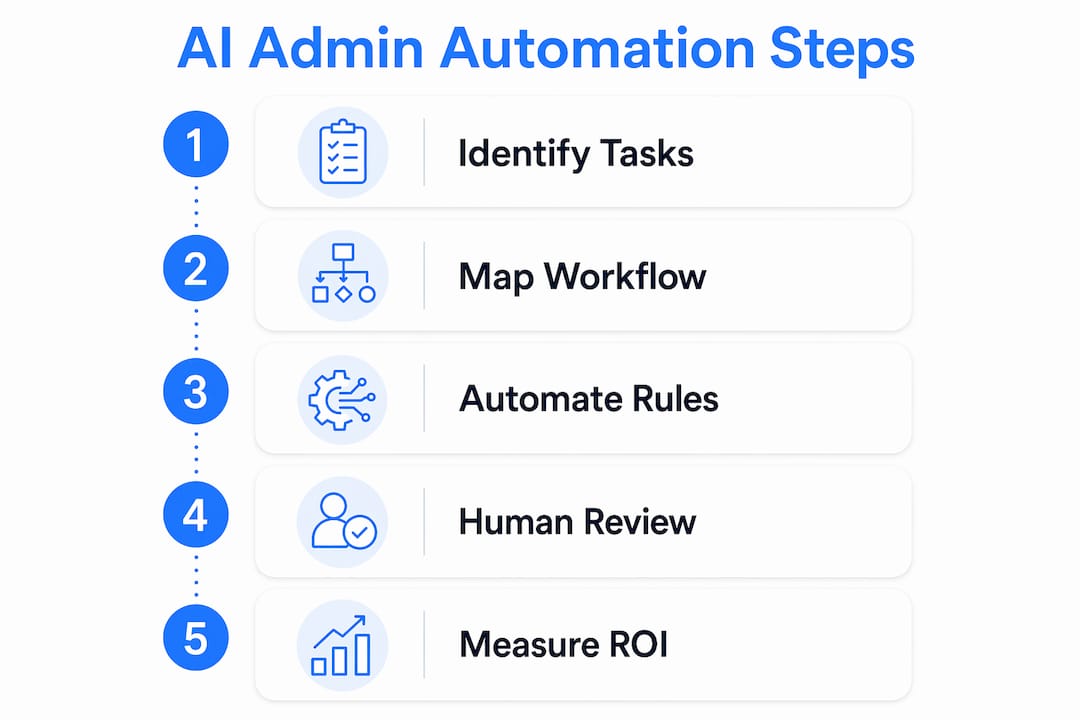
A practical SMB implementation follows this sequence:
- Identify one repeatable manual workflow. Pick a process your team does daily, such as invoice entry, appointment scheduling, or payment follow-up. Narrow scope produces clear measurement.
- Define the output contract before deployment. Specify what the AI must deliver, what format it must use, and what triggers a human review. This prevents error rework from eating your savings.
- Measure both elapsed time and oversight workload. Tracking only how long a task takes misses the full picture. Measuring oversight workload is equally important, because reductions in manual handling time can be offset by increased validation time if the workflow is not designed well.
- Run a governed pilot for 60–90 days. Early AI admin deployments often have unclear ROI initially. A time-boxed pilot with defined success metrics gives you real data before you commit to broader rollout.
- Redesign roles alongside the workflow. Analysis of U.S. federal agencies found that AI adoption shifts staffing from routine admin tasks toward higher-value expert work. Plan for this shift from the start so your team's time is redirected productively.
Pro Tip: Before your pilot ends, calculate the total staff hours spent on oversight and error correction. If that number is growing, your output contract needs tightening, not your AI tool.
The businesses that see the fastest payback from AI in business operations are those that treat the first deployment as a learning exercise. They document what worked, what created new friction, and what they would change. That knowledge makes the second deployment faster and cheaper than the first.
Key takeaways
AI reduces administrative costs most effectively when automation is paired with deliberate workflow redesign and structured human oversight, not deployed as a standalone tool.
| Point | Details |
|---|---|
| Automation cuts processing time sharply | LLM-enabled workflows reduced document processing from 15 to 4 minutes, saving 66 hours monthly. |
| Workflow redesign drives 70% of AI value | BCG research shows process simplification, not technology, generates most of the cost reduction. |
| Output contracts prevent new admin burdens | Defining AI deliverables and exception triggers stops error rework from offsetting savings. |
| Invoice automation delivers fast ROI | Cost per invoice drops from $12–$15 to $2–$4, freeing significant labor for SMB volumes. |
| Pilot with governance before scaling | A 60–90 day governed pilot with clear metrics reveals real ROI before broader commitment. |
The mistake i see smbs make most often with AI
Most SMBs I talk to approach AI adoption the same way: they find a tool that looks promising, connect it to an existing process, and wait for the savings to appear. When the savings do not show up, they assume the tool was not good enough. The tool is rarely the problem.
The real issue is that most administrative workflows were designed around human limitations. They have extra steps because humans needed checkpoints. They have approval layers because humans made errors at certain points. When you drop AI into that structure without changing it, the AI just becomes another participant in a slow process.
The businesses I have seen get genuine results from AI cost reduction do something different. They treat the AI deployment as a reason to question every step in the workflow, not just the step they are automating. They ask whether each approval still makes sense, whether each handoff still serves a purpose, and whether the people involved are doing work that actually requires their judgment.
That mindset shift is harder than choosing a software platform. It requires your team to let go of processes they built and trust. But it is the only approach that converts AI capacity into lower costs rather than just faster versions of the same expensive process. The technology is ready. The question is whether your workflows are.
— Tyler
See how Interval-ai handles admin work for you
If payment follow-up and collections are eating your team's time, that is one of the highest-impact admin workflows you can automate today.

Interval-ai automates outreach across multiple communication channels, tailors follow-up strategies based on historical payment data, and manages the entire collections process without adding headcount. Clients report reducing days to payment by over 30 days and saving thousands in payroll costs. You get consistent, professional follow-up on every overdue account without your staff spending hours on manual calls and emails. If you are ready to see what automated collections can do for your cash flow and admin costs, Interval-ai is built exactly for that.
FAQ
How much can AI reduce administrative costs?
AI-driven automation can cut General and Administrative costs from roughly 8% of revenue down to 3–5%, according to BCG research. Invoice processing alone drops from $12–$15 per invoice to $2–$4 with automation in place.
Do smbs need to redesign workflows before using AI?
Yes. BCG research confirms that layering AI over existing workflows without redesign can leave costs unchanged or higher. Collapsing redundant steps before deployment is what converts AI capacity into actual savings.
What is a human-in-the-loop model in admin AI?
A human-in-the-loop model means staff review only AI-flagged exceptions rather than every output. This approach reduced oversight time by 80% in published MDPI research while maintaining accuracy and quality control.
How long does it take to see ROI from AI admin automation?
Early deployments often show unclear ROI in the first weeks. A governed 60–90 day pilot with defined success metrics, including both elapsed time and oversight workload, gives you reliable data to evaluate before scaling.
Which admin tasks should smbs automate first?
Start with high-volume, rule-based tasks: invoice processing, appointment scheduling, payment follow-up, and standard inquiry handling. These deliver the fastest and most measurable cost reductions for small to medium businesses.
