
Automate Overdue Account Notifications with AI in 2026
Published: August 9, 2026 · 7–8 min read
TL;DR:
- Automating overdue account notifications uses AI workflows to detect invoice status, assign appropriate tone, and send messages precisely when needed. This approach ensures consistent follow-up, improves cash flow, and reduces manual effort, all while maintaining compliance with regulations. Interval-ai's AI-driven system adapts outreach based on customer history, significantly shortens payment cycles, and saves staffing costs.
What does automating overdue account notifications actually mean?
When you automate overdue account notifications, you replace manual reminder drafting with AI-powered workflows that detect invoice status, assign the right tone, and send messages across the right channels at exactly the right time. This is not just scheduling emails. It is a fully adaptive system that reads how late an invoice is and responds accordingly.
Advanced AI workflows assign specific tones based on days past due: a friendly nudge for invoices 1–7 days overdue, a firmer follow-up for 8–14 days, and a final warning tone at 15 days or beyond. That escalation happens automatically, without you writing a single word. You also get granular filtering so reminders only fire when an invoice exceeds a minimum dollar threshold or meets specific timing conditions, keeping your outreach targeted rather than noisy.
Key benefits businesses see from this approach:
- Consistent follow-up across every client, every time, without relying on memory or staff bandwidth
- Saved mental energy by replacing tedious manual drafting with personalized messages running in the background
- Improved cash flow through timely, professional outreach that shortens the gap between invoice and payment
- Regulatory alignment by building compliant messaging sequences that respect the Fair Debt Collection Practices Act (FDCPA) and related guidelines
Silence reads as permission to wait. Automated notifications remove that silence on a schedule you control.
How to design AI-powered workflows for overdue payment follow-up
Building an effective automated reminder system takes more than flipping a switch. The design of your workflow determines whether customers pay faster or tune you out.
Step 1: Map your escalation sequence. Start with a pre-due reminder, add a same-day nudge, then schedule post-due messages at 3, 7, and 14 days. Escalating message intensity across these stages is the most effective structure. Each stage should sound noticeably different from the last.
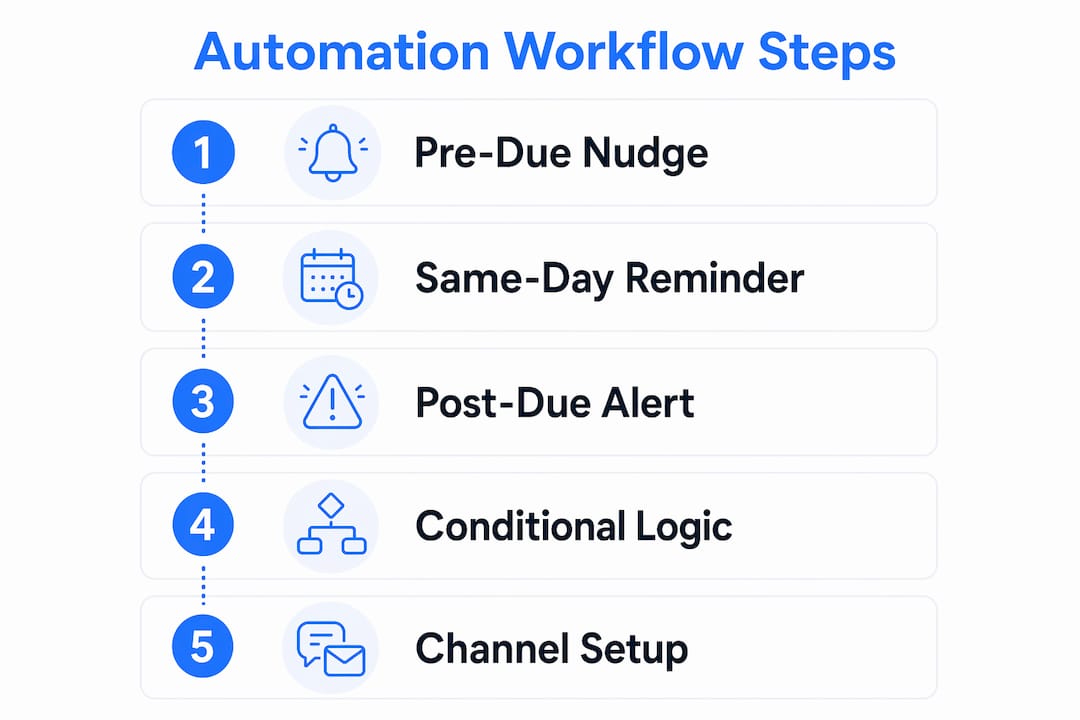
Step 2: Apply conditional logic. Workflow branching based on customer behavior lets you send a more urgent message to a customer who viewed the invoice but did not pay, while holding off on a customer who has not opened it yet. This keeps your outreach proportionate and professional.

Step 3: Configure your channels. Match the channel to the invoice value and customer preference. Email works for most reminders. SMS adds urgency for overdue notices. Phone calls or personal outreach fit high-value accounts where you want a human touch on the final stage.
Step 4: Set your filters. Minimum invoice amount thresholds and timing conditions prevent low-value or premature reminders from cluttering your customers' inboxes.
Step 5: Connect to your accounting and CRM systems. Linking your workflow to QuickBooks Online, Xero, or your CRM ensures customer data stays current and payment status updates in real time. Platforms like Zapier can bridge your invoicing tool to an AI messaging layer for fully personalized, dynamic content. Understanding broader AI payment trends helps you choose the right integration path.
Pro Tip: Before activating any automation, audit your contact lists manually. By default, most platforms send reminders to every contact on a customer record. Reviewing and refining those lists to target only the decision-maker prevents misdirected messages and protects your client relationships.
Key benefits of automating overdue account notifications with AI
The case for automation is not just about saving time. It reshapes how your business manages cash and client relationships.
- Faster payment cycles. Interval-ai reports reducing days to payment by over 30 days for clients using its AI-driven system.
- Consistent cadence. Automated reminders maintain firm-wide follow-up across every client, reducing unpredictable manual collection tasks and keeping cash flow healthier.
- Personalized messaging at scale. AI tailors content based on invoice amount, days overdue, and customer history, so every message feels relevant rather than generic.
- Real-time analytics. You can track open rates, payment rates after each reminder stage, and average days to payment, then refine your sequences based on what actually works.
- Reduced staffing overhead. Clients using Interval-ai report saving thousands in payroll costs by replacing manual collection work with automated workflows.
- Fewer human errors. Automation removes the risk of forgotten follow-ups, inconsistent tone, or messages sent to the wrong contact.
Pair these gains with month-end close automation and your finance team spends far less time chasing and far more time on work that moves the business forward.
Common challenges in implementing automated overdue notifications
Automation done poorly can damage the relationships you built carefully. These are the pitfalls worth knowing before you go live.
- Flat, non-escalating messages. Sending the same tone at day 3 and day 21 signals to customers that your reminders are automated noise. Escalation is not optional; it is what makes the sequence credible.
- Outdated or broad contact lists. Platforms often default to notifying every contact on a record. Without a manual audit, reminders reach the wrong people, which creates confusion and erodes trust.
- Failing to stop on payment. Automation must halt immediately when a payment is received or an account is marked paid. A reminder sent after payment is one of the fastest ways to damage a client relationship.
- Over-notification. Sending too frequently irritates customers and trains them to ignore your messages. Space your sequence thoughtfully and cap the total number of reminders per invoice.
- Compliance gaps. The FDCPA and state-level regulations govern how and when you can contact debtors. Automated systems must respect opt-outs, contact time restrictions, and required disclosures.
- Integration failures. Legacy accounting systems sometimes do not sync payment status in real time, which means your automation may not receive the "paid" signal fast enough to stop outreach.
How Interval-ai uses AI to transform overdue payment recovery
Interval-ai is built specifically for the problem of overdue payments, and its approach goes well beyond scheduled email reminders.
| Feature | What Interval-ai does |
|---|---|
| Tone adaptation | Assigns friendly, firm, or final-warning tone based on days past due |
| Multi-channel delivery | Manages email, SMS, and phone outreach from one workflow |
| Dynamic workflow branching | Adjusts next steps based on customer response and payment behavior |
| Historical data adaptation | Tailors outreach strategy using each customer's payment history |
| Days-to-payment reduction | Clients report a reduction of over 30 days in payment cycles |
| Payroll savings | Clients report saving thousands in collection-related staffing costs |
Interval-ai's data-driven approach means the system learns from historical payment patterns and adjusts its outreach accordingly. A customer who has paid late twice before gets a different sequence than a first-time late payer. That kind of adaptation is not possible with a static reminder template.
The platform also handles compliance by design, keeping communication professional and within regulatory boundaries throughout the collection process. Businesses recover more without adding staff, and without the reputational risk of aggressive or misdirected outreach.
Interval-ai cuts your collection time without cutting corners
Chasing overdue invoices manually costs you time, money, and the goodwill of clients you want to keep. Interval-ai gives you a faster path to payment without any of that friction.

Unlike traditional collection agencies, Interval-ai works within your brand identity. Its AI reads each customer's payment history, assigns the right tone, and sends messages across email, SMS, and phone automatically. Clients report recovering more revenue while saving thousands in payroll costs, with payment cycles shortening noticeably. You get full visibility into every touchpoint, and the system stops the moment a payment lands.
If overdue accounts are slowing your cash flow, see how Interval-ai works and get your collections running on autopilot.
Key Takeaways
AI-powered automation reduces days to payment significantly while cutting the manual workload your team carries on overdue accounts.
| Point | Details |
|---|---|
| Tone escalation is critical | Friendly, firm, and final-warning tones must escalate automatically based on days past due. |
| Filtering prevents noise | Set minimum invoice thresholds and timing conditions so reminders reach the right accounts. |
| Stop triggers protect relationships | Automation must halt immediately when payment is received to avoid damaging client trust. |
| Compliance is non-negotiable | Workflows must align with FDCPA rules on contact timing, opt-outs, and required disclosures. |
| Interval-ai delivers measurable results | Clients report noticeably faster payment and thousands saved in payroll using Interval-ai's AI workflows. |
FAQ
What is the most effective sequence for automated overdue reminders?
A three-to-six stage sequence works best, starting with a friendly pre-due nudge and escalating to a firm final notice by day 14 or beyond. Each stage should use a noticeably different tone to signal increasing urgency.
How does AI personalize overdue payment notifications?
AI pulls customer data including payment history, invoice amount, and behavior signals like whether an invoice was viewed, then generates or selects messaging that fits that specific account's context.
When should automated reminders stop sending?
Reminders must stop as soon as a payment is received or the invoice is marked paid. Continuing to send after payment is one of the most common and damaging automation errors.
Does automating debt notifications raise compliance concerns?
Yes. The FDCPA sets rules on contact timing, frequency, and required disclosures for debt-related communications. Your automation workflow must be configured to respect opt-outs and applicable state regulations.
How does Interval-ai differ from standard billing reminder tools?
Interval-ai adapts its outreach based on each customer's historical payment behavior and manages multi-channel communication across email, SMS, and phone, while clients report reducing days to payment significantly and saving thousands in staffing costs.
