
Automated Pest Control Invoicing: Benefits That Pay Off Fast
Published: August 9, 2026 · 10–11 min read
Automated pest control invoicing speeds up payment collection, cuts billing errors, and protects recurring-treatment revenue without adding staff. If you are running more than 10–15 jobs a week and still invoicing manually, the math no longer works in your favor. The fastest path forward: enable on-site payments and automated reminders this week, then run a 30–60 day pilot on one route.
Key wins at a glance:
- Faster DSO: E-invoicing speeds collections by roughly 10–14 days on average for businesses that switch from paper billing.
- Fewer disputes: Automated line items pulled from a price book match the work performed, so customers have less to argue about.
- Less admin time: Invoices generate on job completion, freeing your office staff for work that actually requires a human.
Start with one technician, measure the results, and scale from there.
Key Takeaways
Automated pest control invoicing reduces DSO, cuts per-invoice costs, and protects recurring-treatment revenue — and pairing it with automated collections closes the loop on overdue accounts.
| Point | Details |
|---|---|
| E-invoicing cuts costs and speeds payment | Processing cost drops from $15.96 (paper) to under $4 per invoice; collections speed up by roughly 10–14 days. |
| Invoice on job completion | Sending the invoice the moment a tech marks the job done compresses the payment cycle and reduces disputes. |
| Require these features | Mobile invoicing, auto-invoice on completion, recurring billing, reminders, accounting sync, and PCI-compliant payments. |
| Run a 30–60 day pilot | Start with one route; measure DSO, on-time payment rate, and hours saved before rolling out company-wide. |
| Interval-ai for overdue accounts | Interval-ai's AI-driven collections layer reduces days-to-payment by over 30 days without adding collections staff. |
What are the real benefits of automated pest control invoicing?
Manual billing has a compounding problem: each error you introduce at data entry ripples into a dispute, a delayed payment, and a customer who questions your professionalism. Automation eliminates common data-entry errors like duplicate invoices and incorrect tax codes, and it gives you real-time visibility into which accounts have paid and which haven't.
The financial case is concrete. Mature automated invoice pipelines complete invoices more quickly than the average manual process, and per-invoice costs drop sharply. Paper invoices average roughly $15 each to process; e-invoicing reduces that cost significantly.
Beyond cost, consider what automation does for your customer relationships. Professional digital invoices with embedded payment links act as a credibility signal and remove friction, which raises on-time collection rates. A customer who receives a clean, branded invoice with a one-tap payment button is far more likely to pay before the due date than one waiting for a mailed statement.
Scalability is where automation really separates itself. Recurring quarterly or monthly treatment plans bill themselves once you set them up. You add a new customer to a plan, and the invoices go out automatically on schedule, without anyone in your office touching them. Recurring treatment plans are the backbone of pest-control revenue, and automated billing keeps customers on schedule while protecting that revenue stream.
How does automated invoicing fit into your pest-control job workflow?
The trigger is simple: your technician marks the job complete in your field service app, and the invoice generates automatically. Here's how the full loop closes:
- Job completion → tech marks done in the mobile app
- Auto-invoice generation → pulls service address, line items, and pricing from the price book
- Embedded payment link → sent to the customer by email or SMS immediately
- Payment captured → receipt issued, ledger updated in real time
That last step matters more than most owners realize. Real-time bi-directional integrations between payments and your accounting ledger eliminate the month-end reconciliation scramble that plagues fragmented billing stacks.
Closing the billing loop on the truck dramatically reduces missed invoices and disputes. When the invoice arrives while the technician is still at the property, the customer can ask questions on the spot, and your tech can capture a signature or payment before leaving.
Pro Tip: Send the invoice before your technician backs out of the driveway. The bill arrives when service value is freshest in the customer's mind, which is when they're most likely to pay immediately.
What should every pest-control invoice include?
A well-structured invoice prevents disputes before they start. E-invoicing delivers fewer errors and better compliance precisely because the fields are standardized and auto-populated. Every invoice you send should include:
- Company name, address, phone, and license number
- Customer name and service address (not just billing address)
- Work order or job number
- Technician name
- Itemized line items: labor, materials, and treatment type
- Quantities, unit prices, and applicable taxes
- Subtotal, total, and payment terms with a clear due date
- A one-tap payment link
For recurring plans, send a brief statement invoice that references the plan agreement and lists the scheduled service date. For commercial accounts, a more detailed statement format with purchase order references is standard.
Pro Tip: Write specific treatment descriptions in your line items ("German cockroach treatment, kitchen and utility room, Advion gel bait applied"). Vague descriptions like "pest service" invite disputes and make renewal conversations harder.
Which software features should pest-control companies require?
Not every invoicing tool is built for field service. Before you commit to a platform, confirm it covers these capabilities:
Operational must-haves:
- Mobile invoicing and on-site payment capture (credit card and ACH) so techs close the sale at the door
- Auto-invoice triggered on job completion, not manually by office staff
- Recurring billing for treatment plans with automatic scheduling
- Automated reminders for overdue accounts (configurable cadence)
Integration and compliance requirements:
- Service-notes sync and price book so invoice line items always match the actual work
- Accounting integration (QuickBooks, Xero, or similar) for real-time ledger updates
- PCI-compliant payment processing and encrypted card storage
- Data retention policies that meet your state's record-keeping requirements
Invoice automation frees your team for strategic work and improves fraud detection. That's a meaningful shift for a small office where one person often handles billing, customer calls, and scheduling simultaneously.
When does automation pay off, and how do you estimate ROI?
The adoption trigger for most pest-control companies is straightforward. If any of these apply to you, the payback period on automation is typically short:
- You're running more than 10–15 jobs per week
- Dispute counts are rising or taking more than 30 minutes a week to resolve
- DSO is stretching beyond typical ranges
- You have five or more active recurring treatment plans
A simple estimate: if your office staff spends three hours a week on manual invoicing at $20/hour, that's $3,120 per year in labor alone, before you count paper, postage, and the cost of late payments. Switching to e-invoicing at under $4 per invoice versus $15.96 on paper adds up quickly at volume.
Track these metrics from day one of your pilot:
- DSO (days sales outstanding): your primary cash-flow indicator
- Percent paid on time: target 80%+ within terms
- Hours saved per week on billing and follow-up
- Invoices processed per staff member per week
Hidden savings also add up: fewer lost invoices, avoided late-fee penalties, and the goodwill you preserve by not chasing customers with manual calls.
How do you run a 30–60 day automation pilot?
- Audit your baseline. Measure current DSO, dispute rate, and weekly job volume before changing anything.
- Map recurring plans. List every active treatment plan and confirm billing frequency, pricing, and customer contact details.
- Build your price book. Standardize line items for every service type so invoices auto-populate correctly.
- Enable payments and reminders. Set up card and ACH acceptance; configure a reminder sequence (3 days before due, day of, 3 days after).
- Connect your accounting software. Sync invoices and payments to your ledger before the pilot starts.
- Train your technicians. Walk them through marking jobs complete and triggering invoices on-site.
- Monitor and iterate. Review DSO and on-time payment rates at 30 days; adjust reminder timing or payment terms as needed.
Pro Tip: Start the pilot with one route or one technician. A focused test gives you clean data and lets you fix workflow gaps before rolling out company-wide.
Why does automated collections matter beyond invoicing?
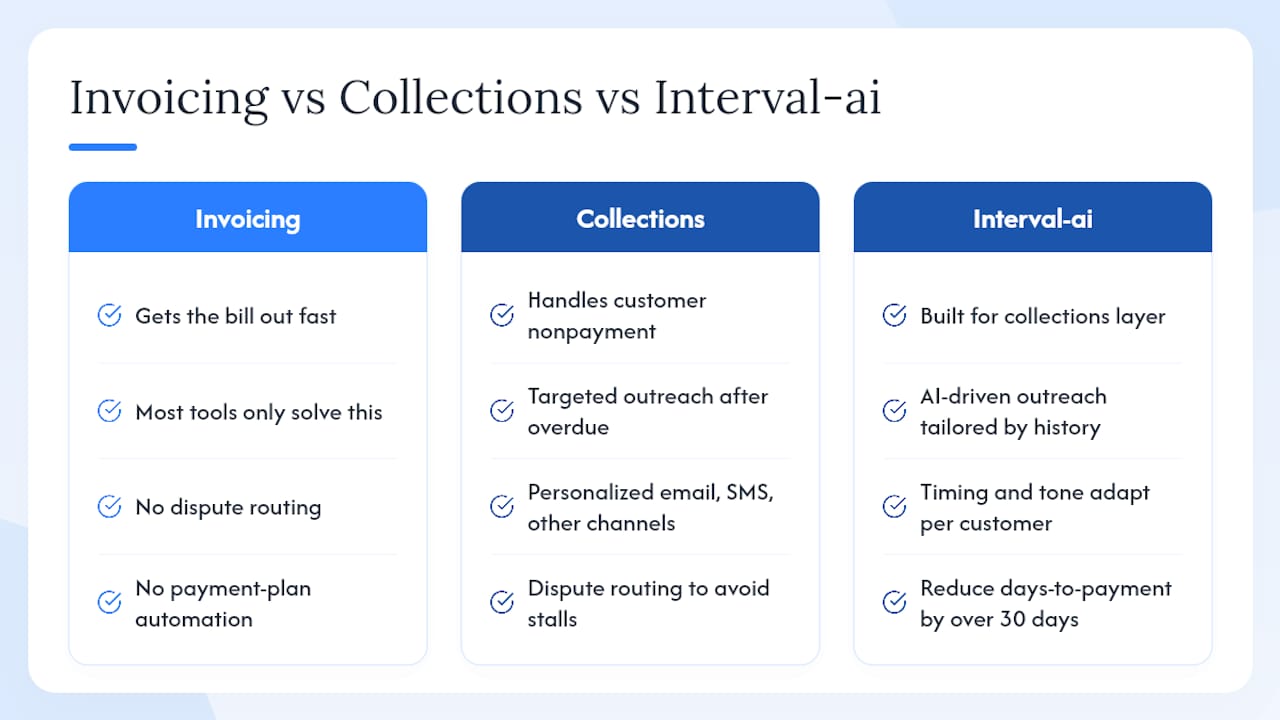
Invoicing automation gets the bill out fast. Collections automation handles what happens when the customer doesn't pay. These are two different problems, and most invoicing tools only solve the first one.
Automated collections adds a targeted outreach cadence after an invoice goes overdue: personalized messages across email, SMS, and other channels, dispute routing so contested invoices don't stall the whole queue, and payment-plan automation for customers who need flexibility. Critically, it does all of this in a way that reflects your brand, not a generic agency template.
Interval-ai is built specifically for this layer. Its AI-driven approach tailors outreach based on historical payment data, so the timing and tone of each message adapt to how that customer has previously paid. Clients report reducing days-to-payment by over 30 days and saving thousands in payroll costs by removing the need for dedicated collections staff. Combining invoicing automation with Interval-ai's collections layer means overdue accounts get consistent, professional follow-up without anyone on your team making manual calls.
Why automated collections is the piece most operators overlook
Automated invoicing is the right starting point. But the gap between "invoice sent" and "payment received" is where most pest-control operators quietly lose money. Silence from a customer reads as permission to wait, and without a consistent follow-up system, overdue balances accumulate faster than most owners track.
Interval-ai's data-driven outreach and accounting integrations address exactly that gap. The combination of fast, accurate invoicing and automated collections creates a closed-loop billing system where overdue accounts are handled professionally and predictably, without adding headcount.
Interval-ai helps you recover overdue invoices without extra staff
Pest-control companies that automate invoicing still face one stubborn problem: customers who don't pay on time. Interval-ai closes that gap with AI-powered collections that integrate directly with your accounting and field service systems.

Interval-ai tailors outreach cadences to each customer's payment history, manages disputes automatically, and keeps every communication on-brand. Clients report cutting days-to-payment by over 30 days and recovering revenue that would otherwise require a dedicated collections hire. There's no traditional agency involved, no aggressive tactics, and no damage to the customer relationships you've built.
Ready to see what that looks like for your business? Book a demo with Interval-ai and find out how quickly overdue balances can move.
Sources
- Automated invoice processing: what businesses need to know — Stripe
- Automated invoice processing — IBM
- What is an electronic invoice? — Sage
- Invoice management systems — Xero
- What is invoice automation? — Coupa
For payment compliance specifics, review your chosen platform's PCI DSS documentation and your state's invoicing record-retention requirements directly.
This article is general information, not a substitute for advice from a qualified financial advisor. Consult a qualified financial professional about your own circumstances before acting on anything here.
FAQ
What are the main benefits of automated pest control invoicing?
Automated pest control invoicing reduces billing errors, speeds up payment collection by roughly 10–14 days, and handles recurring treatment plan billing without manual effort. It also gives you real-time cash-flow visibility so you always know which accounts are current.
When should a pest-control company switch to automated invoicing?
Once you're running more than 10–15 jobs per week or managing five or more recurring treatment plans, manual invoicing costs typically exceed the subscription cost of automation. Rising dispute counts or a stretched DSO beyond typical ranges are also clear signals.
What's the difference between invoice automation and collections automation?
Invoice automation generates and sends the bill; collections automation handles follow-up when the customer doesn't pay. Interval-ai covers the collections layer, using AI-driven outreach to recover overdue balances without requiring dedicated staff.
How do embedded payment links improve on-time collection?
Embedded payment links remove the friction of logging into a portal or mailing a check. According to Xero, professional invoices with direct payment links act as a credibility signal and measurably improve on-time collection rates.
How long does it take to set up automated invoicing for a pest-control company?
Most operators can complete a basic pilot setup, including price book, payment processing, and accounting sync, within one to two weeks. A focused 30–60 day pilot on a single route gives you clean performance data before a full rollout.
