
Connect Invoicing Software to Collections for Better Cash Flow

Published: July 5, 2026 · 10–11 min read
TL;DR:
- Connecting invoicing software to collections automates payment data flow, reducing manual checks and delays. Proper integration with clean data supports real-time updates, improves cash flow, and enhances collection efficiency. Automated workflows and regular system monitoring help maintain accurate, timely customer outreach and payment recovery.
Connecting invoicing software to collections is the process of linking your billing system directly to your accounts receivable and collections workflows so that payment data flows automatically between them. Without this connection, your finance team manually checks invoice statuses, copies data between systems, and chases payments without any real-time visibility. The result is slow collections, missed follow-ups, and cash flow gaps that compound over time. For small to medium businesses, the Order-to-Cash (O2C) lifecycle is where revenue either moves efficiently or stalls. When you integrate invoicing with payment collections, you close that gap and put your cash flow on autopilot.
How to connect invoicing software to collections: what you need first

The foundation of any successful integration is clean, consistent data. Before you link invoicing to collections, your invoicing system must generate structured, accurate records with consistent fields: customer ID, invoice number, due date, amount, and payment status. If your invoicing data is inconsistent or stored across multiple spreadsheets, the integration will inherit those errors and amplify them.
You also need to confirm that your software supports one of three connection methods:
- API integration: Your invoicing platform exposes an API that your collections tool calls to pull or push invoice data in real time. This is the most flexible option and works well when both systems are modern cloud platforms.
- Built-in connectors: Some accounting and collections platforms include native integrations with popular invoicing tools. These require less technical setup but offer less customization.
- Middleware platforms: Tools like Zapier or Make (formerly Integromat) sit between your systems and pass data based on triggers you define. This works well for businesses that cannot modify their existing software.
Beyond the technical connection, you need a single source of truth for your O2C lifecycle. Finance teams waste hours reconciling data between separate invoicing and collections systems when no integration exists. That wasted time directly reduces the hours your team spends on actual collection work. A unified accounts receivable platform that connects billing, collections, payments, and accounting eliminates those reconciliation gaps and gives you real-time cash visibility across the entire cycle.
Step-by-step guide to link invoicing software with collections
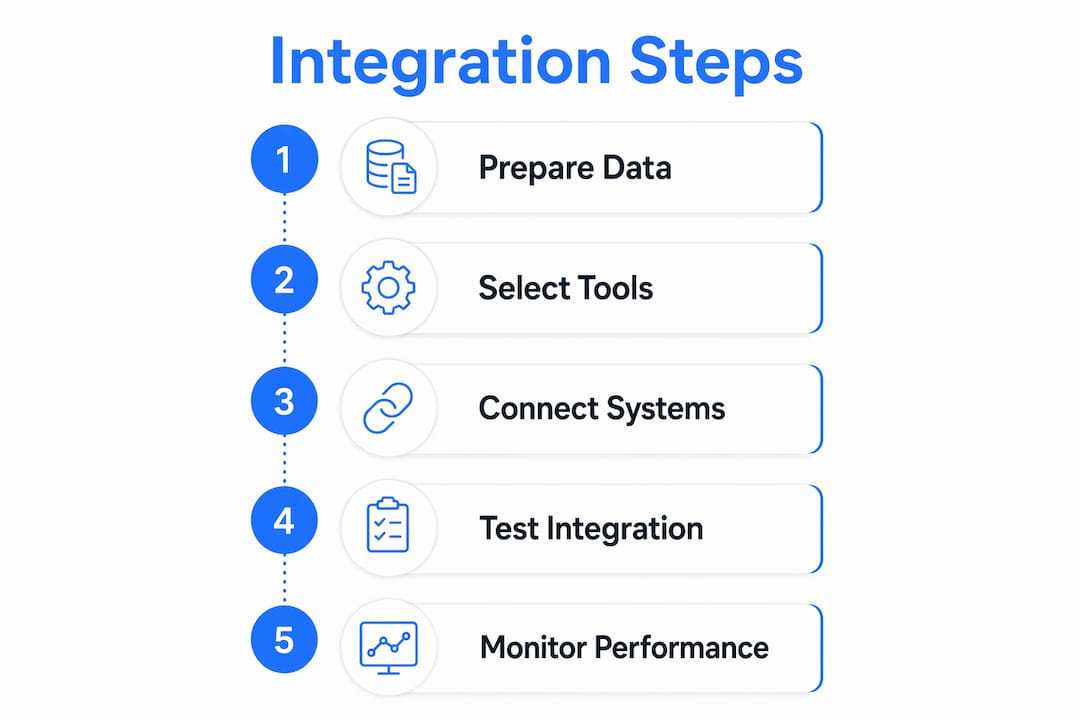
Follow these five steps to build a working connection between your invoicing and collections systems.
-
Map your invoicing data fields to your collections system. List every field your invoicing tool generates and match each one to the corresponding field in your collections platform. Pay close attention to customer identifiers. If your invoicing system uses email addresses as customer IDs and your collections tool uses account numbers, you need a mapping rule that translates between them before any data moves.
-
Set up automated dunning workflows based on invoice age and customer risk. Dunning is the formal term for the structured sequence of payment reminders you send after an invoice goes unpaid. Automating dunning workflows based on invoice age and customer risk profiles shifts your collections from reactive to proactive. A low-risk customer with a 7-day-overdue invoice gets a polite email reminder. A high-risk customer with a 30-day-overdue invoice triggers a phone call task for your team.
-
Configure prioritized collections outreach using risk profiles and invoice statuses. Not every overdue invoice deserves the same urgency. Automated collections can schedule different activities such as email reminders, phone calls, and collection letters based on invoice status. Build your outreach priority around two variables: invoice age and customer payment history. A customer who always pays within 45 days and is currently at day 32 needs a gentle nudge. A customer with two previously disputed invoices needs a different approach entirely.
-
Automate cash application and payment matching where possible. Cash application is the process of matching incoming payments to open invoices. When done manually, it creates delays and errors. Accurate invoice state alignment with collections and matching logic keeps finance data consistent across systems from source through general ledger. Configure your platform to auto-match payments using invoice numbers, amounts, and customer IDs before any human review.
-
Test the integration and monitor system alerts. Run a controlled test with a small batch of invoices before going live. Confirm that status changes in your invoicing system appear in your collections tool within your expected time window. Set up alerts for failed syncs, duplicate records, and unmatched payments so your team catches problems before they affect customer outreach.
Pro Tip: Build a simple dashboard that shows the count of invoices in each status: current, 1–30 days overdue, 31–60 days overdue, and 60+ days overdue. Reviewing this daily takes five minutes and tells you immediately whether your integration is working.
Common challenges when integrating invoicing and collections software
Integration problems fall into three categories: data quality issues, compatibility issues, and compliance issues. Knowing which category you are dealing with speeds up your fix.
Data quality issues are the most common. Duplicate customer records appear when your invoicing system creates a new customer entry for every transaction instead of referencing a master record. Delayed updates occur when your integration runs on a scheduled batch sync rather than in real time, meaning your collections team acts on stale data. Unified models improve cash application and reduce errors in receivables handling, but only if the underlying data is clean before the sync runs.
Common data problems to watch for:
- Mismatched customer names or IDs between systems
- Invoice amounts that differ due to currency rounding rules
- Payment dates recorded in different time zones
- Duplicate invoices created by retry logic in your billing system
Compatibility issues arise most often when your invoicing software is a legacy on-premise system and your collections tool is a modern cloud platform. Legacy systems often lack APIs and require flat-file exports instead. If you are in this situation, a middleware tool that reads exported files and pushes them to your collections platform is a practical workaround.
Compliance issues relate to how you communicate with customers during collections. Different states and industries have rules about contact frequency, required disclosures, and opt-out rights. Your automated outreach sequences must respect customer communication preferences and applicable regulations. Build opt-out handling directly into your workflow so that a customer who requests no further contact is immediately suppressed from all automated sequences.
Pro Tip: Schedule a monthly integration health check. Pull a report of invoices that changed status in your invoicing system but did not update in your collections tool. Even a small mismatch rate compounds quickly across hundreds of invoices.
How does automation improve collections performance and cash flow?
Automation changes the economics of collections for small to medium businesses. Without it, your team's capacity sets a hard ceiling on how many overdue accounts you can actively pursue. With it, your system works every account simultaneously without adding staff.
Finance automation platforms integrate invoice creation, collection prioritization, and payment tracking to accelerate cash flow and reduce manual effort. AI-powered payment matching and real-time AR dashboards give your team visibility and control that manual processes cannot match. The practical result is that your team focuses on the accounts that genuinely need human judgment, while the system handles routine follow-up.
Automating billing and collections does more than save time. It protects customer relationships by keeping outreach consistent and professional. A customer who receives a well-timed, politely worded reminder is far more likely to pay than one who hears nothing for weeks and then receives an aggressive demand. Silence reads as permission to wait. Consistent, automated follow-up removes that ambiguity.
Invoice lifecycle management software combines technology and expert debt collection services to maximize recovery while maintaining customer satisfaction. Protecting the customer relationship during collections is not just good manners. It directly affects whether that customer continues doing business with you after the invoice is resolved. Interval-ai takes this principle seriously, using historical payment data to tailor outreach strategies so that every communication fits the customer's profile and your brand's tone. Interval-ai clients report reducing days to payment by over 30 days without adding headcount, which translates directly to improved liquidity and lower credit risk.
The AI payment trends shaping fintech in 2025 and 2026 confirm that AI-driven prioritization of collection tasks is becoming the standard for finance teams that want to scale without proportional cost increases. Businesses that automate now build a structural advantage over those still relying on manual follow-up.
Key Takeaways
Connecting invoicing software to collections creates a single source of truth that lets your finance team focus on collecting rather than reconciling.
| Point | Details |
|---|---|
| Clean data comes first | Standardize customer IDs and invoice fields before attempting any integration. |
| Choose the right connection method | APIs offer the most flexibility; middleware works well for legacy systems. |
| Automate dunning by risk profile | Segment outreach by invoice age and customer payment history for better results. |
| Monitor integration health monthly | Check for status mismatches between systems before they affect customer outreach. |
| Automation protects relationships | Consistent, professional follow-up improves payment rates and preserves customer goodwill. |
Why most SMBs underestimate this integration
I have worked with enough small and medium businesses to know that the invoicing-to-collections gap is almost always treated as a staffing problem rather than a systems problem. The instinct is to hire another accounts receivable person when invoices start aging. That fixes the symptom for about six months, and then the backlog grows again.
The real issue is that invoicing and collections are treated as two separate workflows when they are actually one continuous process. The moment an invoice is created, the clock starts. Every day that passes without a structured follow-up sequence is a day you are implicitly telling your customer that payment is optional. That is not a people problem. It is a process problem that technology solves directly.
What I have found is that businesses which sync invoicing software with collections early, before the AR backlog becomes painful, build habits and systems that scale naturally. Businesses that wait until they have a crisis integrate under pressure, cut corners on data mapping, and then blame the technology when it produces messy results.
My honest advice: start with one integration point. Connect your invoicing status updates to a single automated reminder sequence. Measure the result over 60 days. The improvement in days sales outstanding will make the case for the next step better than any vendor pitch ever could. Scalable solutions that grow with your business needs are worth far more than a feature-rich platform you implement badly under deadline pressure.
— Tyler
Interval-ai makes it easier to automate billing and collections
Interval-ai is built for businesses that want to connect their invoicing data to a collections process that actually works without hiring a collections agency or adding staff.

Interval-ai uses AI to analyze your historical payment data and build outreach strategies that match each customer's behavior and your brand's voice. The platform manages multi-channel communications automatically, from initial reminders through escalation, so your team stays focused on the accounts that need direct attention. Clients report recovering substantial overdue balances while saving thousands in payroll costs. If you are ready to automate your collections process and get paid faster, Interval-ai is worth a close look.
FAQ
What does it mean to connect invoicing software to collections?
Connecting invoicing software to collections means linking your billing system to your accounts receivable and collections workflows so that invoice status changes automatically trigger the right follow-up actions, without manual data entry.
What integration method works best for small businesses?
API integration offers the most flexibility and real-time data flow, but middleware platforms work well for businesses using legacy invoicing software that lacks a native API.
How does automating dunning workflows improve cash flow?
Automated dunning based on invoice age and customer risk profiles ensures consistent outreach at every stage, which reduces the average time an invoice sits unpaid and improves overall liquidity.
What is the Order-to-Cash lifecycle?
The Order-to-Cash (O2C) lifecycle is the end-to-end process from issuing an invoice to receiving and applying the payment. Integrating invoicing with collections centralizes the invoice lifecycle and reduces the time and errors across each stage.
How do I know if my integration is working correctly?
Run a monthly check comparing invoice status changes in your invoicing system against updates in your collections tool. Any mismatch indicates a sync failure that needs investigation before it affects customer outreach.
