
AR: Implementation First Customer Dispute Portal, 5 Day Resolution
Published: September 3, 2026 · 9–10 min read
A customer dispute portal is the branded, customer-facing layer of your collections software where debtors submit disputes, upload evidence, and track resolution status without a single email. Paired with automation and ERP integration, it cuts the back-and-forth that stalls payment and measurably shortens the path to cash. If your team still manages disputes through shared inboxes and spreadsheets, an AI-enabled portal is worth building or buying now.
TL;DR:
- Dispute portals must integrate seamlessly with ERP, billing, and payment systems to ensure accurate dispute status and quick reconciliation.
- Mapping clear workflows, assigning case owners, and setting SLAs beforehand are crucial for effective dispute resolution and preventing backlog.
- Monitoring key metrics like dispute rate, time-to-acknowledgment, and cash recovered helps evaluate whether the portal shortens DSO and justifies its investment.
- Prioritizing structured intake, role-based security, and user-friendly design encourages customer adoption and reduces support burdens.
- Automated triage using AI significantly speeds up case routing, but ownership discipline remains the most critical factor for success.
What Is a Customer Dispute Portal?
A customer dispute portal is a self-service module built into your collections platform, not a public complaint site or a credit bureau tool. It gives your customers, the people who owe you money, a branded place to flag a problem with an invoice, attach proof, and watch the case move toward resolution.
That distinction matters for how you evaluate software. You're not shopping for a generic ticketing tool. You need something that understands invoices, purchase orders, and payment terms, and that connects directly to your accounts receivable workflow.
Core portal features you should require
The best dispute portals share a common backbone, regardless of vendor. When you're auditing options or scoping an internal build, check for these:
- Structured intake: reason codes, invoice and line-item selection, and required evidence fields so customers can't submit an empty complaint.
- Live status and audit trail: timestamped updates, a visible case owner, and a centralized communication log that replaces scattered email threads.
- Automated triage and routing: rules that sort disputes by reason code, dollar threshold, or customer tier so the right person sees the right case immediately.
- Payment handling: hold logic for disputed amounts, support for partial payments, and saved payment methods for fast re-attempts once a dispute closes.
- Search, export, and role-based access: the ability to filter by PO or invoice number, export dispute records for audits, and restrict who can see or edit what.
Portals that include structured forms, evidence uploads, and automated escalation don't just look more professional. They change how fast a case actually moves, because AI can tag and triage disputes using labels like price discrepancy or quantity mismatch and route them to the correct team without a human sorting the inbox first.
How Do You Roll Out a Dispute Portal Without Breaking Collections?
Integrations come first, because a portal that doesn't talk to your accounting system is just a prettier inbox. Map out exactly which systems need to sync: your ERP or accounting platform, your billing engine, your CRM, and your payment gateway. Every one of these needs shared fields for invoice number, amount, customer ID, and dispute status, or you'll end up reconciling two versions of the truth.
Workflow design comes next. A clear invoice dispute workflow assigns one owner, one status, and one next step to every case. Without that structure, disputes get buried in general collections queues and nobody notices until the customer escalates. Set SLA targets before launch, not after: acknowledge every dispute promptly, and resolve most within a defined resolution window. Best practice guidance also recommends tracking disputes separately from your standard dunning cadence, since mixing the two undermines both.
Here's a practical rollout sequence:
- Build the integration matrix first: list every system, every field, and who owns the sync.
- Map the workflow: define triage lanes, SLA targets, and escalation rules before writing a line of customer-facing copy.
- Set document rules: decide which evidence types you accept, how files are stored, and how long records are retained for audit purposes.
- Run a pilot: choose a segment of high-volume customers, run the portal for 30 to 60 days, and measure intake completeness and time-to-first-response.
- Confirm operational readiness: train the team that owns triage, prepare customer-facing templates, and set a rollback plan in case the pilot surfaces gaps.
Pro Tip: Pilot with your noisiest customer segment, not your easiest one. If the portal survives your highest-dispute-volume accounts, it will handle everyone else without a second rollout.
Which Metrics Prove a Dispute Portal Is Working?
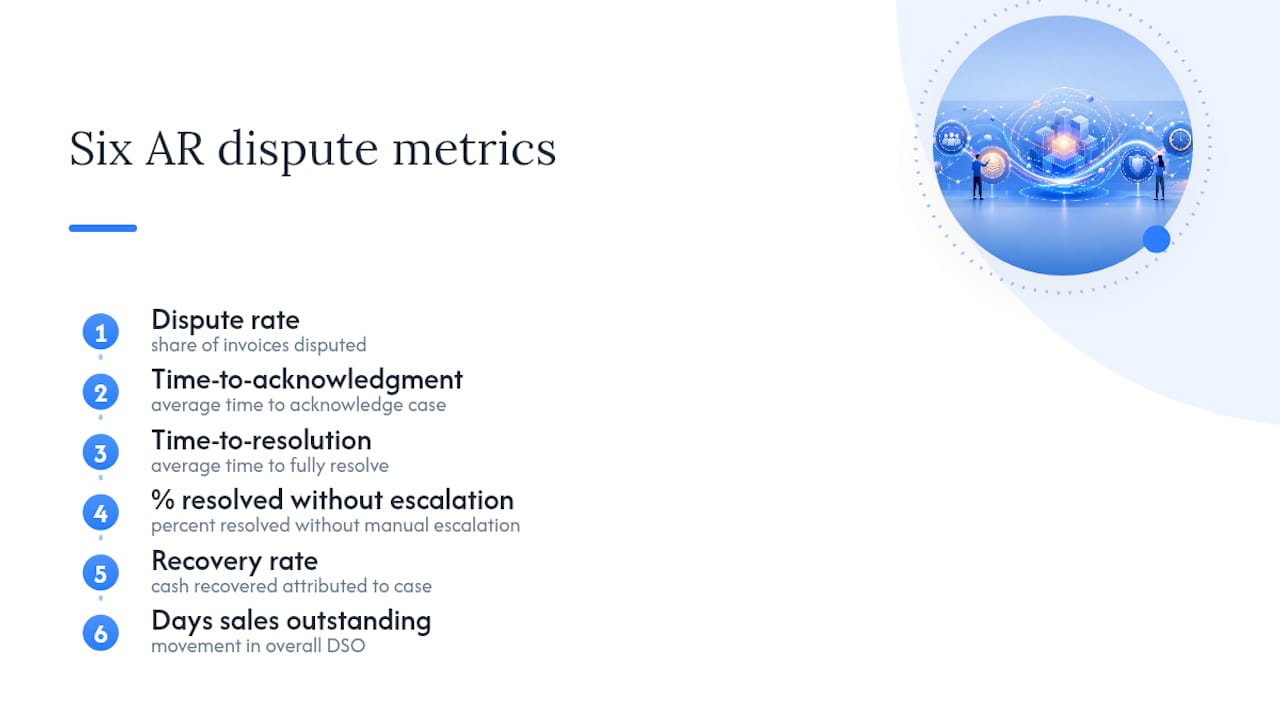
Six numbers tell you whether the portal is paying for itself. Track dispute rate, time-to-acknowledgment, time-to-resolution, the percentage of cases resolved without manual escalation, recovery rate, and movement in your overall days sales outstanding.
Build two dashboards, not one. An operational view shows aging by dispute status, volume by reason code, cost per dispute, and workload by case owner. An executive view rolls those numbers up monthly and ties them to cash recovered.
Closed-loop tracking is the piece most teams skip. Don't just log that a dispute resolved. Attribute the actual cash recovered to that specific case, so finance leadership can see the dollar impact instead of a resolution count.
Automation platforms that track resolution time, aging by status, and recovery rate weekly give AR teams the early warning signals that monthly reports miss entirely. A dispute sitting unresolved for 10 days shows up in a weekly aging report long before it shows up as a cash flow problem.
Suggested cadence: review operational metrics weekly with your AR team and roll executive metrics up monthly for finance leadership.
What UX and Security Choices Actually Drive Adoption?
Customers abandon dispute forms that feel like tax paperwork. Keep intake short and contextual: prefill known fields like invoice number and amount, let customers reference the specific PO inline, and allow line-item disputes instead of forcing an all-or-nothing claim against the whole invoice.
Status clarity matters as much as intake speed. A well-designed portal includes clear status tracking and line-level dispute options so customers know exactly where their case stands and what happens next, instead of guessing whether anyone has even seen it.
A few non-negotiables for the build:
- Support common file types for evidence uploads, and design the upload flow for mobile since many customers will submit from a phone.
- Use secure email links or single sign-on for authentication, and encrypt data both in transit and at rest.
- Apply role-based access controls so internal staff only see what their role requires.
- Offer multilingual support if your customer base spans regions or languages.
- Build accessibility into the intake form from day one, not as a retrofit after a complaint.
Every one of these choices reduces friction on the customer's side and reduces support load on yours.
Publisher Perspective: How Interval-ai Approaches Dispute Portals
Interval-ai builds its dispute portal around three principles: AI-driven triage that sorts and routes cases the moment they arrive, multi-channel communication so customers get updates wherever they already check, and a branded portal experience that integrates directly with your ERP and accounting systems instead of sitting beside them.
Interval-ai uses advanced AI technology to enhance the collections process, tailoring outreach strategies based on historical payment data.
The pattern worth noting: the portals that recover cash fastest treat AI as a triage layer, not a replacement for human judgment on complex or high-value disputes. Automation handles the volume. People handle the exceptions.
Common Problems With Dispute Portals (and How to Fix Them)
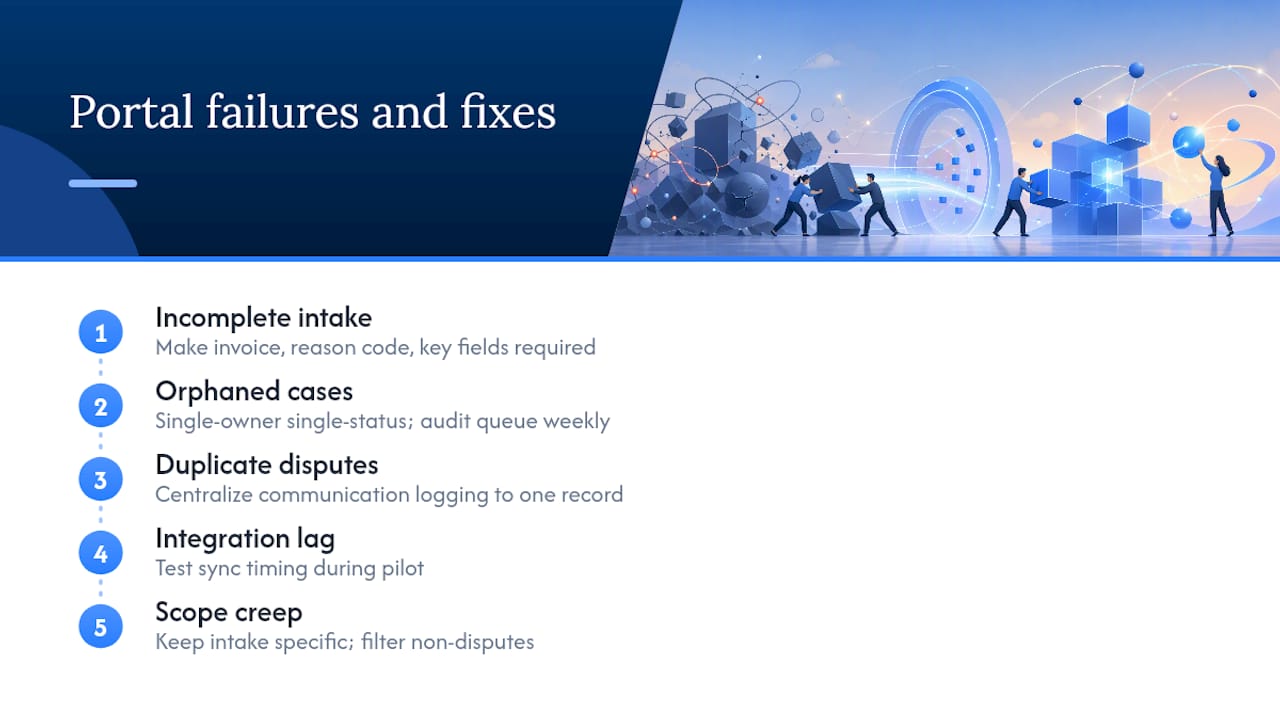
The most common failure isn't the software. It's incomplete intake. Customers submit a dispute with no invoice number, no reason code, and a one-line comment, and your team spends more time chasing details than resolving the actual issue. Fix this by making key fields required at submission, not optional.
The second failure is orphaned cases. A dispute gets created, sits in a queue with no clear owner, and nobody follows up until the customer escalates by phone. This is exactly what a single-owner, single-status workflow prevents, and it's worth auditing your queue weekly to confirm nothing sits unassigned.
Duplicate disputes are a quieter problem. A customer submits through the portal, then emails the same complaint to their sales rep, and now two people are working one case. Centralize communication logging inside the portal itself so every channel feeds the same record.
Integration lag causes a different kind of headache: a dispute resolves in the portal, but the hold on the invoice doesn't clear in your accounting system for another day. That gap creates confusing statements and frustrated customers. Test sync timing during your pilot, not after full rollout.
Finally, watch for scope creep in what counts as a "dispute." If customers start using the portal for general billing questions instead of genuine disputes, your reason-code data gets noisy and your metrics lose meaning. Keep the intake form specific enough to filter out non-disputes before they enter your workflow.
Editorial Take: What Actually Moves the Needle
The research on dispute portals keeps pointing to the same conclusion: features matter less than discipline. A portal with every bell and whistle still fails if disputes get dumped into the same queue as routine collections calls. The single most useful idea in this space is treating disputes as their own operational track, with SLAs and metrics separate from dunning cadence.
Conventional advice overindexes on the interface. Reason codes and evidence uploads help, but they're table stakes now. What separates a portal that actually shortens DSO from one that just moves the paperwork online is ownership: one person, one status, one next step, every time. Skip that discipline and the fanciest AI triage engine won't save you.
If you're prioritizing anything first, prioritize the workflow map and the SLA targets before you touch the interface. Software can be reconfigured. A team without clear ownership rules will bottleneck any tool you give them.
— Tyler
Get Started With Interval-ai's Dispute Portal
Interval-ai gives you a branded, AI-enabled dispute portal without the manual triage that eats your team's week. Instead of staff sorting emails by hand, Interval-ai's AI reads reason codes and routes cases automatically, connects to your ERP and payment gateways, and keeps every communication in one auditable log your customers can see for themselves.

Start with a demo to see how the portal handles your invoice formats and dispute types. From there, pilot it against a segment of your currently disputed invoices, and confirm compatibility with your ERP and payment gateway before a full rollout. If you're ready to see it against your own accounts receivable data, request a demo of Interval-ai and bring a handful of open disputes to the first call.
Sources
- B2B Invoice Dispute Workflow Guide to Reduce DSO in 2026 - Ecom Design Pro
- How to design a portal that supports purchase orders and invoice disputes - Supportbench
- B2B collections best practices: 8 steps to get paid faster
FAQ
What Is a Customer Dispute Portal?
It's the branded, self-service module inside collections software where a business's customers submit payment disputes, upload evidence, and track resolution status, distinct from public complaint or credit bureau sites.
How Does a Dispute Portal Reduce DSO?
By replacing email back-and-forth with structured intake, automated routing, and clear SLAs, portals resolve disputes faster and release held payments sooner, which shortens overall days sales outstanding.
What Integrations Does a Dispute Portal Need?
At minimum, it needs to sync with your ERP or accounting system, billing engine, CRM, and payment gateway so invoice status, amounts, and dispute outcomes stay consistent across every system.
What SLA Should I Set for Dispute Resolution?
A common benchmark is acknowledging disputes within 24 hours and resolving most within five business days, tracked separately from your standard collections cadence.
Can AI Automate Dispute Triage?
Yes. AI can tag disputes by reason code, such as price discrepancy or quantity mismatch, and route them automatically. Interval-ai applies this approach alongside ERP integration and multi-channel outreach to shorten resolution time.
