
How Automated Follow-Up Systems Work for Collections
Published: June 27, 2026 · 9–10 min read
TL;DR:
- Automated follow-up systems send personalized messages based on customer behavior and CRM data, reducing manual effort. They use triggers, sequences, and multi-channel delivery to ensure timely, relevant communication, which improves collection rates. Regular maintenance and behavioral intelligence enhance their effectiveness in managing invoicing and cash flow.
Automated follow-up systems are software tools that send personalized messages based on customer behavior and CRM data to manage invoicing and collections without manual effort. The industry term for this practice is workflow automation, and it sits at the intersection of CRM integration, behavioral triggers, and multi-channel communication. For small and medium business owners, understanding how automated follow-up systems work is the difference between chasing overdue invoices by hand and having a consistent process that runs on its own. Leads responded to within 5 minutes are 100x more likely to qualify than those contacted after 30 minutes. That same principle applies directly to invoice follow-up: silence reads as permission to wait.
How do automated follow-up systems work at a technical level?
Automated follow-up systems operate through three core components: triggers, sequences, and data inputs. A trigger is the event that starts a workflow. A sequence is the series of messages that follows. Data inputs from your CRM determine what those messages say and who receives them.
Triggers come in three types:
- Time-based triggers fire at a set interval. An invoice due in 7 days automatically generates a reminder on day 6.
- Behavior-based triggers respond to customer actions. A client who opens an invoice email but does not pay within 48 hours receives a follow-up automatically.
- Lifecycle-stage triggers activate when a customer moves to a new status. A payment marked overdue shifts the customer into an escalation sequence.
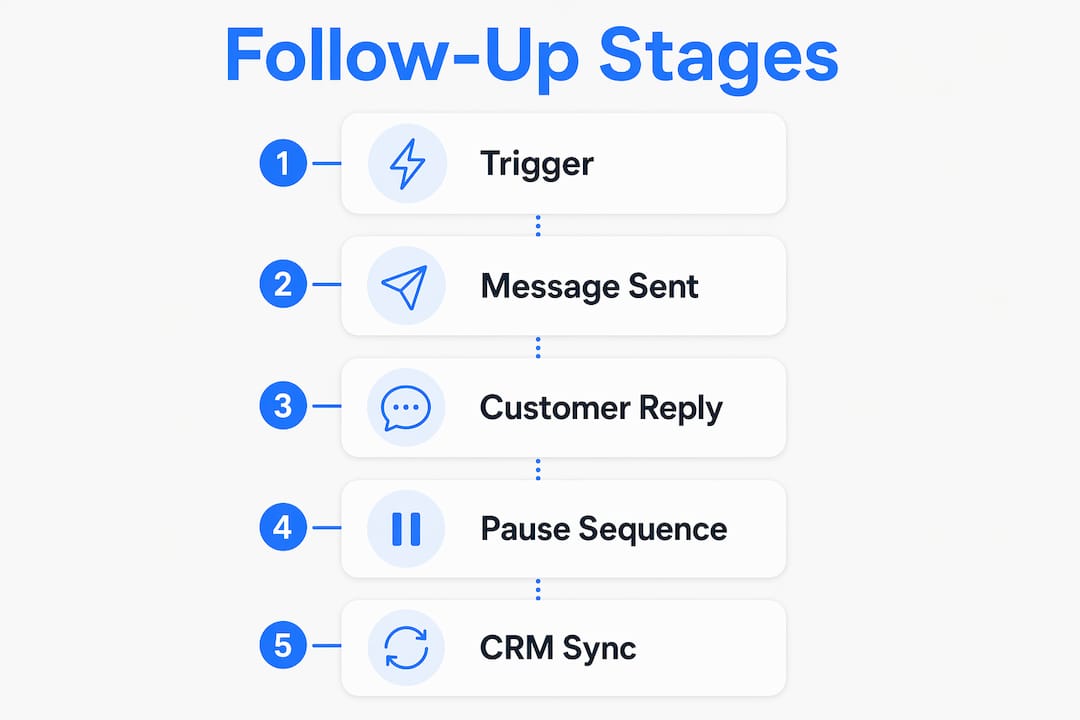
Once a trigger fires, the system runs an if-then logic chain. If the customer replies, the sequence pauses. If the customer pays, the sequence stops entirely. Stop logic pauses sequences immediately upon receiving a reply, preventing the embarrassing mistake of sending a collection notice after payment has already been received.
Multi-channel delivery is where modern systems separate themselves from basic email schedulers. Platforms like Orion route messages across email, SMS, WhatsApp, and LinkedIn based on where a customer is most likely to respond. Advanced systems pivot channels based on engagement signals, for example switching from email to SMS when a message goes unopened for 48 hours.

Real-time CRM sync keeps every message accurate. When a customer's payment status updates in your CRM, the system reflects that change immediately. Without this sync, you risk sending a past-due notice to a customer who paid an hour ago.
Pro Tip: Set your trigger delay for invoice reminders at 24 hours before the due date, not the day of. Customers are more likely to act when they still have time.
What are the key benefits of automated follow-up for invoicing?
The most direct benefit of automated follow-up processes is consistent timing. Manual follow-up depends on someone remembering to send a message. Automated systems do not forget, do not get busy, and do not soften a message because they feel awkward about asking for money.
A single well-timed follow-up email can boost reply rates by 49%. That number reflects what most business owners already know from experience: the first invoice often gets ignored, but the second one gets paid. Automation makes sure the second message always goes out.
The core benefits for invoicing and collections include:
- Reduced manual workload. Your team stops spending hours tracking who owes what and when to follow up.
- Fewer errors. Automated reminders go out on schedule without the risk of a missed account or a duplicate message.
- Data-driven prioritization. High-value or long-overdue accounts can be flagged for escalation automatically, so your team focuses human attention where it matters most.
- Consistent professionalism. Every message follows your approved tone and format, regardless of who set up the workflow.
Automated systems trigger reminders on due dates and initiate follow-ups on missed payments without any manual input. For a business managing dozens or hundreds of invoices, that consistency compounds quickly into real cash flow improvement. Interval-ai, for example, reports reducing days to payment by over 30 days for clients who implement its automated collections workflows.
How do automated systems adapt to customer behavior?
Behavioral intelligence is what separates a useful automated follow-up system from one that annoys customers and gets ignored. Static drip sequences send the same message to everyone on the same schedule. Behavior-based triggers increase engagement by 50% compared to simple re-sends because they respond to what a customer actually does.
Here is how a behavior-adapted sequence works in practice:
- The system tracks engagement signals. It records whether a customer opened the invoice email, clicked a payment link, viewed a proposal, or replied to a previous message.
- The sequence adjusts based on those signals. A customer who clicked the payment link but did not complete the transaction receives a different message than one who never opened the email at all.
- CRM data personalizes the content. The system pulls the customer's name, invoice number, amount, and due date directly from your CRM. Contextual CRM data injections reduce the robotic impression that generic automation creates.
- Fallback logic handles incomplete data. When a CRM field is empty, the system substitutes a neutral phrase instead of sending a message with a blank field. Fallback logic for personalization fields maintains professional messaging even when your data is incomplete.
- Stop logic ends the sequence at the right moment. The system monitors for replies, payments, and status changes. When any of those occur, the sequence halts immediately.
The practical result is that your customers receive messages that feel relevant to their situation, not like a broadcast sent to a list. That relevance is what drives payment.
Pro Tip: Review your behavioral trigger settings every quarter. Customer response patterns shift over time, and a sequence that worked well in march may need adjustment by september.
What are best practices for setting up follow-up automation?
Setting up follow-up systems correctly from the start saves significant rework later. The most common mistake is building sequences before mapping the customer journey. Start with your invoicing touchpoints: when does the invoice go out, when is it due, when does it become overdue, and when does it escalate to a collections process?
A practical setup checklist:
- Map your sequence stages. Define at minimum: pre-due reminder, due-date notice, 3-day overdue follow-up, 7-day overdue escalation, and a final notice before manual intervention.
- Clean your CRM data first. Personalization tokens only work when the underlying data is accurate. Audit your customer records before activating any sequence.
- Use at least two channels. Channel fatigue is real; diversifying across email and SMS increases visibility without increasing send volume.
- Write escalation rules for stalled accounts. High-value customers who have not responded after three touchpoints should trigger a flag for personal outreach by a team member.
- Monitor reply rate and time-to-payment. These two metrics tell you whether your sequences are working. If reply rate drops, your messaging needs revision. If time-to-payment stays flat, your timing or channel mix needs adjustment.
The comparison below shows the difference between a manual process and an automated one across key performance areas:
| Area | Manual process | Automated process |
|---|---|---|
| Reminder timing | Depends on staff availability | Fires on schedule every time |
| Personalization | Relies on memory and notes | Pulls live data from CRM |
| Channel coverage | Usually email only | Email, SMS, WhatsApp, LinkedIn |
| Escalation | Happens when someone notices | Triggered automatically by rules |
| Stop on payment | Requires manual update | Syncs with CRM in real time |
True next-level automation integrates CRM, email engagement, call outcomes, and website behavior into workflows that keep follow-ups timely and context-aware. That level of integration is the goal to build toward, even if you start with a simpler setup.
Combining automation with human intervention and focusing human effort where it yields the highest return is the best practice that experienced operators consistently apply. Automation handles the volume. Humans handle the judgment calls.
Key Takeaways
Automated follow-up systems work best when behavioral triggers, real-time CRM sync, and stop logic operate together to deliver consistent, personalized outreach across multiple channels.
| Point | Details |
|---|---|
| Triggers drive the system | Time-based, behavior-based, and lifecycle triggers determine when messages fire. |
| Stop logic protects your reputation | Sequences must pause immediately when a customer replies or pays. |
| Behavioral intelligence outperforms drip | Behavior-based sequences convert at 2–3 times the rate of static time-based sends. |
| Data quality determines personalization | Clean CRM data and fallback logic prevent errors that make automation feel impersonal. |
| Multi-channel coverage reduces fatigue | Rotating across email, SMS, and other channels improves response without increasing send volume. |
What I've learned about automation that most guides skip
Most articles about follow-up automation focus on the setup. What they skip is the maintenance. I've seen business owners build a solid sequence, launch it, and then leave it untouched for 18 months. By that point, the messaging is stale, the CRM data has drifted, and the sequences are firing on accounts that should have been closed.
The real differentiator in effective collections automation is not the tool you pick. It's the discipline of reviewing your sequences every 90 days and asking two questions: are customers responding, and are payments arriving faster? If the answer to either is no, something in the sequence needs to change.
The other thing most guides underplay is stop logic. Sending a collections notice to a customer who paid yesterday is not just embarrassing. It damages trust in a way that takes real effort to repair. Stop logic is not a nice-to-have feature. It is the minimum standard for any automated collections workflow.
Behavioral intelligence is where the real gains live. A message that references a specific invoice, acknowledges that the customer viewed it, and offers a direct payment link will always outperform a generic "your payment is overdue" notice. The technology to do this exists and is accessible to businesses of any size. The businesses that use it consistently collect faster and spend less time chasing.
— Tyler
How Interval-ai handles automated collections follow-up
Running a business means your time is better spent on work that grows revenue, not on manually tracking who owes you money.

Interval-ai uses AI-driven workflow automation to manage your entire collections follow-up process, from pre-due reminders to escalation notices, across email, SMS, and other channels. The system syncs with your CRM in real time, applies stop logic the moment a payment is received, and personalizes every message using your customer's actual payment history. Clients report recovering significant overdue balances without adding staff, and Interval-ai claims to reduce days to payment by over 30 days. If consistent, professional follow-up is what your collections process is missing, see how Interval-ai works and request a demo.
FAQ
What triggers an automated follow-up in a collections workflow?
Triggers include time-based events like an invoice due date, behavior-based signals like an email open without payment, and lifecycle changes like an account moving to overdue status. Each trigger type fires a different message sequence based on rules you define in advance.
How does stop logic prevent sending messages after payment?
Stop logic monitors your CRM for status changes in real time. When a payment is recorded or a customer replies, the system halts the active sequence immediately to prevent follow-up messages from going out on a resolved account.
Can automated follow-up systems handle multiple communication channels?
Yes. Modern systems route messages across email, SMS, WhatsApp, and LinkedIn based on customer engagement. Automatic channel pivoting after no email opens within 48 hours increases the chance of reaching the customer without increasing total message volume.
What happens when CRM data is incomplete?
Fallback logic substitutes a neutral phrase for any missing personalization field. This prevents a message from sending with a blank customer name or invoice number, keeping the outreach professional even when your data has gaps.
How does follow-up automation improve cash flow for small businesses?
Automated reminders go out on schedule regardless of staff availability, which means fewer invoices fall through the cracks. Consistent, timely follow-up shortens the average time between invoice issue and payment, which directly improves available cash at any given point in the month.
