
How Collections Software Improves Liquidity for SMBs

Published: July 7, 2026 · 9–10 min read
TL;DR:
- Collections software automates payment follow-up and reduces overdue accounts, improving cash flow. It shortens collection cycles by lowering DSO, with most companies reducing DSO by six or more days through automation. Effective use requires active management, workflow adjustment, and combining automation with human judgment for sustained liquidity gains.
Collections software is defined as a specialized accounts receivable (AR) management tool that automates payment follow-up, prioritizes overdue accounts, and converts outstanding invoices into cash faster. Understanding how collections software improves liquidity is the first step toward solving one of the most persistent cash flow problems small and medium businesses face. When invoices sit unpaid for weeks, your ability to pay suppliers, cover payroll, and fund growth shrinks. The right AR automation platform changes that equation by reducing Days Sales Outstanding (DSO), the industry standard metric for measuring how long it takes to collect payment after a sale.
What key features of collections software drive liquidity improvements?
Collections software delivers liquidity gains through specific, measurable functions. Each feature targets a different point in the payment cycle where cash gets delayed.

Automated reminders and dunning workflows send payment notices at preset intervals without any manual effort from your team. Silence reads as permission to wait, and customers who receive no follow-up often deprioritize your invoice. Automated dunning removes that silence consistently, keeping your invoice at the top of the customer's attention.
AI-based account prioritization focuses your team's energy where it matters most. AI-driven prioritization improves collection effectiveness by 23% compared to manual methods. That gain comes from directing human effort toward high-risk, high-value accounts rather than spreading attention evenly across every open invoice.
Centralized dashboards give you a real-time view of every open invoice, payment status, and customer communication. Without a single source of truth, finance teams waste time reconciling spreadsheets and chasing down status updates. A dashboard eliminates that friction.
ERP and payment system integration keeps your data accurate across platforms. Integration with ERP and payment tools ensures data currency and reduces errors in collections workflows. Errors in invoice data are one of the most common reasons customers delay payment, so clean data directly accelerates collections.
Dispute and exception management tools flag problem invoices early. Unresolved disputes can freeze a receivable for weeks. Software that routes disputes to the right person immediately cuts that delay significantly.
Pro Tip: Set your automated reminders to escalate in tone and urgency at 15, 30, and 45 days past due. A gentle nudge at day 15 and a firm notice at day 45 outperforms a single reminder sent at 30 days.
How does automation reduce DSO and boost your cash position?
Days Sales Outstanding measures the average number of days between sending an invoice and receiving payment. A lower DSO means faster cash conversion, which directly strengthens your liquidity position.
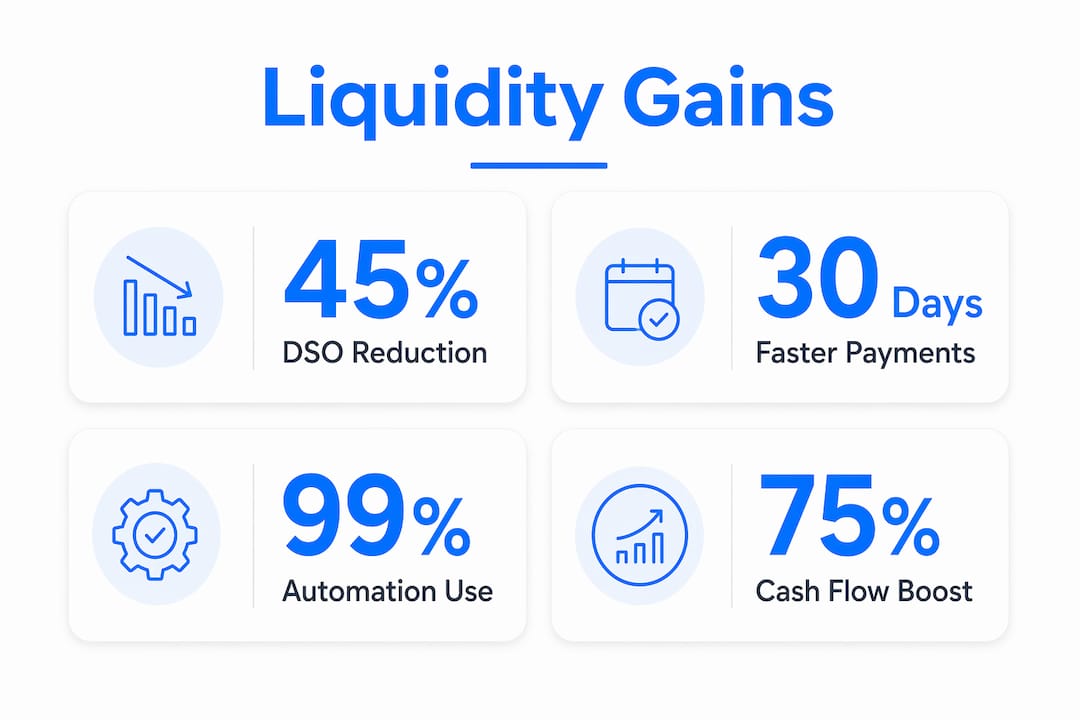
The data on automation's impact is clear. 99% of companies using AI in accounts receivable reduced DSO, with 75% cutting it by six days or more. Six days may sound modest, but for a business with $500,000 in monthly revenue, six fewer days of outstanding receivables frees tens of thousands of dollars in working capital.
Automation also shortens the gap between invoice delivery and cash receipt. Automation shortens the time between invoice sent and cash received by reducing gaps and maintaining momentum with automated follow-ups. Manual processes create gaps: a collector forgets to follow up, a reminder gets delayed, a customer falls through the cracks. Automation closes every one of those gaps.
The most dramatic results come from consistent follow-up at scale. Collection times drop from 60 to 30 days in some cases when automation replaces manual outreach. Cutting your collection cycle in half means your cash arrives twice as fast, which gives you more flexibility to manage expenses and invest in growth.
"Automation doesn't just speed up collections. It makes collections predictable. When you know cash will arrive within a defined window, you can plan with confidence instead of reacting to shortfalls."
Freeing your staff from repetitive follow-up tasks also has a secondary benefit. AR automation improves efficiency and reduces errors, letting collectors focus on payment delays, disputes, and risk review. Your team's time shifts from sending emails to solving problems that actually require human judgment.
| Metric | Before Automation | After Automation |
|---|---|---|
| Average DSO | 60 days | 30 days |
| Collection effectiveness | Baseline | +23% improvement |
| Staff time on manual follow-up | High | Significantly reduced |
| Cash flow predictability | Low | High |
What role does visibility and predictive analytics play in cash flow management?
Visibility is the foundation of good liquidity management. You cannot fix a cash flow problem you cannot see.
Collections software provides that visibility through real-time dashboards and payment behavior analytics. Visibility into receivables lets finance leaders detect where cash is stuck and prioritize critical accounts for human follow-up. That insight turns a reactive process into a proactive one. Instead of waiting for an invoice to become 90 days past due, you catch it at 20 days and act.
Predictive analytics takes visibility a step further. Predictive analytics enables better cash forecasting supporting more stable liquidity and resource planning. When the software analyzes historical payment behavior, it can tell you which customers typically pay late, which invoices carry dispute risk, and when cash is likely to arrive. That forecast lets you make smarter decisions about spending, hiring, and credit.
Here is how a well-built visibility system supports your liquidity management:
- Real-time aging reports show every invoice by age bucket (0–30, 31–60, 61–90 days), so you always know your exposure at a glance.
- Customer payment scoring ranks customers by their likelihood to pay on time, based on historical patterns. You focus effort on the accounts most likely to slip.
- Cash flow forecasting dashboards project expected inflows over the next 30, 60, and 90 days. You plan expenses against real data, not guesses.
- Exception alerts flag invoices that deviate from a customer's normal payment pattern, giving you early warning before a receivable ages into a problem.
- Executive reporting summarizes AR health in plain language, so leadership can make informed decisions without digging through raw data.
Understanding your liquidity risk exposure at the account level is what separates businesses that manage cash well from those that are always scrambling. Visibility tools make that level of insight accessible without a dedicated finance analyst.
What practical steps can SMBs take to implement collections software?
Implementation succeeds when you treat it as a process change, not just a software installation. The technology only works as well as the workflows you build around it.
Assess your current AR process first. Map out how invoices are sent, how follow-ups happen, and where delays occur. Knowing your baseline DSO gives you a benchmark to measure improvement against.
Choose features aligned with your liquidity goals. If your biggest problem is slow payment from a handful of large accounts, prioritize AI-based account scoring and escalation workflows. If you have hundreds of small invoices, automated dunning at scale matters more.
Integrate with your existing billing and accounting systems. Software that does not connect to your current tools creates duplicate data entry and new errors. Confirm integration compatibility before committing to any platform.
Train your team on the new workflows. Automation handles repetitive tasks, but your collectors still manage disputes, handle escalations, and build customer relationships. Clear role definitions prevent confusion about what the software handles versus what requires human action.
Measure performance consistently. Track DSO monthly. Review your collection rate by customer segment. Monitor how many invoices move from current to overdue each period. These numbers tell you whether the software is delivering results or needs adjustment.
Avoid the most common pitfall: setting up automation and then ignoring it. Workflows need periodic review as your customer base and invoice volume change. A workflow that worked well at 200 invoices per month may need adjustment at 500.
Pro Tip: Run a 90-day pilot with one customer segment before rolling out automation across your full AR portfolio. You will catch workflow gaps early and build team confidence before going live at scale.
For businesses managing high-value accounts or complex credit relationships, understanding bank compliance requirements alongside your AR process can prevent collections issues from affecting your credit standing.
Key Takeaways
Collections software improves liquidity by reducing DSO, automating follow-up, and giving finance teams real-time visibility into where cash is delayed.
| Point | Details |
|---|---|
| DSO reduction is measurable | AI-driven AR automation cuts DSO by six or more days for 75% of adopters. |
| Automation closes follow-up gaps | Automated dunning maintains consistent contact and cuts collection cycles significantly. |
| Visibility drives proactive action | Real-time dashboards and aging reports let you catch slow accounts before they become problems. |
| Prioritization multiplies team output | AI-based account scoring improves collection effectiveness by 23% over manual methods. |
| Implementation requires process design | Software only delivers results when paired with clear workflows, staff training, and consistent measurement. |
What most SMBs get wrong about AR automation
The biggest mistake I see small and medium business owners make is treating collections software as a set-and-forget tool. They turn on automated reminders, watch DSO drop for the first quarter, and then stop paying attention. Six months later, a cluster of large accounts has aged past 90 days because no one noticed the automation was not escalating correctly.
The businesses that sustain liquidity gains treat the software as a system they actively manage. They review exception reports weekly. They adjust dunning sequences when a customer segment starts paying differently. They use the forecasting data to make real decisions about credit terms and vendor payments.
The other thing most owners underestimate is the value of combining automation with human judgment. Automation handles volume. Humans handle nuance. A customer who is 45 days past due because of a billing dispute needs a phone call, not another automated email. Good software flags that account for human follow-up. Great operators act on that flag immediately.
Measuring liquidity improvement also requires patience. DSO does not drop overnight. Give any new AR system at least 60–90 days before drawing conclusions. The compounding effect of consistent follow-up takes time to show up in your numbers.
— Tyler
How Interval-ai helps your SMB collect faster and plan with confidence
Interval-ai is built specifically for the cash flow challenges that small and medium businesses face every day. The platform uses AI to tailor outreach based on each customer's historical payment behavior, so your follow-up always fits the situation.

Interval-ai clients report reducing days to payment by over 30 days and recovering significant receivables without adding staff. The automated system manages communications across email, SMS, and other channels, while the dashboard gives you a clear view of every open invoice. If you want faster cash and fewer collection headaches, Interval-ai is worth a close look.
FAQ
What is collections software in accounts receivable?
Collections software is an AR management tool that automates payment reminders, prioritizes overdue accounts, and tracks invoice status in real time. It replaces manual follow-up processes to accelerate cash collection.
How does collections software reduce Days Sales Outstanding?
Automated follow-up closes the gaps in manual processes, maintaining consistent contact with customers and cutting collection cycles. Research shows AI-driven AR automation reduces DSO by six or more days for 75% of adopters.
Can small businesses benefit from AR collections software?
Small businesses benefit directly because automation handles high-volume follow-up without additional staff. Interval-ai, for example, allows companies to recover receivables and reduce collection time without hiring more collectors.
How quickly does collections software improve cash flow?
Results vary, but some businesses see collection cycles drop from 60 to 30 days after implementing automation. A 60–90 day measurement window gives a reliable picture of improvement.
What metrics should I track to measure liquidity improvement?
Track DSO monthly, monitor your collection rate by customer segment, and review your aging report weekly. These three metrics give you a complete picture of how your AR process affects your cash position.
