
How to Automate Dunning Emails for Small Business
Published: May 29, 2026 · 10–11 min read
TL;DR:
- Automating dunning emails enhances cash flow by consistently following up on overdue invoices without manual effort. Implementing a well-designed sequence, backed by accurate data and clear policies, significantly increases collection rates for small businesses. Continuous monitoring and optimization of email timing, tone, and engagement are essential for maximizing recovery success.
Late payments are one of the most consistent cash flow problems small businesses face, and the usual fix, sending manual reminders one by one, makes it worse. When you automate dunning emails for your small business, you replace that time-consuming process with a consistent, professional system that follows up on overdue invoices without you lifting a finger. This guide walks you through exactly what you need to know: what dunning emails are, how to prepare your systems, and how to build an automated sequence that actually recovers payments.
Key takeaways
| Point | Details |
|---|---|
| Automation recovers more payments | A 4-6 email sequence over 14-21 days recovers 50-70% of failed payments vs. 20-31% manually. |
| Preparation prevents failure | Clear payment terms and clean customer data are required before any automation will work reliably. |
| Sequence design matters | Timing, tone, and subject line specificity directly affect open rates and recovery outcomes. |
| Pausing beats canceling | Pausing overdue accounts preserves customer data and improves recovery rates more than immediate cancellation. |
| Optimization is ongoing | A/B testing subject lines and monitoring DSO helps you continuously improve collection results. |
Why automating dunning emails works for small businesses
Dunning emails are payment reminder messages sent to customers after a payment fails or an invoice goes overdue. The word "dunning" sounds formal, but the concept is simple: you are following up to collect money you are already owed. The problem is that most small businesses do this manually, inconsistently, or not at all. Silence reads as permission to wait.
Manual processes create predictable problems. You forget to follow up. You send reminders too late. Your tone shifts depending on your mood that day. Customers learn they can delay without consequence. Automated AR systems reduce Days Sales Outstanding by an average of 7 days and cut manual entry errors by 25%. That is a direct improvement to your cash position without hiring anyone new.
Here is what small businesses consistently get wrong with manual dunning:
- Sending only one reminder, then giving up
- Using a generic subject line like "Invoice Overdue" that gets ignored
- Waiting too long between follow-ups, giving customers more time to deprioritize payment
- Canceling accounts immediately instead of pausing them, which destroys the customer relationship and the data attached to it
- Having no written late payment policy to reference in the emails
Automated billing reminders solve most of these problems by design. Once you set up the sequence, it runs consistently every time, regardless of how busy you are. The system does not forget. It does not hesitate. And it can be personalized with customer names, invoice amounts, and due dates so it never feels like a mass blast.
What you need before you start automating
Jumping straight into automation without the right foundation is where most small businesses waste time. You set up a tool, it sends emails, and nothing improves because the underlying data or policies are broken.
Start with your payment terms. Your invoices and contracts need to spell out exactly when payment is due, what happens when it is late, and what fees or consequences apply. Contracts with late fees, suspension triggers, and collection cost recovery clauses increase payment compliance significantly. If your current contracts do not include these clauses, update them before you automate anything. Automated reminders referencing a policy that does not exist in writing carry no weight.
Next, audit your customer data. Your automation tool needs accurate email addresses, invoice amounts, due dates, and payment history to function properly. Dirty data means the wrong customers get reminded, or the right customers get reminded with wrong amounts. Both outcomes damage trust and waste your time cleaning up.
Here is a practical pre-automation checklist:
- Confirm your invoicing software can trigger automated emails or integrate with a dunning tool
- Verify that all active customer records have current email addresses
- Segment customers by payment history (chronic late payers vs. first-time issues)
- Document your late payment policy in writing and add it to new contracts
- Decide on escalation thresholds: at what point does a reminder become a formal notice?
Pro Tip: Send proactive card expiry notifications 30 days before a card expires. Pre-expiry notifications reduce failed payments by 20-30%, which means fewer dunning emails to send in the first place.
Customer segmentation is worth extra attention here. A customer who has paid on time for two years and missed one invoice deserves a different tone than someone who is 60 days overdue for the third time. Your automation should reflect that. Most small business payment automation tools let you tag or segment customers so the right message goes to the right person.
How to set up your automated dunning email sequence
This is where the real work happens. A well-designed sequence is the difference between recovering 20% of overdue payments and recovering 70%.

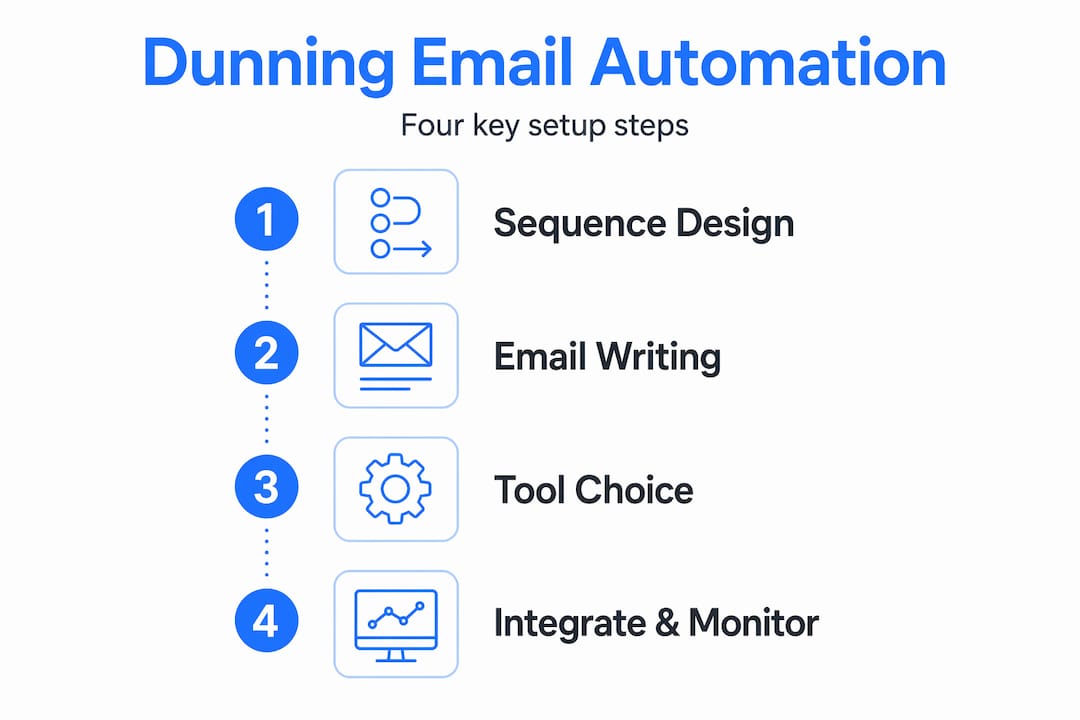
Step 1: Design your sequence structure
A 4-6 email sequence over 14 to 21 days recovers between 50% and 70% of failed payments. Without automation, that number drops to 20-31%. The first email alone achieves a 13.25% recovery rate, which is why sending it immediately after a payment fails is non-negotiable.
A practical sequence looks like this:
- Day 0 (payment failure): Friendly notification. No blame. Just the facts: payment did not go through, here is how to fix it.
- Day 3: Gentle follow-up. Acknowledge they may have missed the first email. Offer a direct payment link.
- Day 7: Slightly more direct. Reference your payment terms. Note that the account may be affected if payment is not received.
- Day 14: Formal notice. State clearly that service may be paused and what the customer needs to do to avoid that.
- Day 21: Final notice before escalation. Keep it professional, not threatening.
Recovery drops sharply after day 21, so do not extend the sequence indefinitely. More emails beyond six actually increase unsubscribe rates without improving recovery.
Step 2: Write emails that get opened and acted on
Subject lines are where most dunning sequences fail. Specific subject lines like "Your payment for Invoice #1042 didn't go through" outperform generic ones like "Action required" by a measurable margin. Use the customer's name in the sender field. Personal sender names improve open rates by 35%.
Keep the body of each email short. State the issue, state the amount, provide a payment link, and close with a clear next step. Do not write paragraphs. Customers who owe money are not going to read an essay.
Step 3: Choose the right tool
Here is a simple comparison of what to look for when evaluating small business payment automation tools:
| Feature | Why it matters |
|---|---|
| Invoicing system integration | Triggers emails automatically when a payment fails |
| Customer segmentation | Sends different sequences to different customer types |
| A/B testing | Lets you test subject lines and timing to improve results |
| Smart retry logic | Retries failed card payments at optimal times without customer action |
| Reporting dashboard | Shows open rates, recovery rates, and DSO in one place |
Pro Tip: Smart retry logic alone recovers 50-60% of failed payments without any customer action required. If your tool does not include it, you are leaving money on the table.
Step 4: Set up triggers and integrations
Your dunning tool needs to connect to your accounting or billing software. When a payment fails or an invoice passes its due date, that event should automatically trigger the first email in your sequence. Manual triggers defeat the purpose of automation. Look for tools that integrate directly with platforms you already use, whether that is QuickBooks, Stripe, or another billing system.
Monitoring results and avoiding common mistakes
Setting up automation is not the finish line. The businesses that see the best results treat their dunning process as something to measure and refine over time.
Track these metrics every month:
- Recovery rate: What percentage of overdue invoices are you collecting?
- Days Sales Outstanding (DSO): Are you getting paid faster? Automated AR software targets an average DSO of 40 days.
- Email open rates: Are customers even reading your reminders?
- Response rate by sequence step: Which email in the sequence drives the most payments?
If your open rates are low, test a different subject line. If most payments come after the third email, consider tightening the gap between emails two and three. Iterative optimization of dunning sequences, including A/B testing and timing adjustments, directly increases revenue recovered.
Common mistakes to avoid once you are up and running:
- Canceling accounts immediately instead of pausing them. Pausing an account preserves customer data and allows one-click reactivation. Cancellation often means losing the customer permanently.
- Ignoring customer replies. Automation handles outbound messages, but someone on your team needs to monitor responses. A customer who replies with a question and gets no answer will not pay.
- Using the same tone for every customer. Chronic late payers need firmer language earlier in the sequence. Long-term reliable customers deserve more patience.
If budget allows, consider multi-channel dunning that adds SMS or in-app notifications alongside email. Multi-channel approaches recover 25-35% more than email alone, though they require more setup and customer consent.
Pro Tip: Review your common accounting mistakes alongside your dunning setup. Errors in your invoicing process often cause payment delays that no amount of automation can fix.
My honest take on dunning automation
I've worked with a lot of small business owners who resist automating their collections process because they worry it will feel cold or damage customer relationships. I understand that instinct. But in my experience, the opposite is true. Manual follow-up is inconsistent, and inconsistency is what actually damages relationships. A customer who gets a reminder two months late feels blindsided. A customer who gets a professional, timely message the day after a payment fails knows exactly what happened and how to fix it.
What I've found actually matters is the writing. Automation handles the timing and delivery, but if the emails sound like they came from a robot, your recovery rate will reflect that. Automation works best with a human touch. Write the emails yourself. Use your real name. Sound like a person.
I've also seen businesses underestimate how much a clear late payment policy changes everything. Not having one is the single most common reason dunning emails fail. Customers push back when there is nothing in writing to reference. Once you have that policy documented and built into your contracts, your automated reminders carry real weight.
The other thing I'd push back on is the idea that you need to get everything perfect before you start. Set up a basic three-email sequence. Run it for 60 days. Look at the data. Then improve it. Waiting for the perfect setup means another quarter of chasing invoices manually.
— Tyler
Let Interval-ai handle your collections automatically
If you are ready to stop chasing invoices and start getting paid faster, Interval-ai was built for exactly this situation.

Interval-ai uses AI-powered automation to manage your entire dunning process, from the first payment failure notification to final escalation, all tailored to your brand voice and customer history. Clients report reducing days to payment by over 30 days and recovering significant revenue without adding staff. The platform handles multi-channel outreach, smart retry logic, and reporting in one place, so you spend less time on collections and more time running your business. Explore Interval-ai to see how it fits your workflow.
FAQ
What is a dunning email?
A dunning email is an automated or manual message sent to a customer after a payment fails or an invoice becomes overdue. Its purpose is to notify the customer and prompt them to complete payment.
How many dunning emails should I send?
A sequence of 4-6 emails over 14-21 days is the most effective approach. Recovery rates drop sharply after day 21, and sending more than six emails increases unsubscribe risk without improving results.
How do I automate dunning emails for my small business?
Connect a dunning or AR automation tool to your invoicing or billing software, build a 4-6 email sequence with specific subject lines and payment links, and set triggers to fire automatically when a payment fails or a due date passes.
Should I cancel or pause accounts with overdue payments?
Pausing is almost always the better choice. It preserves customer data, allows one-click reactivation, and keeps the relationship intact. Immediate cancellation frequently results in a permanently lost customer.
What metrics should I track in my dunning process?
Monitor recovery rate, Days Sales Outstanding, email open rates, and which step in your sequence drives the most payments. Use that data to test and adjust your timing and subject lines over time.
