
How to Measure ROI of Admin Automation for SMBs
Published: May 29, 2026 · 10–11 min read
TL;DR:
- Measuring ROI on admin automation requires tracking actual savings, costs, and the realization rate.
- Baseline data collection before implementation is essential to accurately prove improvements and shorten payback periods.
If you've invested in admin automation tools and aren't sure whether they're actually paying off, you're not alone. Many small and medium business owners struggle to measure ROI of admin automation accurately, often defaulting to gut feel or surface-level metrics that don't tell the full story. The problem isn't the automation itself. It's that most guides skip the hard parts: the hidden costs, the realization rates, and the difference between time saved on paper and money actually recovered. This article walks you through the full picture, with real numbers and practical steps you can apply immediately.
Key Takeaways
| Point | Details |
|---|---|
| ROI goes beyond labor savings | Factor in error reduction, cycle time, compliance, and employee morale for a complete picture. |
| Baseline data is non-negotiable | Measuring before you automate can cut your payback period from five months to under three. |
| Apply realization rates to time saved | Not all hours saved convert to cash. Discount by 50-70% for realistic financial projections. |
| Hidden costs inflate ROI claims | Integration, training, and ongoing tuning often add 30-60% on top of your software license cost. |
| Start small and prove ROI fast | Focused pilots on discrete admin tasks can reach payback in as little as three to thirty days. |
Understanding the components of ROI in admin automation
Before you can measure ROI of admin automation, you need to agree on what ROI actually means in this context. The standard formula is simple: (Net Benefit minus Total Cost) divided by Total Cost, expressed as a percentage. The harder part is deciding what counts as a benefit and what counts as a cost.
Direct benefits you can count right away
The most visible benefits are the ones you can put a dollar figure on immediately. These include:
- Labor savings: Hours your team no longer spends on manual data entry, invoice processing, or scheduling.
- Error reduction: Fewer mistakes means fewer hours spent correcting them and fewer compliance penalties.
- Cycle time improvements: Faster processing means invoices go out sooner, payments come in sooner, and cash flow improves.
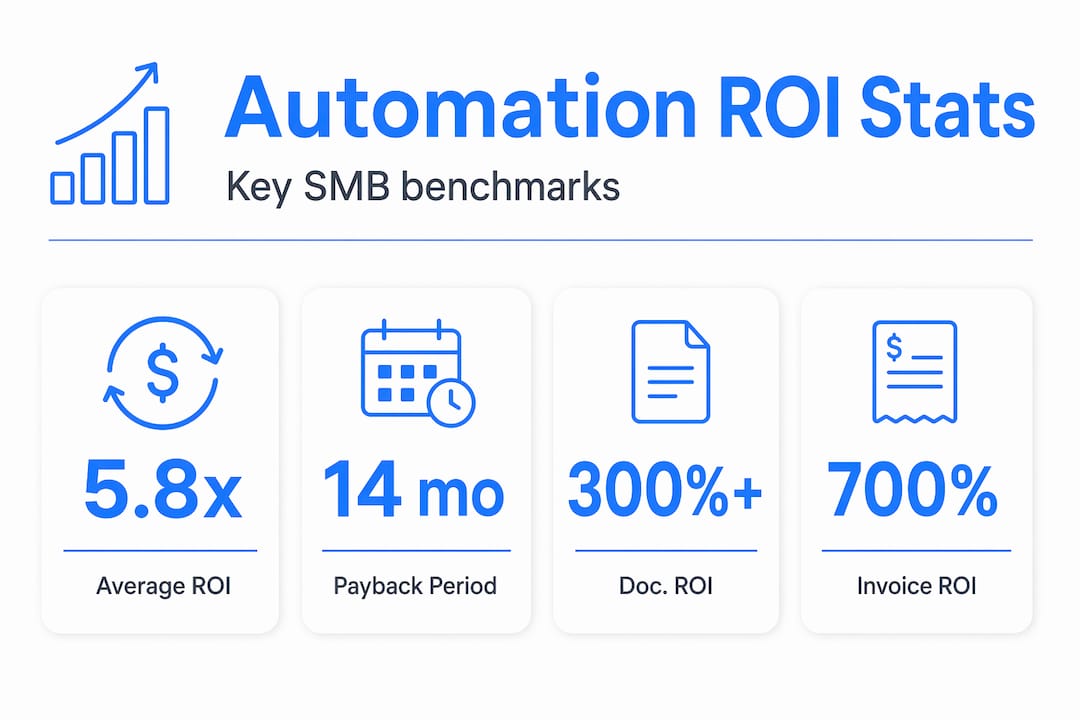
Business process automation delivers an average 5.8x ROI within 14 months, with document-heavy workflows achieving 300 to 400% ROI in the first year alone. Those are strong numbers, but they depend heavily on what you choose to count.
Indirect benefits that most SMBs overlook
The less obvious benefits are just as real. Improved compliance reduces your legal exposure. Faster turnaround improves customer satisfaction. And when your team isn't buried in repetitive work, morale goes up. True ROI is not just headcount reduction. It's the value of time redirected to higher-impact work.
Here's the catch that trips up a lot of business owners. Time saved is not automatically money saved. If you automate a task that frees up two hours a day for an employee who then spends those hours in unproductive meetings, you haven't captured that value. ROI models must apply realization rates, with a typical range of 50 to 70%, since not all hours saved convert to actual cash savings. Keep that in mind before you build your projections.
Pro Tip: When calculating admin automation return on investment, create two columns: "hours saved" and "hours reallocated to revenue-generating or cost-reducing work." Only count the second column as real financial benefit.
Preparing to measure ROI: baseline data and goals
Here's a truth most automation vendors won't tell you upfront. Skipping baseline measurements roughly doubles your project payback time and erodes stakeholder confidence in your results. You cannot prove improvement if you don't know where you started.
Follow these steps before you flip the switch on any automation:
- Map your target processes. Write down every step involved in the admin task you want to automate. Invoicing, accounts payable, lead qualification, customer follow-up. Be specific.
- Record current time per task. Track how long each step takes, who does it, and how often. A simple spreadsheet works. Do this for at least two weeks to get a reliable average.
- Capture error rates and volume. How many errors occur per 100 transactions? How many tasks are processed per week or month? These numbers become your benchmark.
- Calculate current cost per task. Multiply average time per task by the fully loaded hourly rate of the employee performing it. Include benefits and overhead, not just salary.
- Define success metrics tied to business KPIs. ROI must map to operational KPIs like cycle time, days sales outstanding, or error rate reduction, not vanity metrics like "tasks automated."
Pro Tip: Use a shared tracking doc or time-logging tool for two to four weeks before your automation goes live. That data becomes your most powerful proof of ROI when you report results to your leadership team or investors.
Calculating ROI step by step

Now for the part most guides gloss over. Here is a working framework for how to measure ROI of automation in admin tasks, with realistic SMB-relevant numbers.
Step-by-step ROI calculation
- Quantify total annual savings. Add up labor savings, error correction costs avoided, and any direct cost reductions like postage or paper.
- Apply a realization rate. Multiply your gross savings by 0.5 to 0.7 to account for the portion of saved time that actually converts to productive work or reduced headcount.
- Add up total costs. Include the software license, implementation, integration with existing systems, staff training, and ongoing maintenance. Hidden costs in admin automation, including change management, retraining, data prep, and tuning, often add 30 to 60% on top of the license fee.
- Calculate net benefit. Subtract total costs from realized savings.
- Divide net benefit by total cost and multiply by 100. That's your ROI percentage.
Example calculations for common SMB tasks
The table below shows realistic ROI estimates for three common administrative automation projects:
| Admin Task | Annual Savings (Gross) | Realization Rate | Total Cost | Net Benefit | ROI % |
|---|---|---|---|---|---|
| AP invoice processing | $48,000 | 65% | $18,000 | $13,200 | 73% |
| Accounts receivable follow-up | $36,000 | 60% | $10,000 | $11,600 | 116% |
| Customer onboarding docs | $24,000 | 70% | $8,000 | $8,800 | 110% |
These numbers are conservative on purpose. Automating AP invoicing can yield up to 700% ROI in the first year for companies with high invoice volume, with payback in six to eight months. Your actual results depend on volume, current process inefficiency, and how well you capture redirected time. For a deeper look at how to structure your accounts payable costs before automating, the accounts payable guide from Concorde Company Solutions provides a helpful breakdown of cost components.
Pro Tip: Don't build your ROI case on best-case scenarios. Use your realization rate to create a conservative projection, a base projection, and an optimistic projection. That range gives you credibility and prepares you for the conversation if results come in below expectations.
Validating and improving your ROI over time
Getting to a positive ROI number on paper is step one. Keeping it real and improving it over time is where most SMBs drop the ball.
What to track after going live
Once your automation is running, set up a monthly review cadence. Compare actual savings against your projections. Track the following:
- Actual hours saved per week versus your baseline
- Error rates before and after
- Cycle time for the automated process
- Employee time reallocation (where are those saved hours actually going?)
- Total cost to date, including any surprise expenses like additional integrations or support hours
Continuous sensitivity analysis reduces the risk of overestimating ROI and guides better decision-making. Running a few scenarios, such as "what if realization drops to 40%?" or "what if volume doubles?", keeps your ROI assessment honest and prepares you for growth.
Common mistakes that distort your results
| Mistake | Why It Matters | Fix |
|---|---|---|
| No baseline data collected | You can't prove improvement without a starting point | Track for 2-4 weeks pre-launch |
| Ignoring hidden implementation costs | ROI appears inflated, then crashes when actuals come in | Budget 40-60% above license cost for true TCO |
| Counting all saved hours as cash | Overestimates financial return significantly | Apply a 50-70% realization discount |
| Measuring vanity metrics only | Doesn't connect to business outcomes | Map metrics to KPIs like DSO and error rate |
| No regular post-launch review | Problems go undetected and ROI drifts | Schedule monthly tracking reviews |
When your data shows consistent, positive ROI over three to six months, that's your signal to scale. Use those results to justify expanding automation to adjacent processes.
Maximizing admin automation ROI: best practices for SMBs
Getting the most from your automation investment comes down to a few consistent habits. These aren't complicated, but they require discipline.
Focus your first automation projects on high-volume, repetitive tasks. Successful admin automation reduces time on repetitive tasks by 60 to 80%, which translates to the fastest payback period. Think invoice processing, payment follow-up, and data entry. These are your best starting points.
Here's what else moves the needle for SMBs specifically:
- Involve your team early. When staff understand the "why" behind automation, adoption is faster and change management costs drop. Resistance is a hidden cost that rarely shows up in vendor proposals.
- Choose tools that integrate with your existing systems. Every custom integration adds cost and time. Prioritize tools that connect out of the box to your accounting, CRM, or project management software.
- Review and update your workflows regularly. Automation set up six months ago may not reflect your current process. Stale workflows produce declining returns.
- Tie every metric back to cash flow. Admin efficiency measurement is only useful when it connects to revenue recovered, costs avoided, or days reduced in your collections or billing cycle.
Targeted SMB automations scoped as small, discrete projects can achieve payback in three to thirty days. Start narrow, prove the value, then expand. That's how you build internal momentum for broader automation adoption.
Pro Tip: When evaluating admin automation effectiveness for a new tool, ask the vendor for a cost-by-category breakdown, not just a total price. That breakdown reveals integration fees, setup costs, and support tiers that often surprise buyers post-purchase.
My honest take on measuring admin automation ROI
I've reviewed automation ROI assessments across dozens of SMBs, and the pattern that keeps showing up is this: businesses overestimate savings and underestimate the work required to capture them.
The realization rate issue is the biggest one. I've seen teams automate a process, free up 10 hours a week, and then watch those hours disappear into unstructured work. No one tracked where they went. No one had a plan for redirecting them. The automation was technically successful, but the financial return was almost invisible on the books.
What actually works is pairing automation with a reallocation plan from day one. Before you launch, decide specifically what your team will do with the time they get back. Assign it to revenue-generating tasks, customer retention, or reducing overtime. If you can't answer that question before you automate, you're not ready to measure ROI honestly.
The other thing I'd push back on is the idea that you need a perfect, enterprise-grade measurement system. You don't. A shared spreadsheet, consistent weekly tracking, and a monthly review with your operations lead is enough to build a credible ROI case. The goal is consistent measurement, not perfection.
Start small, measure carefully, and let the data tell you where to go next. That's the approach that actually builds confidence in automation decisions, both yours and your team's.
— Tyler
See how Interval-ai helps you recapture lost revenue
If your admin automation efforts include managing overdue payments or collections, measuring the ROI becomes even more direct. Interval-ai uses data-driven, automated outreach to recover payments faster, with clients reporting a reduction in days to payment of over 30 days without adding staff.

The platform tracks outreach effectiveness, payment timelines, and recovery rates, giving you the admin process automation metrics you need to calculate real return on your collections investment. There's no guesswork about whether it's working. You see the numbers. If you want to understand how Interval-ai could fit into your broader automation strategy, explore what Interval-ai offers and how the platform's built-in analytics connect directly to your cash flow outcomes.
FAQ
How do I calculate admin automation ROI?
Subtract your total automation costs (including software, implementation, and training) from your realized savings, then divide by total costs and multiply by 100. Apply a 50 to 70% realization rate to your gross time savings before calculating.
What's a realistic ROI timeline for admin automation?
Most SMBs see payback within six to eight months for high-volume admin tasks like invoice processing. Narrow-scope pilot projects can reach payback in as little as three to thirty days when scoped correctly.
Why does measuring baseline data matter so much?
Without baseline data, you have no way to prove improvement. Research shows that collecting pre-automation metrics cuts your time-to-value and can reduce your payback period from five months to under three.
What hidden costs should I include in my automation cost-benefit analysis?
Beyond software licensing, budget for system integration, staff retraining, data preparation, and ongoing workflow tuning. These hidden costs typically add 30 to 60% on top of the base license fee and are the most common reason ROI projections miss their targets.
How do I know when to scale admin automation across more processes?
When your data shows consistent, positive ROI over three to six months on your initial automation project, that's a reliable signal to expand. Use those results to build the business case for automating adjacent workflows.
