
No-Code Automation Explained for Business Owners
Published: July 5, 2026 · 9–10 min read
TL;DR:
- No-code automation enables business owners to create workflows using visual tools without programming. It replaces manual tasks like follow-ups and data entry, saving time and reducing errors. The approach empowers non-technical users and scales with business needs through tiered pricing and integration options.
No-code automation is defined as the practice of building automated workflows using visual, drag-and-drop tools without writing any code. The no-code market is projected to reach $65 billion by 2027, growing at 19.6% year over year between 2023 and 2024. That growth reflects a fundamental shift: business owners no longer need a developer to automate repetitive tasks. If you manage invoices, follow up with customers, or route leads between tools, no-code automation lets you build those workflows yourself, in minutes.
What is no-code automation explained for everyday business use?
No-code automation is the industry term for what many business owners call "workflow automation without IT." The formal category sits under the broader umbrella of business process automation (BPA), but no-code specifically refers to platforms that hide all programming logic behind a visual interface.

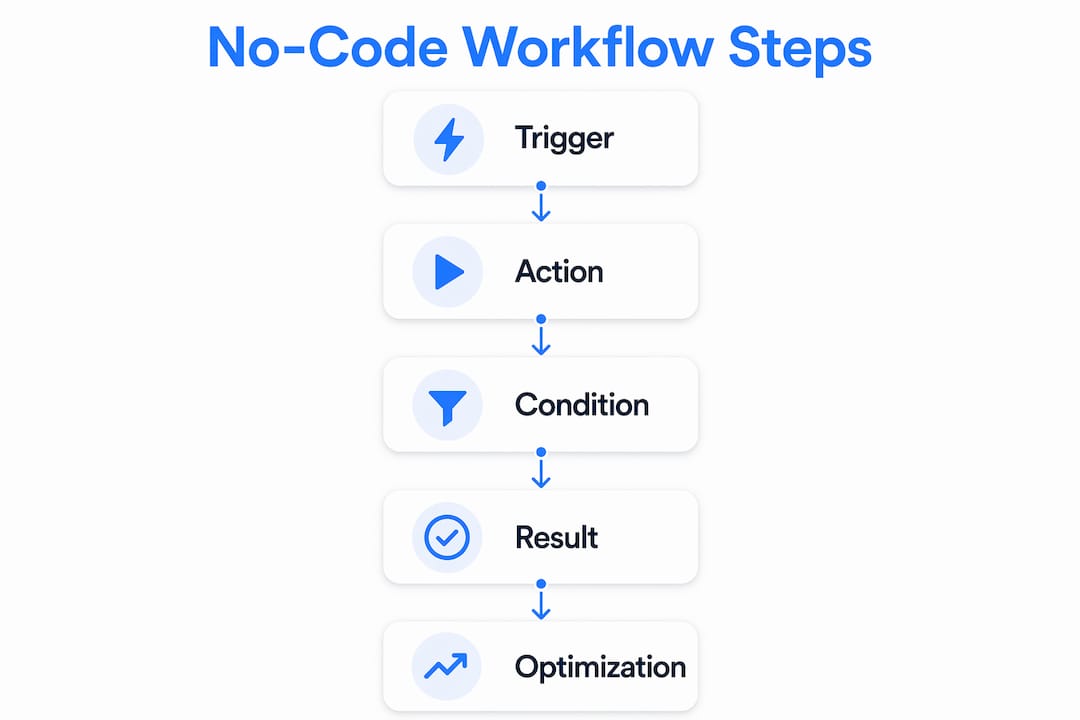
The core mechanic is the trigger-action-condition model. A trigger is the event that starts a workflow, such as a new invoice being created. An action is what happens next, such as sending an email or updating a spreadsheet. A condition adds logic, for example, "only send the email if the invoice amount exceeds $500." Most no-code platforms build every workflow from these three components.
Behind the scenes, these platforms use APIs to connect your apps. When you drag a "send email" block onto a canvas, the platform is actually making a POST request to your email provider's API. Understanding basic API concepts like webhooks and polling helps you debug issues when a workflow breaks unexpectedly. You do not need to write the API call, but knowing it exists helps you ask the right questions.
Businesses manage an average of 106 SaaS applications across departments. That number explains why no-code automation has become a priority. Connecting that many tools manually creates enormous repetitive work.
Key components of a no-code workflow
- Triggers: Events that start a workflow (new form submission, payment received, date reached)
- Actions: Tasks the platform performs automatically (send email, create record, update spreadsheet)
- Conditions: Rules that control whether an action runs ("if customer status equals overdue, then send reminder")
- Integrations: Pre-built connectors to apps like Gmail, Slack, QuickBooks, or Salesforce
- Templates: Pre-built workflow blueprints for common tasks like lead routing or invoice follow-up
Pro Tip: Avoid building workflows around unstructured data like PDFs, scanned documents, or images. Standard no-code tools lack the AI needed to classify or extract data from those formats. Add a dedicated AI parsing layer first, then feed the structured output into your no-code workflow.
What are the benefits and use cases for business owners?
No-code automation shifts workflow ownership from developers to the business users who actually understand the process. That shift is the most underrated benefit. When a sales manager can update a lead-routing workflow without filing an IT ticket, the business moves faster and the workflow stays accurate longer.
The practical benefits break down across three areas:
- Time savings: Repetitive tasks like data entry, follow-up emails, and report generation run automatically. A business owner who manually sends 30 payment reminders a week can replace that work with a single workflow built in an afternoon.
- Cost efficiency: You avoid hiring developers for routine automation. You also reduce errors that come from manual data handling, which carry their own hidden costs.
- Faster updates: When a process changes, a business user edits the workflow directly. No sprint planning, no developer queue, no two-week delay.
Real-world examples by department
Finance: Automatically flag overdue invoices, trigger payment reminder sequences, and update accounting records when payments are received. Interval-ai applies this exact trigger-action-condition logic to collections, automating outreach across channels based on historical payment data.
Sales: Route new leads to the right rep based on territory or deal size. Send a follow-up email sequence when a prospect fills out a contact form. Update your CRM when a deal stage changes.
Marketing: Add new subscribers to the correct email list based on the form they completed. Notify the sales team when a lead reaches a qualifying score. Post approved content to multiple channels from a single approval step.
Operations: Send onboarding documents when a new client signs a contract. Alert a manager when a support ticket has been open for more than 48 hours. Sync inventory counts between your point-of-sale system and your spreadsheet.
The common thread across all of these is consistency. Automated workflows do not forget steps, skip follow-ups, or make data entry errors. That consistency compounds over time into measurable operational improvement.
How do pricing and platform features compare?
No-code automation platforms follow a tiered pricing model. Entry-level plans are free or very low cost, designed for individuals or small teams with limited workflow volume. Mid-tier plans add higher operation limits, more integrations, and team features. Enterprise plans include advanced security, dedicated support, and custom contract terms.
Pricing for paid plans typically starts between $10 and $25 per month for entry-level tiers, scaling up based on the number of operations, users, or connected apps.
| Tier | Monthly cost | Operations per month | Best for |
|---|---|---|---|
| Free | $0 | 200–1,000 | Testing and simple personal workflows |
| Entry paid | $10–$25 | 5,000–10,000 | Small businesses with moderate automation needs |
| Mid-tier | $25–$100 | 10,000–50,000 | Growing teams with multiple departments |
| Enterprise | Custom | Unlimited or high cap | Large organizations with compliance requirements |
Beyond price, evaluate platforms on four feature categories. First, check the integration library. A platform with 500 pre-built connectors saves you from building custom API connections. Second, look for a template library. Pre-built workflows for common tasks cut setup time significantly. Third, confirm the platform has a built-in testing and debugging environment. Workflows fail, and you need to see exactly which step broke and why. Fourth, check for version history. When a workflow change causes a problem, you need to roll back quickly.
Scalability matters more than most business owners expect at the start. An entry-level plan that works for 20 workflows today may hit its operation limit within six months as your team adds more automations.
How does no-code automation fit into digital transformation?
No-code automation sits on a continuum that runs from no-code to low-code to full custom development. No-code handles the majority of standard business workflows. Low-code platforms add a layer of scripting for more complex logic. Full custom development handles processes that are too unique or too sensitive for off-the-shelf tools.
The line between no-code and low-code is blurring. Most mature platforms in 2026 include low-code "escape hatches," meaning you can inject a JavaScript or Python snippet when the visual builder reaches its limit. That flexibility makes the no-code versus low-code distinction less meaningful than it was three years ago.
"Automations must be treated as explicit systems with structured logic. Vague processes lead to fragile workflows."
That principle applies directly to digital transformation projects. Many businesses attempt to automate a process before they have documented it clearly. The result is a workflow that mirrors the confusion of the manual process, just faster. Successful automation requires structured data and explicit process steps before you build anything.
No-code automation also integrates into broader enterprise architecture. Workflows built on no-code platforms can connect to ERP systems, data warehouses, and customer platforms through standard API integrations. That means a no-code workflow built by a finance manager can feed data into the same systems that enterprise developers maintain.
Pro Tip: Before you automate any process, write it out as a numbered list of steps. If you cannot describe the process clearly in plain language, the automation will fail. Clarity in documentation translates directly into reliability in execution.
Key Takeaways
No-code automation gives business owners direct control over their workflows by replacing manual, repetitive tasks with visual, trigger-based logic that runs automatically without developer involvement.
| Point | Details |
|---|---|
| Core model is trigger-action-condition | Every no-code workflow starts with an event, defines an action, and applies rules to control when it runs. |
| Business users own the workflows | Shifting automation ownership away from developers means faster updates and more accurate processes. |
| Structured data is a prerequisite | Workflows built on ambiguous or unstructured data fail; document every process clearly before automating. |
| Pricing scales with volume | Free tiers cover basic testing; paid plans from $10/month support growing business automation needs. |
| No-code and low-code are converging | Most platforms now offer code injection for complex needs, making the two categories functionally similar. |
Why I think most businesses are automating in the wrong order
The most common mistake I see is business owners grabbing a no-code tool and immediately trying to automate their most painful process. That instinct is understandable. But the most painful processes are usually painful because they are poorly defined, not because they lack automation.
The businesses that get the most out of no-code automation start with their simplest, most repetitive processes. A daily report that takes 20 minutes to compile manually. A follow-up email that always goes out three days after a quote is sent. These are clean, structured, and easy to automate correctly. They build confidence and reveal how the platform works before you tackle anything complex.
The second thing I have learned is that automation exposes process gaps. When you build a workflow and it breaks on day three, the problem is almost never the tool. It is usually a step in the process that was handled differently by different people. Automation forces consistency, and that consistency surfaces the inconsistencies that were always there.
Treat your first five automations as learning exercises. Document what you built, why it works, and what edge cases you had to account for. That documentation becomes the foundation for every workflow you build after it.
— Tyler
Interval-ai and no-code automation for financial workflows
If you are a business owner dealing with overdue payments, the trigger-action-condition model is exactly how Interval-ai approaches collections automation. The platform applies data-driven outreach logic based on historical payment behavior, automating follow-up communications across multiple channels without adding headcount.

Interval-ai reduces days to payment by over 30 days, according to client results, and clients report saving thousands in payroll costs by replacing manual collections work with automated workflows. For business owners who want to see how payment automation applies to real financial operations, the Interval-ai platform is worth a close look. You can review the full workflow capabilities and see how trigger-based collections logic works in practice at Interval-ai.
FAQ
What does no-code automation mean for a business owner?
No-code automation means you can build and manage automated workflows using visual tools without writing any code. It lets non-technical business owners connect apps, automate repetitive tasks, and update processes without waiting for a developer.
How does the trigger-action-condition model work?
A trigger is the event that starts a workflow, an action is the task that runs automatically, and a condition is the rule that controls when the action fires. Together, these three components define every no-code workflow.
What types of tasks are best suited for no-code automation?
Structured, repetitive tasks work best, such as sending follow-up emails, routing leads, updating records, and generating reports. Unstructured data types like PDFs and scanned documents require an AI layer before standard no-code tools can handle them.
How much does a no-code automation platform cost?
Most platforms offer free tiers covering 200–1,000 operations per month. Paid plans typically start at $10–$25 per month and scale based on operation volume, number of users, and integration depth.
Is no-code automation the same as low-code automation?
No-code and low-code are distinct but converging categories. No-code uses only visual tools with no programming required. Low-code adds scripting options for complex logic. Most modern platforms now offer both, making the distinction less clear than it once was.
