
Payment Follow-Up Automation Setup Guide for SMBs
Published: July 15, 2026 · 9–10 min read
TL;DR:
- Payment follow-up automation uses multi-stage reminders triggered by invoice status to speed cash collection. It requires accurate data, well-structured sequences, and proper stop conditions to avoid customer annoyance. Properly implemented, it can reduce Days Sales Outstanding by up to 10 days and improve overall cash flow.
Payment follow-up automation is a structured, multi-stage reminder sequence triggered by invoice status and due dates, designed to accelerate cash collection without manual effort. For small and medium business owners, this is the most direct path to reducing overdue balances and improving cash flow. Integrated automation can reduce Days Sales Outstanding by up to 10 days. That kind of gain compounds fast when you run dozens of invoices each month. This payment follow-up automation setup guide walks you through every step, from prerequisites to optimization, so you can build a system that works while you focus on running your business.
What does a payment follow-up automation setup guide cover?
A complete setup covers four areas: the tools you need, the reminder sequence you build, the stop conditions you configure, and the metrics you track. Each area depends on the one before it. Skip prerequisites and your reminders fire on bad data. Skip stop conditions and you annoy customers who already paid. The industry term for this discipline is accounts receivable (AR) automation, and it sits inside the broader category of payment processing automation. Both terms describe the same goal: replacing manual follow-up with a consistent, rules-based system.
The core benefit is consistency. Silence reads as permission to wait. When a customer receives no reminder, they assume the invoice is not urgent. Automated payment reminders operate on invoice status, due date, and customer behavior, moving through pre-due nudges, due-date notices, and escalating overdue messages. The sequence stops automatically on payment or dispute. That structure removes the awkward manual chase and replaces it with a professional, predictable process.
What do you need before setting up automation?
The quality of your automation depends entirely on the quality of your data. Before you configure a single reminder, confirm three things: your invoicing software reflects accurate payment status in real time, your customer contact records are complete and current, and your payment terms are clearly defined on every invoice.

Key tool categories and integrations
| Tool category | Purpose | Minimum requirement |
|---|---|---|
| Invoicing software | Issues invoices and tracks status | Real-time sync with payment gateway |
| Payment gateway | Processes payments and updates status | Webhook or API connection to invoicing tool |
| Automation platform | Sends reminders and manages cadence | Email and SMS delivery, payment link support |
| CRM or contact database | Stores customer contact details | Up-to-date email, phone, and billing contact |
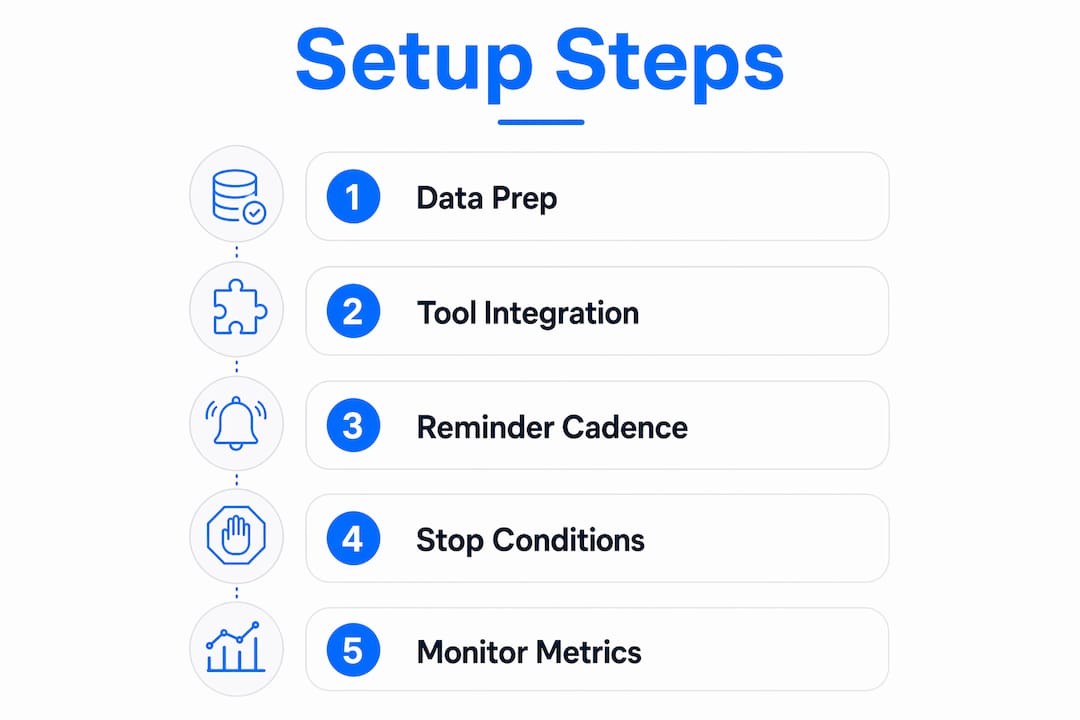
Your automation platform must connect to your invoicing software so it knows when an invoice is issued, when it is due, and when it is paid. Without that sync, reminders fire on stale data. Payment automation embedded in AR workflows provides real-time cash visibility and reduces manual reconciliation work. That integration is not optional. It is the foundation everything else runs on.
Compliance is also a prerequisite, not an afterthought. Automated reminders must comply with CAN-SPAM regulations, include clear opt-out mechanisms, and maintain audit trails of messages and consents. Set this up before your first reminder goes out.
Managing cash flow during the setup period can be a challenge. If you need working capital while your AR system matures, understanding cash flow options for small businesses gives you a practical buffer.
How do you set up an effective payment follow-up sequence?
The sequence is the engine of your automation. A well-built cadence moves a customer from invoice receipt to payment with minimal friction and maximum professionalism.
Recommended reminder cadence
- Day 3 before due date: Send a friendly pre-due reminder. Confirm the invoice details and provide a direct payment link. Tone: warm and helpful.
- Day 1 (due date): Send a due-date notice. Restate the amount, due date, and payment link. Tone: neutral and clear.
- Day 7 overdue: Send a firm follow-up. Acknowledge the overdue status, restate consequences if applicable, and include the payment link. Tone: professional and direct.
- Day 14 overdue: Send a final notice. State that the account is significantly overdue and that further action may follow. Tone: serious but not aggressive.
- Day 21 and beyond: Escalate to human intervention. A phone call or personal email from a team member is appropriate here.
The recommended cadence of Day 3, Day 7, Day 14, and Day 21+ is the industry standard for net-30 invoices. For shorter terms, compress the timeline. Early reminders within 24–48 hours of the due date are especially effective for net-7 or net-14 invoices.
What every reminder message must include
Every message in your sequence needs five elements: the invoice number, the due date, the amount owed, a direct one-click payment link, and a clear call to action. Every reminder must include a direct payment link to minimize friction and increase conversion. Each additional step between the customer and the payment button reduces the likelihood they complete it.
Pro Tip: Personalize every reminder with the customer's first name and the specific invoice number. Generic messages feel like spam. Personalized messages feel like professional service.
Multi-channel delivery improves results. Email works best for detail, SMS works best for immediacy, and voice calls work best for complex or high-value cases. Use email as your primary channel, SMS for Day 7 and Day 14 follow-ups, and reserve calls for Day 21 escalations.
What are the most common setup mistakes to avoid?
Most automation failures trace back to a small set of recurring problems. Knowing them in advance saves you significant time and protects your customer relationships.
Common mistakes to avoid:
- Sending reminders after a customer has already paid, caused by a sync delay between your payment gateway and invoicing software
- Missing reminders entirely because a customer's email address is outdated or missing from the contact record
- Failing to configure stop conditions for partial payments, disputes, and promises to pay
- Using a generic payment portal instead of a direct, one-click link in each reminder
- Sending SMS reminders without confirming customer consent, which creates compliance exposure under TCPA regulations
- Applying the same cadence to every customer regardless of their payment history or invoice value
Stop conditions for paid invoices, partial payments, disputes, and promises to pay are non-negotiable. Without them, your system sends reminders to customers who have already resolved the invoice. That damages trust and generates unnecessary support requests.
Pro Tip: Segment your customers by payment behavior before you launch. Reliable payers who occasionally run late need a different tone than chronic late payers. Build two or three cadence variants and assign customers accordingly.
Data sync is the most common technical failure point. Typical problems include reminders sent after payment due to sync delays and missing reminders from incomplete records. Test your integration with a small batch of invoices before going live with your full customer base.
How do you measure whether your automation is working?
Three metrics tell you most of what you need to know: Days Sales Outstanding (DSO), reminder open rates, and payment conversion rates. DSO measures how long it takes to collect payment after an invoice is issued. A lower DSO means your automation is accelerating collections. Open rates tell you whether your messages are reaching customers. Conversion rates tell you whether those messages are prompting payment.
Key metrics and optimization strategies
| Metric | What it measures | Optimization action |
|---|---|---|
| Days Sales Outstanding (DSO) | Average days to collect payment | Tighten cadence timing or add a pre-due reminder |
| Reminder open rate | Email and SMS engagement | Test subject lines and send times |
| Payment conversion rate | % of reminders that result in payment | Simplify payment link and reduce message length |
| Escalation rate | % of invoices reaching Day 21+ | Review Day 7 and Day 14 message tone and clarity |
| Dispute rate | % of invoices generating disputes | Audit invoice accuracy and clarity before sending |
Review your automation logs weekly for the first month. Look for patterns: which customers consistently ignore email but respond to SMS, which invoice values generate the most disputes, and which reminder in the sequence drives the most payments. Advanced systems dynamically adjust reminder timing, wording, and channel based on customer payment history and engagement signals. You can replicate this manually by reviewing logs and updating your cadence segments quarterly.
Human review at the Day 21 escalation point is not a failure of automation. It is the correct design. Automation handles the routine. Humans handle the exceptions. Keep that boundary clear and your system will perform consistently.
Key Takeaways
Effective payment follow-up automation requires clean data, a structured reminder cadence, reliable stop conditions, and consistent metric tracking to reduce DSO and improve cash flow.
| Point | Details |
|---|---|
| Data quality comes first | Sync invoicing and payment tools before configuring any reminder sequence. |
| Use a proven cadence | Send reminders at Day 3, Day 7, Day 14, and escalate at Day 21 for net-30 invoices. |
| Always include a payment link | Every reminder must contain a direct, one-click payment link to maximize conversion. |
| Configure stop conditions | Prevent reminders from firing after payment, dispute, or promise to pay. |
| Track DSO and conversion rates | Review metrics weekly and adjust cadence, tone, or channel based on results. |
My honest take on automating payment follow-ups
The biggest mindset shift I see business owners resist is moving from "chasing" to "helping." Most unpaid invoices are not the result of bad-faith customers. They are the result of busy people who forgot. When you frame your reminders as helpful service rather than aggressive collection, the tone of your messages changes, and so do your results.
The second thing I have learned is that over-automation is a real risk. I have seen businesses configure a reminder sequence and then never touch it again. Six months later, they are sending the same generic message to a customer who has paid on time for two years and just had one late invoice. That customer deserved a softer touch. The system did not know that because no one reviewed the segments.
High-value accounts and disputed invoices always need a human at the escalation point. Automation is excellent at the routine. It is poor at nuance. Build your system to hand off gracefully, not to run indefinitely without oversight. The businesses that get the best results treat automation as a first layer, not the whole solution.
— Tyler
How Interval-ai supports your payment follow-up process

Interval-ai integrates directly with your AR and ERP workflows to manage the full payment follow-up cycle, from automated reminder sequences to real-time payment status sync. The platform tailors outreach based on historical payment data, so your reminders match each customer's behavior rather than following a one-size-fits-all script. Interval-ai clients report reducing days to payment by over 30 days and recovering significant balances without adding staff. If you are ready to move beyond manual follow-up, explore Interval-ai to see how automated collections can work for your business.
FAQ
What is payment follow-up automation?
Payment follow-up automation is a rules-based system that sends invoice reminders based on due dates and payment status, replacing manual outreach with a consistent, multi-stage sequence.
How many reminders should I send before escalating?
The standard approach uses three automated reminders at Day 3, Day 7, and Day 14, followed by human escalation at Day 21 for net-30 invoices.
What should every payment reminder include?
Every reminder must include the invoice number, due date, amount owed, and a direct one-click payment link to minimize friction and maximize the chance of payment.
How do I prevent reminders from going to customers who already paid?
Configure stop conditions in your automation platform that trigger when a payment is received, a dispute is opened, or a promise to pay is logged, halting the sequence immediately.
How does automation affect my Days Sales Outstanding?
Integrated payment automation can reduce DSO by up to 10 days by accelerating cash application and removing delays caused by manual follow-up processes.
