
Cut 30+ Days to Payment: Salesforce Collections Integration for Teams
Published: September 5, 2026 · 9–10 min read
An effective Salesforce collections integration unifies core banking data, real-time payments, and automated collection plans so agents work from accurate borrower context and collect faster. The architecture rests on four pillars: a unified borrower record built on the Collections data model, real-time middleware linking loan or core banking systems, payment capture through Pay Now and tokenized components, and an AI-enabled Agent Console running on Flows and Action Launcher. Skip any one of them and the whole system slows down.
TL;DR:
- Real-time API integration using middleware like MuleSoft is crucial to prevent timing gaps that lead to duplicate payments or outreach mistakes.
- Automating payment events to instantly update the Collection Plan reduces errors and suppresses unnecessary borrower contact.
- Successful integration depends on careful data mapping for promises, payments, and reconciliation, along with thorough sandbox testing before deployment.
- Embedding AI and multi-channel outreach within a unified console enhances agent efficiency by prioritizing high-value accounts and personalizing communication.
- Avoiding batch-only syncing and ensuring clear system ownership and rollback plans are essential to prevent costly failures during live operation.
What Does a Salesforce Collections Integration Actually Require?
Before you talk to a vendor or an integrator, you need a checklist that separates a real integration from a glued-together workaround. Most collections teams underestimate how many moving parts have to line up.
Start with the data model. Collection Plan and its related Collections objects need to track cases, promises, payment status, and communication history in one place, so an agent isn't toggling between five screens to answer one borrower question.
From there, build out:
- Middleware layer — a real-time API connection (commonly MuleSoft) that handles error retries and idempotency, so the same payment or update doesn't get processed twice.
- Payment components — Pay Now links, a hosted card component, tokenization for PCI compliance, and payment events that fire back into Salesforce automatically.
- Agent Console — a single working screen with embedded AI suggestions, rather than a patchwork of related-list tabs.
- Analytics objects — dashboards tracking recovery rate, days to payment, and reconciliation variance, pulled straight from Payments Workspace and Collection Plan history.
Salesforce's own Collections & Recovery datasheet describes this exact combination: Borrower 360, Agent Console, Collections Recovery Portal, and Pay Now, tied together through core banking integration.
How Do You Build a Salesforce Collections Integration Step by Step?
Sequencing matters more than most teams expect. Jumping straight to automation before your data model is mapped usually means rebuilding flows twice.
- Run discovery first. Inventory every system that touches a borrower record: loan servicing, core banking, payment processors, and whoever owns each data field. Define success KPIs (days to payment, recovery rate) before writing a single flow.
- Map your data carefully. Promises to pay, payment intents, saved payment methods, and reconciliation fields all need clear ownership. Get this wrong and your agents will chase phantom balances.
- Wire up payments. Configure Pay Now, hosted card components, and tokenization, then confirm payment events (PaymentIntent, SavedPaymentMethods) actually reach Salesforce, per Salesforce's own payments documentation.
- Build automation. Prioritized collection plans, Flows, Action Launcher shortcuts, and message templates come next, not first.
- Test before cutover. Run sandbox payment flows, simulate late-arriving confirmations, and check reconciliation scenarios against a rollback plan.
Pro Tip: Run your first sandbox test with a deliberately duplicated payment confirmation. If your Collection Plan doesn't suppress the second outreach attempt, you've found your biggest go-live risk before it costs you a customer relationship.
How Do Payments Update the Collection Plan in Real Time?
The promise-to-pay lifecycle is where most collections integrations either shine or quietly break. A borrower makes a promise, a payment either lands or doesn't, and the Collection Plan needs to reflect that instantly, not at the next nightly batch job.
Design the connection between promise records and PaymentIntent objects up front, so a saved payment method can be reused without re-entering card data every time. Pay Now generates a payment link directly from the Collection Plan or case record, and the confirmation event needs to be captured automatically rather than checked manually.
Practical patterns that keep this clean:
- Use platform events or webhooks, not scheduled jobs, to update Collection Plan status the moment a payment clears.
- Automatically suppress the next scheduled outreach the instant a promise or payment event registers.
- Reconcile against accounting daily to catch mismatches before they become disputes.
- Log every promise change with a timestamp so agents can see the full history at a glance.
Salesforce's promise-to-pay guidance frames this as event-driven design, not batch reconciliation, and that distinction is the difference between a borrower getting one accurate reminder and getting three redundant ones.
Can Automation and AI Actually Make Agents More Effective?
Automation only pays off when it removes clicks, not when it adds new screens to check. Action Launcher and prebuilt flows standardize outreach so an agent isn't reinventing a call script for every account.
Embedded AI inside the Agent Console adds a layer most legacy tools never had: next-best-action ranking that tells an agent which of their forty open cases actually deserves a call this morning. That shifts the job from manual triage to prioritized conversation, which is the real value of the console model, according to analysis of Salesforce's next-gen service console.
Build automation around:
- Multi-channel orchestration — SMS, email, and phone sequenced by borrower preference and past response history.
- Personalization patterns — templates that pull real balance and promise data instead of generic placeholders.
- Caseload scoring — AI-ranked priority so agents see the highest-value accounts first, not just the oldest.
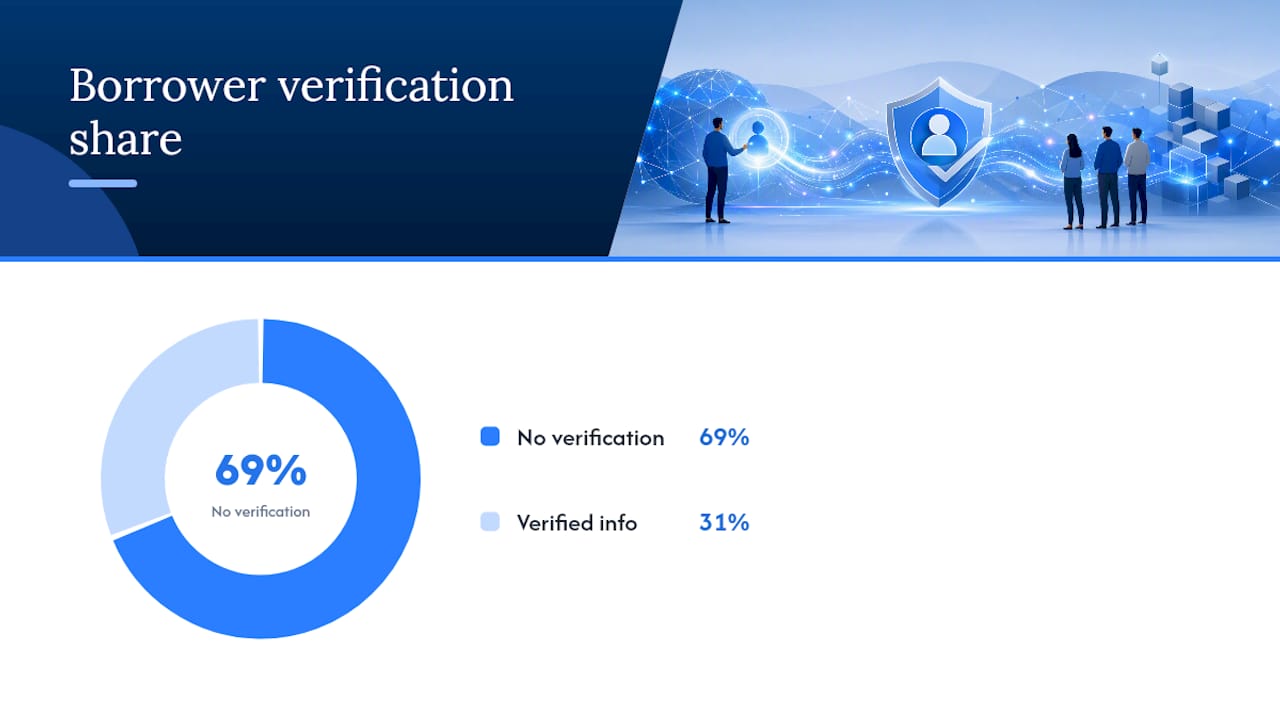
Serious delinquency accounts have been doubling annually in disconnected collections environments, and 69% of borrowers in those same environments lack enough information to verify their own debt. That's not an automation problem alone. It's a data visibility problem automation happens to fix, once agents can see accurate context in one screen.
Track contact rate, promise-kept rate, and average handle time before and after rollout. Those three numbers tell you faster than any dashboard whether the automation is actually working or just adding motion.
What Should You Track to Prove the Integration Is Working?
Dashboards only matter if finance and operations trust the numbers behind them. Build reporting around metrics that map directly to cash flow, not vanity activity counts.
Track days to payment, recovery rate, promise-kept rate, and reconciliation variance as your core four. Payments Workspace gives transaction-level visibility that a generic list view can't, so pull dashboards from there rather than rebuilding reports from scratch.
- Set automated alerts for failed payment events, duplicate payment attempts, and sync lag between systems.
- Audit collection rules monthly against live account data, not just documentation, since rules drift as products and policies change.
- Flag reconciliation variance above a set threshold for manual review before it compounds into a bigger accounting problem.
- Review promise-kept rate by channel to see which outreach method actually gets results.
What Mistakes Break a Salesforce Collections Integration?
Batch-only syncing is the single most common failure point. When account data updates once a day instead of in near real time, agents call borrowers who already paid, and that damages trust fast.
The fix is designing for event-driven updates from the start rather than retrofitting real-time logic onto a batch architecture later, which almost always costs more than building it right the first time.
Other recurring problems worth guarding against:
- Payment events that never link back to the Collection Plan, causing duplicate outreach on already-settled accounts.
- Missing audit trails and role-based access controls on sensitive payment and collections data.
- Skipping sandbox testing for edge cases like late-arriving confirmations or duplicate payment attempts.
- No documented rollback plan if a Flow or middleware change breaks production mid-cycle.
Pro Tip: Before go-live, write a one-page runbook that names who owns each system (Salesforce admin, middleware team, payments provider) and their response time commitment. When something breaks at 4:45 PM on a Friday, that document saves hours.
Interval-ai's Take on Building This Right
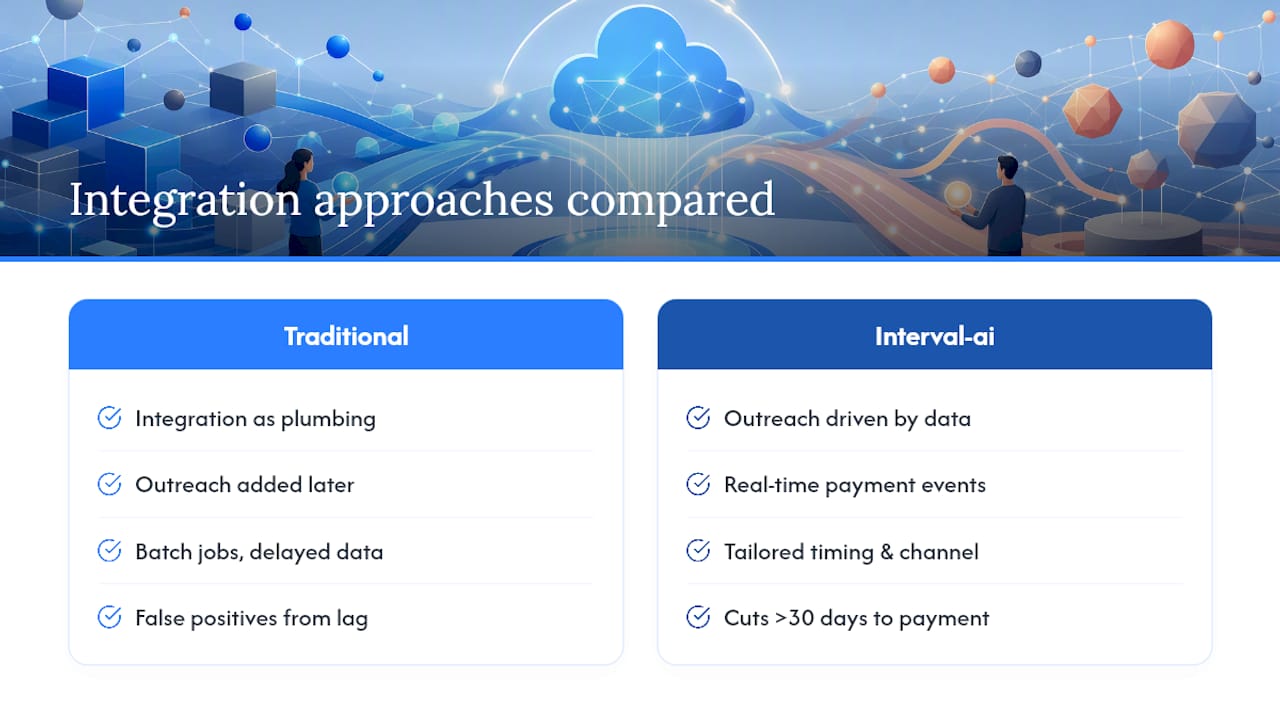
Most collections teams treat integration as a data-plumbing exercise and outreach as a separate afterthought. That's backwards. The outreach strategy should be designed around what the integrated data actually tells you about a borrower's payment behavior, not bolted on after the systems are connected.
Interval-ai's approach uses historical payment data to tailor outreach timing and channel per account, which only works because it sits on top of the same kind of real-time data flow described throughout this piece: middleware feeding accurate account status, payment events updating records instantly, and no batch-job lag creating false positives. Clients report cutting days to payment by over 30 days and recovering meaningful amounts without adding headcount. The lesson generalizes past any one tool: automation without accurate, real-time underlying data just automates the wrong call at the wrong time faster.
— Tyler
Ready to Connect Your Collections Data the Right Way?
This approach provides collections teams a faster path to accurate, real-time borrower context driving outreach that actually gets paid, without hiring more staff to manage it. Instead of stitching together middleware, payment components, and automation logic from scratch, some AI-driven systems read historical payment data and adjust outreach timing, channel, and tone automatically, while staying aligned with brand voice.

If you're evaluating this kind of integration, come to a demo ready with three things: your current data mapping between systems, your expected API or sync cadence, and the KPIs you need to move (days to payment, recovery rate, promise-kept rate). Teams can walk through how such platforms handle payment method updates, dispute tracking, and multilingual outreach inside existing workflows. Schedule a demo with Interval-ai to see how it fits your collections process before you commit to a longer build.
This article is general information, not a substitute for advice from a qualified financial advisor. Consult a qualified financial professional about your own circumstances before acting on anything here.
Sources
FAQ
What Are Collections in Salesforce?
Collections in Salesforce refers to the data model and workflow tools, including Collection Plan objects and the Agent Console, used to track overdue accounts, manage promises to pay, and automate recovery outreach.
What Is a Good CRM for Debt Recovery?
Salesforce, integrated with real-time middleware and payment components, works well for debt recovery because it centralizes borrower data, promise history, and payment status in one record instead of scattering it across separate systems. Tools like Interval-ai extend that foundation by automating the outreach itself based on each account's payment history.
What Are Some Examples of Salesforce Integrations Used in Collections?
Common examples include MuleSoft connections to core banking or loan management systems, Pay Now payment links embedded in Flows, and Agent Console integrations that surface AI-ranked next-best actions for each account.
Why Do Legacy Collections Systems Fall Short Compared to Integrated Salesforce Setups?
Disconnected systems create data gaps. Salesforce reports that in traditional collections environments, 69% of borrowers lack enough information to verify their own debt, which slows resolution and increases disputes.
How Long Does a Salesforce Collections Integration Typically Take to Implement?
Timelines vary by scope, but most implementations move through discovery, data mapping, middleware setup, payment configuration, automation build, and testing in sequence, with testing and sandbox validation typically taking the longest to get right.
