
Save Payroll Costs With Automation: SMB Guide

Published: June 27, 2026 · 9–10 min read
TL;DR:
- Payroll automation uses software to handle wages, taxes, and compliance, reducing manual errors and costs.
- It requires auditing current processes, integrating systems, and testing thoroughly before going live to prevent errors and waste.
Payroll automation is the process of using software to handle wage calculations, tax filings, and compliance tasks automatically, replacing manual entry with reliable, rules-based processing. For small and medium-sized business owners, this shift is one of the fastest ways to reduce payroll expenses and free up time for work that actually grows the business. Automated payroll systems reduce processing time by up to 90% and cut payroll management costs by 80%. This save payroll costs with automation guide walks you through exactly what to do, step by step, so you can put those savings to work.
What you need before automating payroll
Before you touch any software, audit what you already have. Most business owners who struggle with automation skipped this step. They installed a new system on top of a broken process and ended up with faster errors instead of fewer errors.
Start by mapping your current payroll workflow from start to finish. Write down every step: how employees clock in, how hours get approved, how data moves into payroll, and who touches it along the way. You are looking for manual hand-offs, duplicate data entry, and approval steps that slow everything down.
Once you have that map, gather the tools and data you will need:
- Payroll software that fits your business size and tax jurisdiction
- Time-tracking integration that connects directly to payroll without manual imports
- Employee records including tax forms, benefit elections, and pay rates
- Compliance updates for your state and federal tax tables for 2026
- Measurable goals such as reducing processing time by a specific number of hours or cutting error rates
Direct integration between timekeeping and payroll is non-negotiable. When time-tracking data requires a manual import step, you reintroduce the exact errors automation is supposed to eliminate. The two systems must talk to each other automatically.
Pro Tip: Set a baseline before you automate. Record your current processing time, error rate, and monthly payroll cost. You cannot measure savings without a starting point.
How to implement payroll automation step by step
A clear implementation plan prevents the most common and costly mistakes. Follow these steps in order.
-
Choose software that matches your complexity. A business with 10 employees and straightforward hourly pay needs a different tool than one with 50 employees, multiple pay rates, and contractor payments. Automation is needed based on process complexity, not just headcount. Evaluate software based on your specific pay rules, not just price.
-
Configure payroll settings before running anything live. Set up tax withholding tables, benefit deductions, garnishments, and overtime rules correctly from day one. A misconfigured deduction runs silently for months before anyone notices. Have your accountant or HR lead review every setting before you go live.
-
Integrate your time-tracking system. Connect your attendance and scheduling tool directly to payroll so hours flow through automatically. If your current time-tracking tool does not offer a direct integration, replace it. Manual imports negate the benefits of automation entirely.
-
Train every person who touches payroll. This includes HR staff, managers who approve timesheets, and any employee who submits their own hours. Training does not need to be long, but it must be specific. Show people exactly what they are responsible for in the new system.
-
Run a dummy payroll before going live. Process a complete payroll cycle with real data but do not release payments. Compare the output to your last manual payroll. Look for discrepancies in gross pay, deductions, and net pay. Fix every difference before the first live run.
-
Set up a regular audit schedule. After go-live, run a dummy payroll after every major change, including tax law updates, software version changes, and new employee additions. This catches errors before they reach paychecks.
Pro Tip: Do not automate a process you have not already cleaned up. Automating an inefficient workflow only speeds up the waste. Fix manual leaks like timesheet rounding and redundant approvals before you flip the switch.
The most common mistake at this stage is rushing to go live. Business owners feel pressure to start saving money immediately. The irony is that a rushed implementation creates errors that cost more to fix than the savings you were chasing. Take the extra week to configure and test properly.
How does payroll automation reduce costs and boost efficiency?
The savings from automating your payroll process come from several distinct sources, not just one. Understanding each one helps you set realistic expectations and measure results accurately.

Time savings
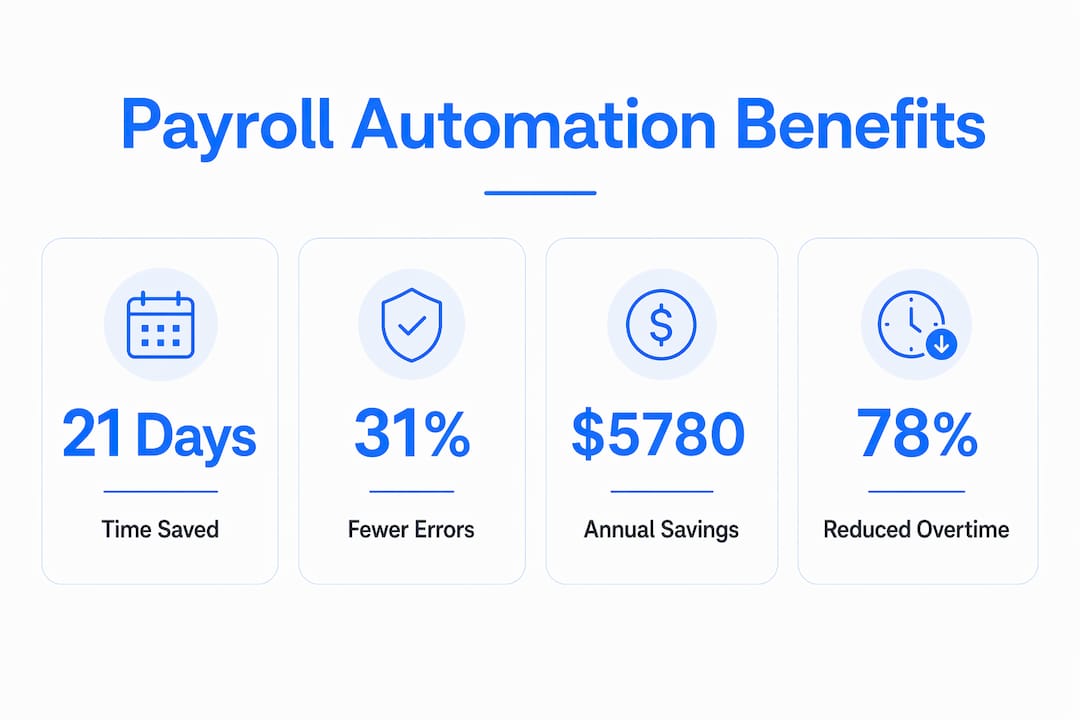
Small business owners waste 21 days annually on manual payroll tasks that automation handles in minutes. That is nearly a full month of productive time lost every year to data entry, calculation checks, and compliance lookups. Reclaiming those hours lets you or your team focus on customer service, sales, and operations instead.
The financial translation is direct. Switching from manual to automated payroll saves an estimated $5,780 annually because manual processing costs roughly $6,500 in staff time while automated services often cost less than $720 per year. That gap is real money back in your operating budget.
Error reduction and compliance
Automated payroll systems produce 31% fewer errors compared to manual entry, which carries a 33% higher incidence of mistakes. Payroll errors trigger IRS penalties, state tax fines, and employee complaints that damage trust. Fewer errors mean fewer fines and fewer hours spent correcting mistakes after the fact.
Attendance and overtime control
| Cost driver | Manual approach | Automated approach |
|---|---|---|
| Time theft | Hard to detect without audits | Eliminated with biometric or geofenced tracking |
| Unauthorized overtime | Caught after payroll runs | Flagged before approval |
| Timesheet rounding | Common and cumulative | Removed by digital clock-in |
| Compliance tracking | Manual spreadsheet updates | Automatic rule application |
Biometric or geofenced attendance tracking reduces gross payroll expenses by 5–10% within 30 days by eliminating time theft and unauthorized overtime. Paired with a hiring freeze, this approach can yield an 8–15% reduction in payroll expenses over a year without cutting a single salary.
One company cut overtime costs by 78% within 90 days by implementing strict digital attendance policies and overtime justification rules. The savings ran into the tens of thousands annually. The policy change cost nothing to implement beyond the software already in place.
What are the most common payroll automation challenges?
Automation does not run itself after setup. Most problems that surface post-implementation fall into a predictable set of categories.
-
Sync failures between time tracking and payroll. If your integration breaks after a software update, hours stop flowing automatically. Set up an alert that flags any payroll run where the imported hours differ significantly from the prior period.
-
Automating a flawed process. If your pre-automation workflow had timesheet rounding, buddy punching, or unapproved overtime, the automated system will process those same problems faster. Pre-automation audits are the only way to catch and remove these leaks before they get baked into your new system.
-
Tax law changes breaking your configuration. Federal and state tax tables update regularly. Your software may update automatically, but your settings may not apply the new rules correctly. Run a dummy payroll after every tax table update.
-
Employee distrust of automated paychecks. Some employees will question whether the system is calculating their pay correctly, especially in the first few months. Create a simple process for employees to flag discrepancies and commit to a 24-hour response time.
"Payroll costs can be controlled without damaging culture by identifying payroll leaks and optimizing schedules using analytics."
Building employee trust in automated payroll takes consistency. When every paycheck arrives on time and every query gets answered quickly, skepticism fades. Silence on employee concerns, by contrast, reads as permission to distrust the whole system.
Key takeaways
Payroll automation reduces costs by eliminating manual errors, reclaiming staff time, and controlling overtime, making it the most direct way for small and medium-sized businesses to cut payroll expenses without reducing headcount.
| Point | Details |
|---|---|
| Audit before automating | Map your current workflow and remove inefficiencies before installing any software. |
| Integrate time tracking directly | Connect timekeeping to payroll automatically; manual imports reintroduce the errors you are trying to eliminate. |
| Run dummy payrolls | Test every payroll cycle with real data before releasing payments, especially after tax or software changes. |
| Measure attendance costs | Biometric or geofenced tracking can cut gross payroll expenses by 5–10% within 30 days. |
| Treat payroll as a cost lever | Every dollar of payroll should produce measurable output; automation gives you the data to see where it does not. |
Why payroll automation is a business decision, not just an IT project
Most business owners I work with think of payroll as a back-office function. It runs in the background, it has to be done, and the goal is just to avoid mistakes. That mindset leaves a lot of money on the table.
Payroll is a strategic lever. Every dollar you spend on wages, overtime, and processing should produce a measurable return. When you automate payroll, you do not just save processing time. You gain visibility into where your labor dollars are actually going. That visibility is where the real decisions happen.
I have seen business owners discover, for the first time after automating, that 15% of their overtime was concentrated in two roles that could be restructured. They had no idea because the data was buried in spreadsheets. Automation surfaced it in a dashboard.
The other myth worth addressing is that cutting payroll costs means cutting people. It does not. The savings come from eliminating waste: time theft, manual processing hours, compliance penalties, and unapproved overtime. Your team stays intact. Your budget gets healthier.
Start with the audit. Measure what you have. Then automate with a clear target in mind. That sequence is what separates businesses that save real money from those that just buy new software.
— Tyler
How Interval-ai helps you recover costs beyond payroll
Payroll automation handles what goes out. Interval-ai addresses what comes back in.

For small and medium-sized businesses, overdue payments are a hidden payroll cost. When cash flow slows because customers are not paying on time, you end up covering payroll from reserves instead of revenue. Interval-ai uses AI-driven outreach to recover overdue payments faster, with clients reporting a reduction in days to payment of over 30 days. The system manages follow-up communications across multiple channels automatically, without adding staff. Visit Interval-ai to see how automated collections can put recovered revenue back into your operating budget where it belongs.
FAQ
What is payroll automation?
Payroll automation is the use of software to calculate wages, apply tax withholdings, and process payments automatically. It replaces manual data entry and reduces errors by applying consistent, rules-based processing to every pay cycle.
How much can I save by automating payroll?
Switching from manual to automated payroll saves an estimated $5,780 annually, since manual processing costs roughly $6,500 in staff time while automated services often cost less than $720 per year.
How do I reduce payroll expenses without cutting staff?
Implement biometric or geofenced attendance tracking, enforce overtime justification rules, and audit your payroll process for leaks like timesheet rounding. These steps can reduce gross payroll expenses by 5–10% within 30 days without any layoffs.
What is the biggest mistake in payroll automation?
Automating an inefficient process without auditing it first. If your current workflow has manual errors or unapproved overtime, automation will process those problems faster rather than eliminating them.
How often should I audit my automated payroll?
Run a dummy payroll after every major change, including tax law updates, software version changes, and new employee additions. Regular audits catch discrepancies before they affect actual paychecks.
