
How to Send Payment Reminders to Pest Control Clients

Published: July 28, 2026 · 10–11 min read
TL;DR:
- Sending AI-driven, channel-matched payment reminders that include the amount, invoice number, due date, and a direct payment link increases collection speed. Implementing a staged cadence with personalized follow-ups based on engagement enhances recovery rates and reduces manual effort. Escalate overdue accounts based on dollar and time thresholds while ensuring compliance with TCPA and FDCPA regulations.
Send a three-step, channel-matched reminder sequence orchestrated by AI, and you'll recover more balances in less time without a single extra staff member. Here's what every reminder must include:
- Amount due with the exact dollar figure
- Invoice or reference number so clients can match it to their records
- Due date (or days overdue if past due)
- Direct payment link that accepts card and ACH in one tap
TL;DR: Pair this cadence with an AI orchestration layer that branches on engagement, and you can expect faster payment collection and fewer manual follow-up calls. Automation tools using this approach collect outstanding balances measurably faster than manual chase workflows.
What's the right cadence to send payment reminders to pest control clients?
The most effective sequence combines a pre-due nudge, a day-of notice, and staged overdue follow-ups. Multi-touch sequences with pre-due, day-of, and escalating overdue reminders consistently outperform single-touch approaches.
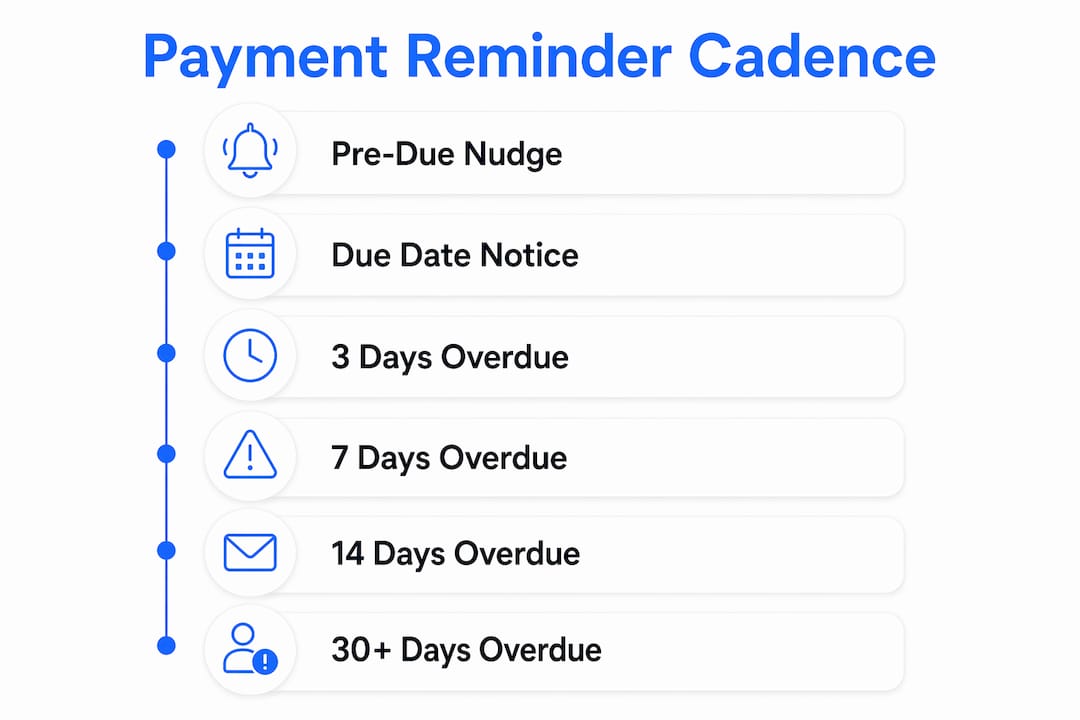
| Timing | Purpose | Tone | Escalation |
|---|---|---|---|
| 3 days before due | Friendly heads-up | Warm, informational | None |
| Day of due date | Last-chance nudge | Polite, clear | None |
| 3 days after due | First overdue notice | Firm, professional | Mention late fee possibility |
| 7 days after due | Second overdue notice | Direct, urgent | State late fee amount |
| 14 days after due | Escalation notice | Serious, formal | Pause service warning |
| 30+ days after due | Final notice | Formal | Collections referral |
This aligns with the cadence: reminders at 3 days before due, day-of, and at 3, 7, 14, and 30+ days overdue.
Recurring-contract accounts (quarterly or annual plans) need a softer touch at the early stages. A missed payment on a recurring plan is a retention risk, not just a collections problem. Use warmer language and offer a payment plan before escalating. One-time job clients can move to a firmer tone sooner.
Which channel should you use, and what should your messages say?
Match the reminder channel to how your technician or office already communicates with that client. If your tech texts the customer to confirm arrival, send the reminder by text. Switching channels can feel like an escalation and put clients on the defensive before you have even asked.

Tone rule: Be polite, confident, and direct. Stripe's payment communications guidance explicitly warns that apologetic language ("sorry to bother you") weakens the request. Own the ask.
Ready-to-use templates
Pre-due SMS (3 days before):
Hi [First Name], your pest control invoice #[INV-001] for $[Amount] is due [Date]. Pay now: [Link]
Day-of email subject: Invoice #[INV-001] due today — pay in one click
Hi [First Name], just a quick reminder that invoice #[INV-001] for $[Amount] is due today. [Pay now →] Questions? Call us at [Phone].
3–7 day overdue SMS:
[First Name], invoice #[INV-001] for $[Amount] is past due. Please pay at [Link] or call [Phone] to make arrangements.
Voicemail script (high-value accounts): Technician field script (on-site billing confirmation): Place a single payment link in every message. Two links create confusion; zero links create friction. One clear link, one clear action.
Pro Tip: Keep the payment link above the fold in every email and within the first two sentences of every SMS. Clients who have to scroll or search rarely complete the payment.
How does AI orchestration personalize your follow-up strategy?
Use an orchestration layer that branches by engagement rather than sending the same flat sequence to every client. A client who clicked your payment link but didn't pay needs a different message than one who never opened the email.
Signals your orchestration layer should track:
- Email opens and link clicks
- SMS replies
- Card-on-file status
- Contract type (recurring vs. one-time)
- Invoice amount
- Prior late-payment history
Practical branching examples:
- Clicked the link but didn't pay: Send a short SMS: "Looks like you started the payment — need help finishing? [Link]"
- Large balance or chronic late account: Trigger a phone-call handoff to your office team after the 7-day mark.
- Repeat delinquent on a recurring plan: Initiate a service-pause workflow with a formal written notice.
Tie your orchestration rules to invoice.status events in your field-service platform so reminders stop the moment a payment clears. Nothing damages a client relationship faster than a collections message arriving after they already paid.
Pro Tip: Require cards on file for all recurring plans and collect upfront deposits for jobs over $500. Prevention is the highest-leverage move — it eliminates most follow-up before it starts.
What US compliance rules apply when you text or call clients?
Get written or digital consent before sending autodialed texts or prerecorded calls. The Telephone Consumer Protection Act (TCPA) requires prior express written consent for marketing and collection messages sent via autodialer to cell phones. Violations carry statutory damages per message.
Key steps to stay compliant:
- Capture consent in your service agreement or digital signup form
- Honor opt-outs within 10 business days (best practice: immediately)
- Log every outbound message with timestamp and channel
- Confirm debt details are accurate before any third-party handoff
- Consult a qualified attorney for edge cases involving prerecorded calls or third-party collectors
This article is general information, not legal advice. Confirm current TCPA and FDCPA requirements with a qualified attorney for your specific situation.
What should your payment link include, and how do you reconcile payments?
Every payment link should pass invoice ID, customer ID, amount, and payment method options (card and ACH) back to your accounting system. One-click payment links increase on-time payments by removing friction from the process.
For failed card payments, use gateway retry windows with customer-notify triggers rather than blind retries. Repeated declines frustrate clients and can trigger fraud flags. After two failed attempts, alert your office team to reach out directly.
Reconcile payment batches daily. Any unmatched transaction should trigger an alert before the next reminder cycle runs, so you never send a collections message to a client who already paid through a different channel.
When should you escalate, and how do you hand off to collections?
Use dollar and age thresholds to make escalation decisions consistent and defensible.
- $100+ and 14+ days overdue: Stop automated-only outreach; add a personal phone call.
- $500+ and 15+ days overdue: Office manager calls directly; offer a payment plan.
- 30 days overdue: Issue a formal final notice with a stated collections deadline.
- 45+ days overdue: Hand off to a collection agency or file in small-claims court.
For recurring accounts, offer a short-term flexible payment arrangement before escalating. Losing a recurring client to a collections dispute costs more than the overdue balance in most cases.
Phone script for escalation calls: Handoff checklist before sending to collections:
- Confirm the debt amount and invoice details are accurate
- Document all prior contact attempts with dates and channels
- Send a final written notice with a clear deadline
- Verify the collection agency is licensed in your state
Which metrics and A/B tests actually improve your recovery rate?
Measure these KPIs first: days-to-payment, recovery rate within 7, 30, and 90 days, email open and link-click rates, link-click-to-pay conversion, and manual-call conversion rate.
| KPI | Target benchmark | What a positive lift looks like |
|---|---|---|
| Days-to-payment | Reduce by 9+ days with automation | Clients paying before the 7-day overdue mark |
| 7-day recovery rate | 60%+ of invoices resolved | Fewer accounts reaching the 14-day escalation |
| Email open rate | — | Subject line A/B test showing clear winner |
| Link-click-to-pay | 30%+ of link clicks convert | Simplified payment page reducing drop-off |
| Manual-call conversion | — | Fewer accounts reaching collections |
A/B tests worth running:
- Subject line: "Invoice #[X] due today" vs. "Quick reminder: your balance is ready"
- First-touch channel: SMS vs. email for clients who haven't established a preference
- Send time: Tuesday–Thursday mornings (8–10 AM) vs. afternoons (1–3 PM)
For mid-sized pest control books of business, run each test for at least 60 days and 100 invoice events per variant before drawing conclusions. Smaller samples produce misleading results.
Key Takeaways
A channel-matched, AI-orchestrated reminder sequence is the single most effective way to reduce days-to-payment without adding staff.
| Point | Details |
|---|---|
| Use a staged cadence | Send reminders at 3 days before due, on the due date, and at 3, 7, 14, and 30+ days overdue. |
| Match the channel | Text clients your tech texts; email clients your office emails to avoid signaling escalation. |
| Branch by engagement | Use AI orchestration to send different messages to link-clickers vs. non-openers. |
| Escalate by threshold | Apply phone handoffs at $100+/14 days; final notice at 30 days; collections at 45+ days. |
| Interval-ai automates this | Interval-ai's AI orchestration handles branching, multichannel delivery, and stop-on-pay automatically. |
What running AI-powered collections actually looks like day-to-day
The biggest operational shift isn't the technology. It's the silence. Before AI orchestration, office staff spent hours each week manually tracking overdue accounts, deciding who to call next, and drafting follow-up emails. After implementation, the system handles those decisions automatically, and staff attention shifts to the escalation calls that genuinely need a human voice.
The metric that shows up fastest is days-to-payment. Automated reminder workflows have been shown to collect outstanding balances 9 days faster than manual chase workflows in field-service environments. That's not a small operational win — it's the difference between making payroll comfortably and scrambling at the end of the month.
Rolling this out without disrupting technicians is straightforward: keep their workflow identical and tie the orchestration to invoice events in the back office. Technicians confirm billing details on-site using the field script above; the system handles everything after that.
Interval-ai recovers overdue pest control payments faster, with less effort
Chasing overdue balances manually costs your team hours every week and still leaves money on the table. Interval-ai is built specifically for businesses that need a smarter path to recovery: AI-driven branching logic that adapts to each client's payment behavior, multichannel delivery across SMS, email, and voice, and automatic stop-on-pay so no client ever gets a reminder after they've settled.

Pest control operators using Interval-ai report recovering substantial balances without adding headcount, with days-to-payment reduced significantly compared to manual workflows. The system reads historical payment data to personalize cadence, so your best recurring clients get a softer touch while chronic late-payers get a faster escalation path.
Ready to put collections on autopilot? See how Interval-ai works and get a live demo for your pest control business.
Useful sources
- Payment reminders: A guide for businesses | Stripe — backs the four required reminder elements, tone guidance, and the apology-trap warning
- Payment Reminders: Complete Guide for Small Business | Payable.at — source for the multi-touch cadence, channel-matching rule, and cards-on-file prevention strategy
- 5 Best Payment Reminder Tools for Pest Control 2026 | US Tech Automations — source for orchestration branching logic, recurring-plan retention risk, and the 9-day faster recovery figure
- How Automated Payment Reminders Improve Cash Flow for Exterminators | ArcSite — supports one-click payment link design and reconciliation rationale
- How Pest Control Companies Get Paid Faster | Briostack — practical guidance on invoicing immediately after service and automating recurring billing
- Pest Control Overdue Notice Template | FieldRoutes — template language and timing guidance for overdue notice cycles
Consult these sources directly before changing any policy that touches client consent, collections escalation, or TCPA compliance.
FAQ
What must every pest control payment reminder include?
Every reminder needs the amount due, invoice number, due date (or days overdue), and a direct payment link. Stripe's guidance links these four elements to faster payment outcomes when combined with automation.
How often should you send payment reminders to pest control clients?
Send reminders at 3 days before the due date, on the due date, and at 3, 7, 14, and 30+ days overdue. Recurring-contract clients warrant softer language and a payment-plan offer before escalation.
When should a pest control business hand an account to collections?
A practical threshold is 45+ days overdue after a formal final notice at 30 days. Before any third-party handoff, verify debt accuracy and document all prior contact attempts to stay compliant with FDCPA requirements.
Can Interval-ai stop reminders automatically when a client pays?
Yes. Interval-ai ties its orchestration to invoice-status events, so reminders stop immediately upon a confirmed payment, preventing any post-payment messages that damage client relationships.
What's the fastest A/B test to run on payment reminders?
Test your email subject line first: "Invoice #[X] due today" vs. a benefit-framed variant. Run the test for at least 60 days and 100 invoice events per variant to get results you can act on confidently.
