
Set Up Automated Payment Reminders for Better Cash Flow
Published: July 15, 2026 · 11–12 min read
TL;DR:
- Automation of payment reminders reduces late payments by up to 60% and shortens collection times significantly. Proper setup requires accurate data, integrated systems, compliance review, and a well-defined multi-channel workflow. Ongoing optimization and human review of high-value accounts enhance system effectiveness and customer relationships.
Automated payment reminders are scheduled, system-triggered notifications that alert customers about upcoming or overdue invoices without any manual effort from your team. When you set up automated payment reminders correctly, you can reduce late payments by 40–60% and improve cash flow by 25–35%. That means the average payment turnaround drops from 45 days to under 15 days. For small business owners managing invoices across dozens of clients, that shift is the difference between a healthy cash position and a stressful month-end scramble. The industry term for this process is accounts receivable (AR) automation, and it covers everything from dunning sequences to multi-channel outreach.
What do you need to set up automated payment reminders?
Before you configure a single reminder, you need the right foundation in place. Skipping this step is the most common reason reminder systems fail within the first month.

Software and integrations
Your accounting or AR platform must support automation natively or through an integration. QuickBooks Online, for example, includes built-in invoice reminder scheduling. Dedicated AR platforms go further, connecting with your CRM, payment gateway, and customer database to trigger reminders based on real-time invoice status. Without that connection, reminders fire on a calendar schedule rather than on actual payment behavior.
Customer data quality
Your system is only as good as the contact data inside it. Every customer record needs a verified email address, a mobile number for SMS, and a clear billing contact. Outdated or missing data means reminders go nowhere. Audit your customer list before you flip the switch.
Legal and compliance requirements
Late fees and reminder policies must appear in your signed customer agreements before you automate them. A 1.5% late fee applied after 15 days is a common standard, but it is only enforceable if the customer agreed to it upfront. Review your contracts and your local regulations before configuring any penalty rules. For a deeper look at what compliance requires, the 2026 payments compliance guide covers the key legal considerations in detail.
Pre-setup checklist:
- Confirm your AR or accounting platform supports automated reminders
- Verify all customer records have accurate email and phone data
- Review customer contracts for late fee and communication consent clauses
- Connect your invoicing system to your payment gateway for real-time status updates
- Assign a team member to monitor the system during the first 30 days
Pro Tip: Run a data cleanup on your customer list before activating any reminder workflow. Even a 10% error rate in contact data will generate complaints and missed follow-ups from day one.
How to configure your payment reminder workflow step by step
A well-built reminder workflow follows a defined schedule tied to invoice milestones, not arbitrary calendar dates. The goal is consistent, professional contact at the right moment.
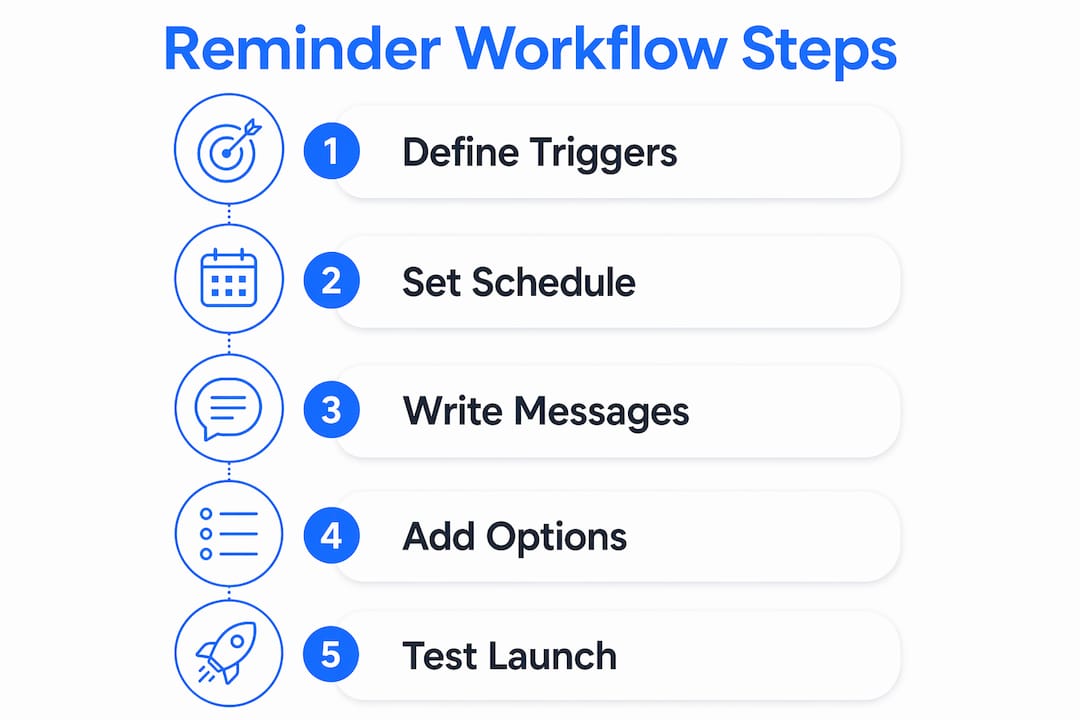
1. Define your trigger events
Set reminders to fire based on invoice status changes: invoice sent, due date approaching, due date reached, and days past due. Avoid time-based triggers that ignore whether a payment has already been received.
2. Set your reminder schedule
The standard reminder cadence sends notifications at three days before the due date, on the due date, and at 3, 7, and 14 days overdue. This schedule balances persistence with professionalism. Adjust the intervals based on your average payment cycle and customer type.
3. Write your message templates
Each reminder needs a distinct tone. Early reminders are friendly and informational. Reminders sent after the due date are firm but respectful. Messages sent at 14 or more days overdue are direct and include clear next steps. Every message should include the invoice number, amount due, due date, and a one-click payment link.
4. Add self-service options
Include a payment link and a dispute option in every reminder. Customers who can pay or flag an issue immediately are far more likely to act. Removing friction at this step is one of the highest-impact changes you can make.
5. Test before you launch
Pilot your reminder sequence on a small segment of customers before rolling it out fully. Monitor open rates, payment rates, and complaint volume. Adjust timing and tone based on what the data shows.
Pro Tip: Write your 14-day overdue message first. If you can make that one feel professional and firm without sounding hostile, the earlier messages will be easy.
Here is a sample reminder schedule with tone guidance:
| Trigger | Timing | Tone | Channel |
|---|---|---|---|
| Pre-due reminder | 3 days before due | Friendly, informational | |
| Due date reminder | Day 0 | Neutral, clear | Email + SMS |
| First overdue | 3 days past due | Polite, direct | |
| Second overdue | 7 days past due | Firm, urgent | Email + SMS |
| Third overdue | 14 days past due | Serious, escalating | Email + SMS + call |
How do automated payment reminders work across multiple channels?
Relying on email alone is the single biggest mistake businesses make with payment reminders. SMS significantly increases on-time payment rates because text messages are read within minutes, while emails can sit unopened for days. A multi-channel approach closes that gap.
Email works best for detailed communication. It carries the full invoice, payment instructions, and any attachments. Customers can forward it to their accounts payable team or save it for reference. Email is the right channel for the first reminder and for any message that requires documentation.
SMS works best for immediacy. A short, direct text with a payment link drives faster action than any email. Use SMS on the due date and at the 7-day overdue mark. Keep messages under 160 characters and always include the payment amount and a link.
Voice calls are reserved for high-value accounts or complex disputes. Automated voice reminders work for straightforward overdue notices. Live calls from a billing manager are appropriate when the invoice is large, the relationship is important, or a dispute needs resolution.
Managing consent and opt-outs
Every customer must consent to receive SMS reminders before you send them. Include opt-out instructions in every text message. Track consent status in your CRM and suppress reminders for customers who have opted out. Non-compliance with SMS regulations carries real legal risk.
Here is how the three channels compare for payment reminder use:
| Channel | Best use case | Response speed | Compliance requirement |
|---|---|---|---|
| Detailed invoices, documentation | Hours to days | CAN-SPAM compliance | |
| SMS | Due date alerts, overdue nudges | Minutes | TCPA consent required |
| Voice | High-value accounts, disputes | Immediate | Do-not-call list checks |
How to optimize your automated reminders for maximum results
A configured reminder system is a starting point, not a finished product. The businesses that recover the most overdue payments are the ones that tune their workflows over time.
Build a dunning sequence with escalating tone
A phased dunning sequence that moves from friendly to firm, combined with self-service payment links, increases payment rates while protecting customer relationships. Start warm. Get firmer at 7 days. Be direct at 14 days. Escalate to a different channel or a human contact at 30 days.
Use smart retry logic for failed payments
When a payment attempt fails, do not retry immediately. Smart retry logic waits strategically, timing retries to align with customer payday cycles. This approach recovers a meaningful share of failed payments without requiring any customer action.
Pause reminders during disputes
The moment a customer opens a dispute, your automated reminders must stop. Continuing to send reminders during a dispute damages trust and can escalate a manageable situation into a lost customer. Route disputed invoices to a billing manager immediately and resume automation only after resolution.
Key optimization practices:
- Review open rates and payment rates by reminder step every month
- A/B test subject lines on your due-date email to find what drives opens
- Segment customers by payment history and adjust reminder frequency accordingly
- Set a maximum reminder count before escalating to a human or a collections process
- Track which channel drives the most payments for each customer segment
Pro Tip: Customers who have paid late before respond better to SMS than email at the overdue stage. Tag those accounts in your CRM and route them to a text-first sequence automatically.
What are the most common problems with automated payment reminders?
Even well-configured systems run into problems. Knowing what to watch for saves you from damaging customer relationships with avoidable errors.
Reminders sent after payment
This is the most common complaint customers raise. It happens when your reminder system and your payment gateway are not syncing in real time. Integration reliability is critical. A reminder sent after a customer has already paid reads as incompetent and erodes trust fast. Confirm that your payment status updates trigger an immediate suppression of pending reminders.
Low response rates
If customers are not responding to reminders, the problem is usually the message or the channel. A generic "your invoice is overdue" email with no payment link will be ignored. Rewrite your templates to include the specific invoice amount, a direct payment link, and a clear deadline.
Message fatigue
Sending too many reminders too close together trains customers to ignore them. Silence reads as permission to wait. Space your reminders deliberately and cap the total number before escalating to a different approach.
"The goal of a payment reminder is not to pressure a customer. It is to remove every possible obstacle between them and the payment button. When reminders are clear, specific, and easy to act on, most customers pay without any friction at all."
Integration errors and data sync
Check your system logs weekly during the first 90 days. Errors in data sync between your invoicing platform and your reminder tool are common and easy to miss until a customer calls to complain. Build a simple audit process: pull a weekly report of reminders sent versus payments received and look for mismatches.
Key Takeaways
Automated payment reminders, built on a structured dunning sequence with multi-channel delivery and real-time payment sync, reduce late payments by 40–60% and cut average collection time from 45 days to under 15 days.
| Point | Details |
|---|---|
| Start with clean data | Audit customer contact records before activating any reminder workflow. |
| Use a standard cadence | Send reminders at 3 days before due, on the due date, and at 3, 7, and 14 days overdue. |
| Go multi-channel | Combine email and SMS for higher response rates; reserve voice for high-value accounts. |
| Pause during disputes | Stop all automated reminders the moment a customer opens a dispute. |
| Test before full rollout | Pilot your sequence on a small segment and refine timing and tone before scaling. |
Why I think most businesses set this up backwards
Most small business owners I talk to build their reminder system starting with the first message and working forward. That is the wrong direction. The message that matters most is the one at 14 days overdue, because that is where relationships either hold or break. If you write that message well, the earlier ones almost write themselves.
The other thing I have seen consistently: businesses treat automation as a replacement for relationship management. It is not. Automation handles the routine follow-up so your team does not have to. But your best customers, the ones with high invoice values and long histories, still deserve a personal call when something goes sideways. The system should flag those accounts for human review, not just keep firing reminders into the void.
The businesses that get the most out of payment automation are the ones that treat it as a discipline, not a setup task. They review their metrics monthly. They rewrite templates that are not working. They adjust their cadence when customer behavior changes. Automation as a finance assistant frees your team to focus on those complex cases while the system handles everything else. That division of labor is where the real value lives.
One more thing: do not let perceived complexity stop you from starting. Modern tools are straightforward to integrate and the operational cost savings show up quickly. The businesses that delay are the ones still chasing invoices manually six months from now.
— Tyler
How Interval-ai helps you automate collections without the complexity
Getting a payment reminder system running is one thing. Getting it to work consistently across channels, adapt to customer behavior, and protect your brand relationships is another challenge entirely.

Interval-ai uses AI to tailor outreach strategies based on your customers' historical payment data, so every reminder goes out at the right time, through the right channel, with the right tone. Clients report reducing days to payment by over 30 days and recovering significant overdue balances without adding staff. The system manages multi-channel communications automatically and keeps your brand voice consistent throughout the collections process. If you are ready to move beyond manual follow-up, visit Interval-ai to see how the platform handles payment automation for small businesses.
FAQ
What is an automated payment reminder?
An automated payment reminder is a system-triggered notification sent to customers before or after an invoice due date, without manual effort from your team. It is the core tool in accounts receivable (AR) automation.
How do automated payment reminders work?
The system monitors invoice status in your accounting or AR platform and fires pre-scheduled messages via email, SMS, or voice when a trigger event occurs, such as a due date approaching or a payment going overdue.
What is an automated SMS payment reminder?
An automated SMS payment reminder is a short text message sent to a customer's mobile phone when an invoice is due or overdue. SMS reminders drive faster payment responses than email because most texts are read within minutes of delivery.
How often should I send payment reminders?
The standard schedule sends reminders at 3 days before the due date, on the due date, and at 3, 7, and 14 days overdue. Adjust frequency based on your customer relationships and average invoice size.
What happens if a customer disputes an invoice?
Your system should automatically pause all reminders the moment a dispute is opened and route the case to a billing manager. Sending automated reminders during an active dispute damages trust and can escalate the situation unnecessarily.
