
2–3 Texts That Work: SMS Payment Reminder Templates for U.S. AR
Published: September 4, 2026 · 14–15 min read
Use a short, staged SMS sequence that names the invoice, includes a tappable payment link, and honors opt-outs. That combination reliably improves collections when you already have consent to text the customer. The formula is simple: identify your business and the invoice, state the amount, give a one-tap way to pay, and follow TCPA consent and quiet-hours rules on every send.
TL;DR:
- Sending two to three well-timed SMS reminders, including pre-due, due-day, and 7 to 10 days overdue messages, can boost on-time payments by about 7 to 9 percent.
- Messages should remain neutral, helpful, and include essential elements like invoice number, amount, due date, a payment link, and opt-out instructions within 160 characters.
- Proper TCPA compliance requires capturing prior explicit consent, honoring STOP requests immediately, and sending messages only during reasonable hours, typically 8 a.m. to 9 p.m. in the recipient’s time zone.
- Using custom short links with embedded invoice IDs improves click-through rates and reduces errors, and automation ensures consistent follow-up that manual efforts often miss.
- Handling responses should involve routing keywords like PAY, HELP, and STOP to appropriate systems, with all interactions documented to protect against disputes or compliance issues.
SMS Payment Reminder Templates by Stage
Every stage of an invoice's life calls for a different tone. A pre-due nudge should feel like a courtesy. A day-30 message needs urgency without sounding like a threat. Below are templates you can copy, adjust to your brand voice, and drop into your SMS system today.
Pre-due (3 days before) "Hi [Name], this is [Company]. Invoice #[123] for $[amount] is due [date]. Pay now: [link]. Reply STOP to opt out."
Due-day "[Company] here — Invoice #[123] ($[amount]) is due today. Pay in one tap: [link]. Reply STOP to unsubscribe."
+3 days past due "[Name], Invoice #[123] ($[amount]) is now 3 days past due. Avoid late fees, pay here: [link]. Questions? Reply HELP."
+7 days past due "[Company]: Invoice #[123] ($[amount]) is 7 days overdue. Please pay today: [link] or reply PAY to arrange a plan."
Pre-escalation (14+ days) "[Name], Invoice #[123] ($[amount]) remains unpaid after 14 days. Pay now to avoid further action: [link]. Reply HELP for assistance."
Promise-to-pay confirmation "Thanks [Name]! We've noted your promise to pay Invoice #[123] by [date]. Link if you'd like to pay early: [link]."
Payment confirmation "[Company] confirms your payment of $[amount] for Invoice #[123]. Thank you! No action needed."
Failed payment retry "[Name], your payment for Invoice #[123] didn't go through. Try again here: [link]. Reply HELP if you need support."
Keep every message under 160 characters where you can, since longer texts with links or special characters split into multiple billable segments. Use a branded short link with the invoice number baked into the slug (something like pay.yourco.com/inv1234) instead of a raw, generic shortener. It saves characters, preserves trust, and lets you track exactly which invoice a click belongs to. Test every link before a campaign goes live. A broken payment link on a due-date text is the fastest way to turn a five-minute collection into a phone call.
How Often Should You Send Payment Reminders by Text?
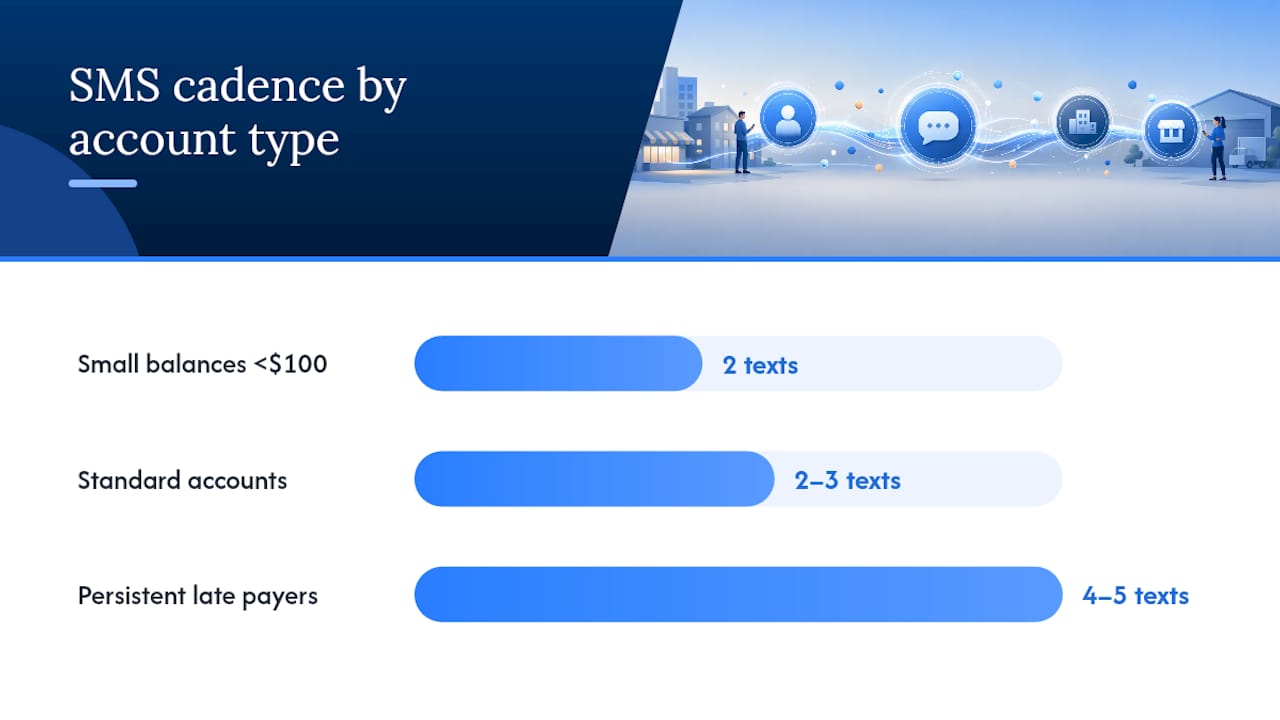
Most accounts need two to three texts across the invoice lifecycle, not a daily barrage. A pre-due nudge, a due-day reminder, and one follow-up at 7 to 10 days past due cover the majority of customers who simply forgot or meant to pay later. Persistent late payers can move to a more aggressive ladder, four or five touches stretched over 30 days, but that ladder should be the exception, not your default setting.
Timing inside the day matters almost as much as the count. Mid-morning on Tuesday through Thursday, roughly 9 to 11 a.m., tends to produce the best response rates, since people are settled into their workday but haven't buried the text under other notifications yet. Avoid Monday mornings, when inboxes are already flooded, and avoid Friday afternoons, when payment decisions get pushed to the following week.
Segment your cadence by more than just days overdue:
- Small balances under $100 often respond to a lighter touch, two texts, no phone call.
- Larger commercial invoices should lean on email first, then SMS as a follow-up nudge, reserving text for reinforcement rather than the primary contact.
- Any account with a flagged dispute pauses the SMS ladder entirely until a human resolves it.
Businesses that automate this sequencing report on-time payment improvements of roughly 7 to 9 percent compared with manual follow-up alone. That gap comes almost entirely from consistency: an automated system never forgets to send the third text the way a busy office manager sometimes does.
What Are the TCPA Rules for Payment Reminder Texts?
Texting customers about money they owe puts you squarely under the Telephone Consumer Protection Act, and the rules aren't optional extras. Get this wrong and a single complaint can turn into a legal headache that costs far more than any invoice you were trying to collect.
Three things matter most:
- Capture prior express consent before the first text goes out. A checkbox at signup, a line in your invoice terms ("By providing your mobile number, you agree to receive payment reminders by SMS"), or a documented verbal agreement all work, as long as you log how and when consent was given.
- Honor STOP immediately. The moment a customer replies STOP, unsubscribe, or a close variant, your system needs to suspend all future texts to that number without delay. There's no grace period here.
- Stick to reasonable sending hours. TCPA guidance points to prior express consent, immediate opt-out handling, and reasonable sending windows as the baseline for any billing text, and most businesses stay inside 8 a.m. to 9 p.m. in the recipient's local time zone.
Keep records that go beyond the bare minimum: the exact consent language shown to the customer, the date it was given, every message sent, and every reply received, including STOP requests and promises to pay. Good recordkeeping isn't just a compliance formality. It's what protects you if a customer ever disputes that they agreed to be texted in the first place.
What Should Every Payment Reminder Text Include?
A payment reminder text earns its read in about two seconds, so every field has to justify its place. Six elements belong in nearly every message: your company name, the invoice number, the amount owed, the due date or days overdue, a payment link, and opt-out instructions.
Tone matters just as much as content. Keep the language neutral and helpful, never threatening. "Your invoice is due" works. "We need to discuss your account immediately" does not, even at day 30. Practitioners consistently point to neutral, solution-focused phrasing as the difference between a text that gets paid and one that gets ignored or reported as spam.
On links: use a custom short link with the invoice ID embedded, test it before every campaign, and track click-through so you know whether customers are seeing the message but not acting on it, or not opening it at all. Never put full card numbers, bank details, or other sensitive billing information directly in the text body. The link should lead to a secure payment page, not carry the sensitive data itself.
Pro Tip: Route incoming replies by keyword. A simple rule set, "PAY" opens a payment portal link, "HELP" alerts a human agent, "STOP" triggers immediate unsubscribe, catches most replies automatically and keeps your team focused on the handful that actually need a person.
How Does SMS Fit With Email and Phone Collections?
Each channel has a job. Email carries the full documentation, itemized invoice, payment history, and terms. SMS is the fast nudge that gets someone to actually open that email or tap the pay link. Phone calls handle the messy stuff: real disputes, payment plan negotiations, anything that needs back and forth.
A sequence that balances documentation and speed usually looks like this:
- Send the detailed invoice by email on the due date.
- Follow with a short SMS nudge two to three days later if unpaid, since SMS open rates run close to 99 percent and will surface an invoice that got buried in an inbox.
- Escalate to a phone call only after a dispute is flagged, a promise-to-pay is broken, or the customer opts out of texts entirely.
Any reply that isn't a simple confirmation should route straight to a human, not sit in an automated queue.
How to Set Up SMS Payment Reminders: A Launch Checklist
Getting a program running takes less setup than most finance teams expect. Add consent language to your invoice terms and intake forms first, choose a dedicated sender number, and build a small template library for each stage before you touch automation. Run a pilot with a limited customer cohort, then watch delivery rate, click-to-pay rate, payments per 100 sends, and the change in your days sales outstanding.
- Add consent checkboxes to invoices and account setup forms.
- Build 8 to 12 stage templates before launch, not after.
- Test every payment link on a real device before sending.
- Route PAY, HELP, and STOP keywords to a shared inbox for fast human response.
| Metric | What it tells you |
|---|---|
| Delivery rate | Whether numbers are valid and carriers aren't blocking sends |
| Click-to-pay rate | Whether the message and link are compelling enough to act on |
| Payments per 100 sends | Overall conversion of the SMS channel |
| Change in DSO | Whether the program is actually shortening collection time |
Handling Customer Responses, Disputes, and Support Escalation
Not every reply is a payment confirmation. Customers text back questions, complaints, and sometimes outright disputes, and your system needs a clear path for each.
Set up keyword routing so the easy cases resolve themselves. A reply of "PAY" can trigger an automated link resend. "HELP" should route to a shared inbox where a team member picks it up within the same business day, not the same week. Anything that reads as a dispute, "this isn't my invoice," "I already paid this," "this amount is wrong," needs to pull the account out of the automated SMS ladder immediately. Continuing to send payment nudges to a customer who is actively disputing a charge is both a bad customer experience and a compliance risk.
Build a simple escalation tier: automated keyword responses handle routine replies, a support agent handles account questions and payment plan requests, and a manager or collections specialist handles anything involving a formal dispute or a customer threatening to switch providers over the issue. Document every escalation the same way you document consent. If a customer later claims they told you about a problem and got ignored, your reply log is the evidence that says otherwise.
The businesses that get the most out of SMS collections treat replies as a two-way conversation, not a one-way broadcast. A text that only pushes information out and never makes it easy to respond back leaves money on the table and customers frustrated.
What Does SMS Payment Reminder Software Cost?
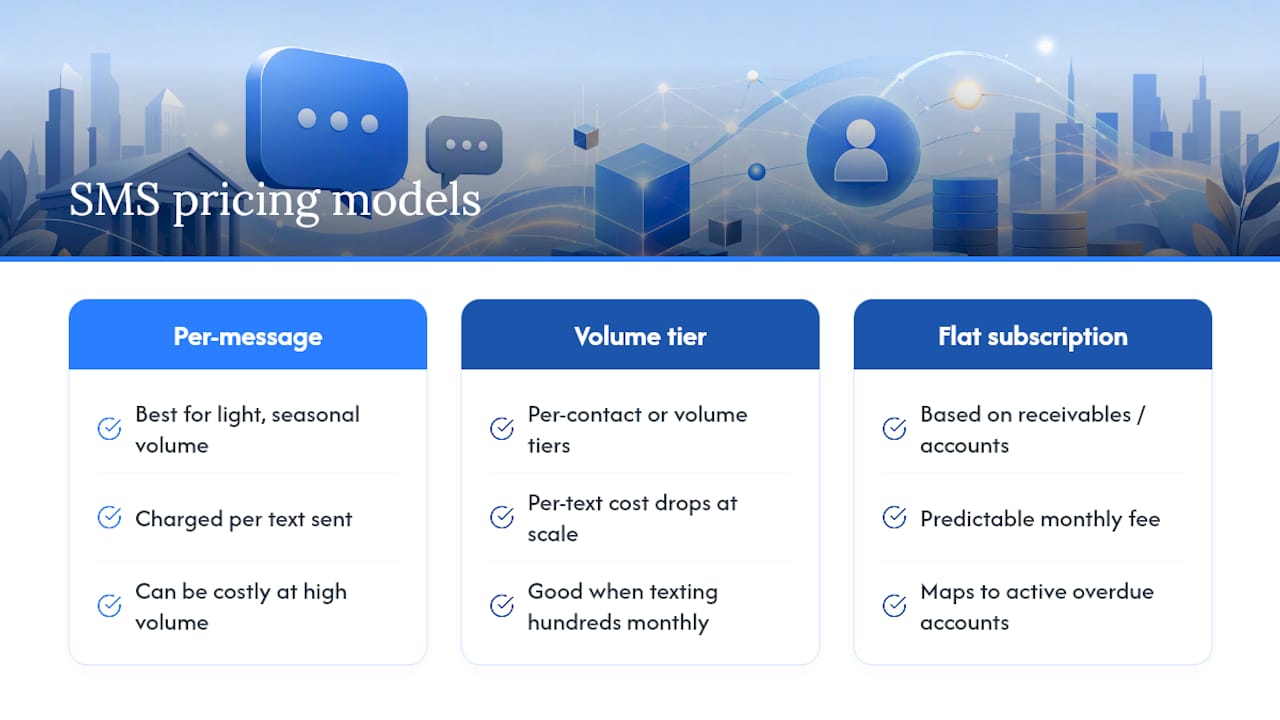
Pricing for SMS collections tools generally follows one of three models: per-message, per-contact or volume tier, or a flat subscription based on the size of your receivables and how many overdue accounts you manage. Per-message pricing suits businesses with light, seasonal collection volume. Volume tiers or flat subscriptions tend to make more financial sense once you're texting hundreds of overdue accounts a month, since the per-text cost drops sharply at scale.
Beyond the base software fee, factor in three real costs. First, carrier fees and message segment charges, since a text that runs past 160 characters or includes special characters can split into two billable segments instead of one. Second, the time cost of building and maintaining templates, testing links, and managing keyword routing if you're running this manually rather than through automation. Third, the opportunity cost of NOT automating: staff hours spent manually sending reminders and chasing replies add up fast, and that's payroll spent on work a system can handle without supervision.
When comparing SMS reminder tools, weigh the pricing model against your actual account volume rather than the sticker price alone. A tool that looks expensive per month can be cheaper per collected dollar than a "free" manual process that ties up an employee for ten hours a week. Ask any vendor directly how their pricing scales with your accounts receivable and overdue volume. Some tools tailored specifically to collections, rather than generic SMS marketing platforms, price based on how many overdue accounts you're actively working, which usually maps more closely to the actual value you're getting than a flat per-message rate does.
Protecting Customer Data in Your SMS Collections Program
Compliance rules like TCPA set the legal floor, but protecting customer payment data takes more than checking those boxes. The businesses that run into trouble usually aren't the ones who forgot to log consent. They're the ones who treated a payment reminder text like an informal, low-stakes channel and got careless with what actually went into the message.
Never put full account numbers, card details, or specific balance breakdowns tied to sensitive services directly in the SMS body. A text is not an encrypted channel the way a payment portal is, and it can sit visible on a lock screen or a shared family phone. The message should point to a secure link, not carry the sensitive data itself.
Limit who inside your business can access the full SMS log and consent records. Treat that data the way you'd treat a customer's payment history, restricted to the people who actually need it for collections, support, or compliance audits, not open to the whole office. If you're using a third-party platform to send texts, confirm how long they retain message content and whether that retention period matches your own recordkeeping needs, since some platforms purge data faster than you'd want for an audit trail.
Finally, review your opt-out list regularly and make sure suppressions carry over cleanly if you ever switch platforms or CRM systems. A customer who opted out six months ago showing up in a new campaign because a migration dropped their preference isn't just a compliance risk. It's the fastest way to turn a former customer into an angry one.
Why a Staged, Brand-Safe SMS Program Works
Collections work is a balancing act, and most advice ignores half the equation. Automation buys back payroll hours and shortens the time to payment, but only if the messages sound like your business and not like a collections agency. The businesses getting real results treat consent and tone as core infrastructure, not compliance afterthoughts bolted on at the end.
I'd argue the biggest mistake companies make isn't sending too few reminders. It's sending the same generic, slightly threatening text at every stage instead of matching tone to timing. Respect the customer relationship, and the payments follow.
— Tyler
A Practical Next Step: Automating Collections Without Losing Your Voice
If you've read this far and thought "this is exactly what I need, minus the hours it takes to build and manage," Interval-ai is built for that gap. It automates the staged outreach described above, pre-due nudges, due-day texts, follow-ups, and escalation, while integrating with your existing accounting and CRM systems so the data stays in sync automatically. The tone and cadence adapt to your brand rather than sounding like a generic collections script, and clients report saving thousands in payroll costs by not staffing manual follow-up.
Some businesses report reductions in days to payment when switching from manual outreach to an automated, data-driven sequence. If your team is still tracking overdue invoices in a spreadsheet and sending reminders one by one, book a demo with Interval-ai to see how the automation handles the sequencing, consent tracking, and dispute flagging covered in this guide.
Sources
For deeper detail on the topics covered here, see Sinch's guide to SMS billing, SmartSMSSolutions' payment reminder templates for TCPA basics, and TextUs' texting guide for reply routing and channel pairing. Businesses coordinating SMS with transactional email may also find Moxy Web's breakdown of ecommerce transactional email useful for aligning the two channels.
- SMS for Billing & Payments: Get Paid Faster with Text Reminders | Sinch
- Reduce Chasing Past-Due Bills with SMS Payment Reminders | Notifyre
- Payment reminder SMS templates (Short, Friendly, and Firm) | SmartSMSSolutions
FAQ
How Do You Politely Remind Someone for Payment by Text?
Keep the tone neutral and helpful: state the invoice number and amount, include a payment link, and avoid threatening language. A message like "Hi [Name], Invoice #123 ($[amount]) is due tomorrow. Pay here: [link]" gets the job done without sounding aggressive.
Can You Give an Example of a Text Payment Reminder?
"Hi [Name], this is [Company]. Invoice #123 for $[amount] is due [date]. Pay now: [link]. Reply STOP to opt out." That single message covers sender identification, invoice detail, amount, a payment link, and the required opt-out.
What Is an SMS Reminder?
An SMS reminder is a short text message, usually under 160 characters, sent to prompt a specific action, like paying an invoice, before or after a due date. In collections, it typically includes the amount owed, a payment link, and opt-out instructions.
How Do You Politely Send a Payment Reminder?
Send it during business hours, mid-morning Tuesday through Thursday tends to perform best, use a neutral tone, and always give the customer a clear, one-tap way to pay. Tools like Interval-ai automate this staged sequencing so the tone stays consistent across every send.
