
The Role of APIs in Business Automation for SMEs

Published: May 23, 2026 · 11–12 min read
TL;DR:
- Most automation should focus on integrating back-end systems through APIs to enhance speed, reliability, and maintainability.
- Relying solely on UI automation is fragile and increasingly costly due to frequent interface updates and high maintenance needs.
Most business leaders think automation means robots clicking through screens. That mental model is costing you time, money, and reliability. The real role of APIs in business automation is far more foundational. APIs are the direct connections between your software systems, and when you automate through them instead of through user interfaces, you get workflows that are faster, more consistent, and far less likely to break. This guide breaks down how API automation works, what it delivers in real business terms, and how you can start applying it at your company.
Key Takeaways
| Point | Details |
|---|---|
| APIs outperform UI automation | API automation communicates directly with back-end systems, making it faster and more reliable than screen-based tools. |
| Real cost savings are documented | Companies have saved up to $40,000 annually by replacing UI-based workflows with API-driven automation. |
| Retry logic is a business requirement | Idempotency keys and retry strategies protect your data integrity and prevent costly duplicate transactions. |
| Hybrid workflows cover the gaps | Combining API and UI automation gives you the best coverage, especially when legacy systems lack API access. |
| Start small, prove ROI fast | API monitoring and provisioning automation are low-risk entry points that build leadership confidence quickly. |
The role of APIs in business automation, explained
Before you can evaluate API automation for your business, you need a clear picture of what an API actually does. An API, or application programming interface, is a set of rules that lets two software systems talk to each other. Think of it as a structured contract: System A sends a specific request to a defined endpoint, and System B responds with data or takes an action. No human clicks required.
API automation takes that concept further by scripting the logic and timing of those calls so that entire workflows run end-to-end without manual intervention. Your CRM updates a customer record, your billing system generates an invoice, and your fulfillment platform ships the order. All triggered by a single event, all connected through APIs.
This is fundamentally different from robotic process automation, or RPA. RPA works by mimicking human actions on a screen. It finds a button, clicks it, reads a field, and types into another. It is useful when no API exists, but it is fragile. Any time a vendor updates their interface, your automation breaks. API automation is faster and more reliable because it bypasses the interface entirely and communicates directly with the back-end system.
Here are the most common scenarios where API automation adds immediate value for SMEs:
- Order and fulfillment workflows: Connecting your e-commerce platform to your inventory and shipping systems without manual data entry.
- Employee provisioning: Automatically assigning permissions and setting up accounts when a new hire is added to your HR system. Microsoft's Dynamics 365 Business Central uses API calls to handle exactly this kind of company setup automation.
- Financial reconciliation: Pulling transaction data from payment processors and matching it against your accounting records on a schedule.
- Customer communications: Triggering personalized follow-up messages based on behavior data from your CRM.
Each of these scenarios replaces a repeatable human task with a consistent, automated process. The result is fewer errors, faster execution, and staff time redirected to work that actually requires human judgment.
Real business benefits and what the numbers say
The business case for API automation is not theoretical. Companies that have made the shift from UI-based workflows to API-driven processes report concrete, measurable outcomes.

One of the most compelling examples involves SuccessFactors vacation clearance processing. A company was relying on UI automation to manage this workflow, and every time the interface changed, the automation failed. After transitioning to API-first orchestration, the team eliminated those failures entirely and achieved $40,000 in annual savings from reduced licensing and infrastructure costs. That is not a marginal improvement. That is a full-time salary recovered.
Monitoring is another area where the ROI shows up fast. One SaaS company implemented automated API monitoring and within 90 days had saved $47,000 in direct costs, reduced incidents by 89%, and cut customer-reported issues by 87%. The monitoring workflows caught anomalies before they became outages.
"Funding API automation initiatives with measurable ROI examples like API monitoring and reliability tooling builds leadership confidence before larger deployments." — US Tech Automations
Beyond the headline numbers, here is what consistent API automation delivers day to day:
- Reduced manual errors: Automated API calls follow the same logic every time. Human data entry does not.
- Faster cycle times: API calls execute in milliseconds. A human completing the same task might take minutes or hours.
- Predictable scaling: Adding volume to an API-automated workflow costs almost nothing compared to adding headcount.
- Auditability: Every API call can be logged, timestamped, and reviewed. Your compliance team will appreciate this.
The importance of APIs in automation becomes clearest when you compare the maintenance burden. UI automation requires constant upkeep every time a vendor updates their product. API contracts are far more stable. Vendors version their APIs and give you advance notice of changes. That stability translates directly into lower operational overhead for your team.
Best practices for reliable API automation
Getting API automation right requires more than connecting two systems and hoping for the best. Here is a practical framework for building workflows that hold up under real business conditions.
1. Design for safe retries with idempotency keys
Network timeouts happen. A request might time out before you receive confirmation, and your system retries the call. Without the right design, you could create duplicate records, charge a customer twice, or provision the same user account multiple times. Idempotency keys prevent this by tagging each request with a unique identifier. If the same request is submitted twice, the API recognizes it and returns the original result instead of processing it again. Treat this as a business safety requirement, not a technical detail.
2. Handle rate limits with exponential backoff and jitter
Most APIs limit how many calls you can make per minute or per day. When you hit that limit, a naive retry strategy sends all your queued requests at once the moment the window resets. This creates what engineers call a "thundering herd." Exponential backoff with jitter staggers your retries by adding randomized delays, spreading the load and keeping you within limits without losing data.
3. Manage asynchronous workflows carefully
Not every API operation completes instantly. Provisioning a new company in Business Central, for example, triggers a background job. Your automation needs to poll for job status and handle timeouts gracefully rather than assuming the task is done. Status polling and timeout management are standard patterns for long-running processes, and skipping them leads to silent failures that are hard to diagnose.
4. Build hybrid workflows for legacy system coverage
Not every system you use will have a well-documented API. For those gaps, hybrid API and UI automation gives you the best of both approaches. Use API automation wherever it is available for speed and reliability, and fall back to UI automation for legacy systems or edge cases. Modern intelligent workflow tools can orchestrate these handoffs automatically.
5. Set up operational monitoring and alerting first
Before you automate a complex workflow, automate your visibility into it. Monitoring API usage, error rates, and latency gives you early warning when something goes wrong. It is also one of the fastest ways to demonstrate ROI to leadership, as the $47,000 savings case study above shows.
Pro Tip: Start your API automation program with a monitoring workflow rather than a transactional one. You will build confidence in the approach, catch problems early, and have a concrete ROI story to share before you tackle more complex integrations.
Here is a quick comparison to help you decide which automation approach fits a given situation:
| Scenario | Best approach | Why |
|---|---|---|
| Modern SaaS with documented API | API automation | Stable, fast, low maintenance |
| Legacy desktop application | UI automation | No API available |
| Mixed environment | Hybrid workflow | Covers all cases |
| High-volume transactional process | API automation with rate limit handling | Scales without added cost |
| Compliance-sensitive workflow | API automation with full logging | Auditability built in |
How SMEs can get started with API automation
You do not need a large IT department to begin. Most SMEs can make meaningful progress with the right priorities and a phased approach.
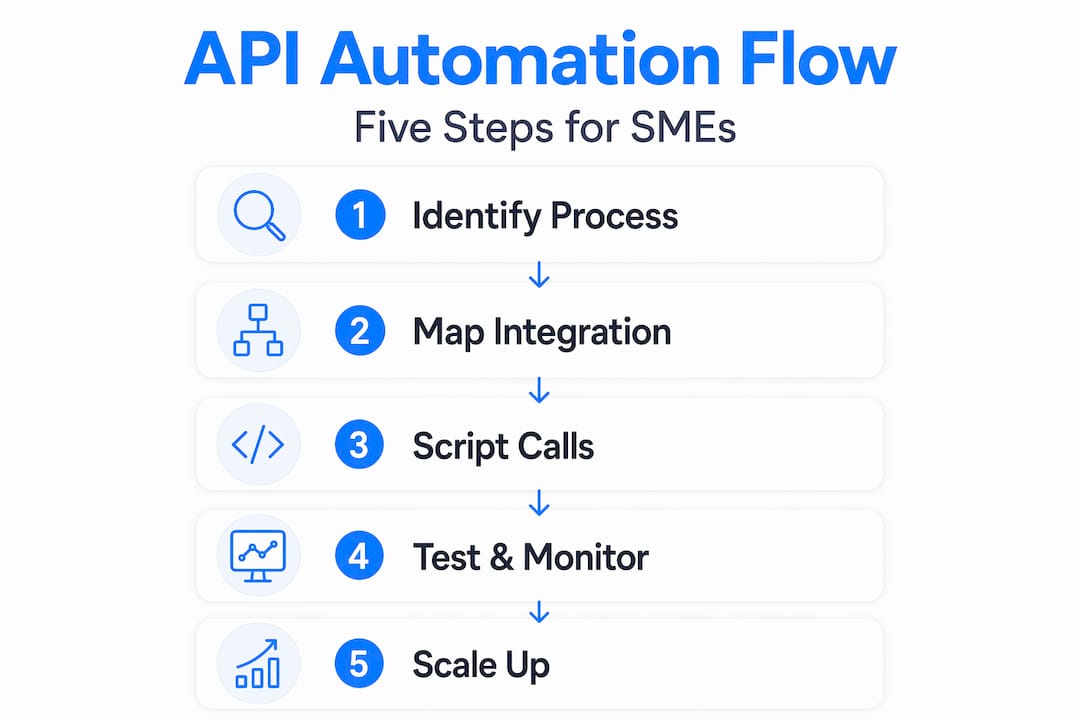
Start by identifying processes that are repeatable and rule-based. If a task follows the same steps every time and involves data moving between two or more software systems, it is a strong candidate for API automation. Common starting points include invoice generation, customer onboarding steps, payment status updates, and report distribution.
Next, evaluate whether your existing tools have APIs available. Most modern SaaS platforms do. Check the documentation for your CRM, accounting software, HR system, and project management tool. Look for REST APIs with clear documentation and active support. If the documentation is thin or outdated, that is a signal the API may not be reliable enough to build on.
Pro Tip: Before committing to a custom API integration, check whether your existing tools offer native integrations or pre-built connectors through platforms like Zapier or Make. These can get you to automation faster with less technical overhead, and you can replace them with custom API calls later as your needs grow.
Here is a practical sequence for your first API automation initiative:
- Assess your systems: List the tools your team uses daily and check which ones have documented APIs.
- Pick a high-frequency, low-risk process: Something that happens dozens of times a week but does not involve irreversible financial transactions is ideal for your first build.
- Start with monitoring: Set up API usage monitoring before you automate transactions. This gives you a baseline and catches problems early.
- Build incrementally: Automate one step at a time, test thoroughly, and add complexity only after each stage is stable.
- Track time and error rates: Document the before and after. This data justifies further investment and helps you prioritize the next automation project.
API automation workflows can also include human approval steps for sensitive changes, which is worth building in early. You get the efficiency of automation without removing the oversight your business requires.
My take on why API-first is the only sustainable path
I have watched teams spend months building UI automation workflows, only to have a vendor update their interface and break everything overnight. The maintenance burden alone can consume more time than the original manual process. That is not automation. That is technical debt dressed up as progress.
What I have learned is that prioritizing API-first designs reduces maintenance costs and produces far more predictable results. APIs are versioned, documented, and stable in ways that user interfaces are not. When you build on an API, you are building on something the vendor has committed to supporting.
That said, I do not think pure API automation is realistic for every SME right away. Legacy systems exist. Some vendors simply do not offer good APIs yet. The honest answer is a hybrid approach, where you use API automation wherever you can and accept UI automation as a temporary bridge for the gaps. The key word is temporary. Every UI automation you run should have a plan for replacing it with an API connection when one becomes available.
The other thing I would tell any business leader starting this journey: invest in retry logic and monitoring before you invest in more automations. Reliability is the foundation. One well-monitored, idempotent API workflow that runs without fail is worth ten fragile automations that need constant attention.
— Tyler
See how Interval-ai puts this into practice
If you are ready to move from manual follow-up processes to automated, API-driven workflows, Interval-ai is worth a close look.

Interval-ai uses data-driven automation to manage overdue payment communications across multiple channels, connecting directly with your existing systems through reliable API integrations. The platform applies the same principles covered in this article: consistent workflows, automated follow-up, and measurable results. Clients report recovering significant receivables while cutting the time to payment by more than 30 days, without adding staff. Explore the Interval-ai platform to see how automated collections can work for your business, or check the pricing and features to find the right fit for your team.
FAQ
What is the role of APIs in business automation?
APIs connect software systems directly, allowing automated workflows to move data and trigger actions without human intervention. They are the foundation of reliable, scalable business automation because they communicate with back-end systems rather than mimicking user interface interactions.
How do APIs compare to RPA for business automation?
API automation is generally faster and more stable than RPA because it bypasses the user interface and works directly with the application's back end. RPA is useful when no API exists, but it breaks whenever the interface changes, making it more expensive to maintain over time.
What is idempotency and why does it matter in API automation?
Idempotency means that sending the same API request multiple times produces the same result as sending it once. This protects your business from duplicate transactions or data corruption when network issues cause retries, making it a critical design requirement for any automated workflow.
How should an SME start with API automation?
Begin by identifying high-frequency, rule-based processes that involve data moving between two or more systems. Set up API monitoring first to build visibility and demonstrate ROI, then automate one workflow at a time, testing thoroughly before adding complexity.
Can API automation work alongside legacy systems?
Yes. A hybrid approach combines API automation for modern systems with UI automation for legacy platforms that lack API access. This gives you reliability where APIs are available while maintaining coverage across your full technology stack.
