
What Is a SaaS Automation Tool? SMB Guide 2026
Published: June 10, 2026 · 9–10 min read
TL;DR:
- SaaS automation tools are cloud-based software that streamline repetitive business tasks through trigger-based workflows, enhancing efficiency for SMBs. They connect various apps using visual builders to automate processes like billing, lead routing, and customer support, often integrating AI for smarter decision-making. The most valuable automations focus on high-impact, revenue-related workflows such as payment recovery and overdue follow-up.
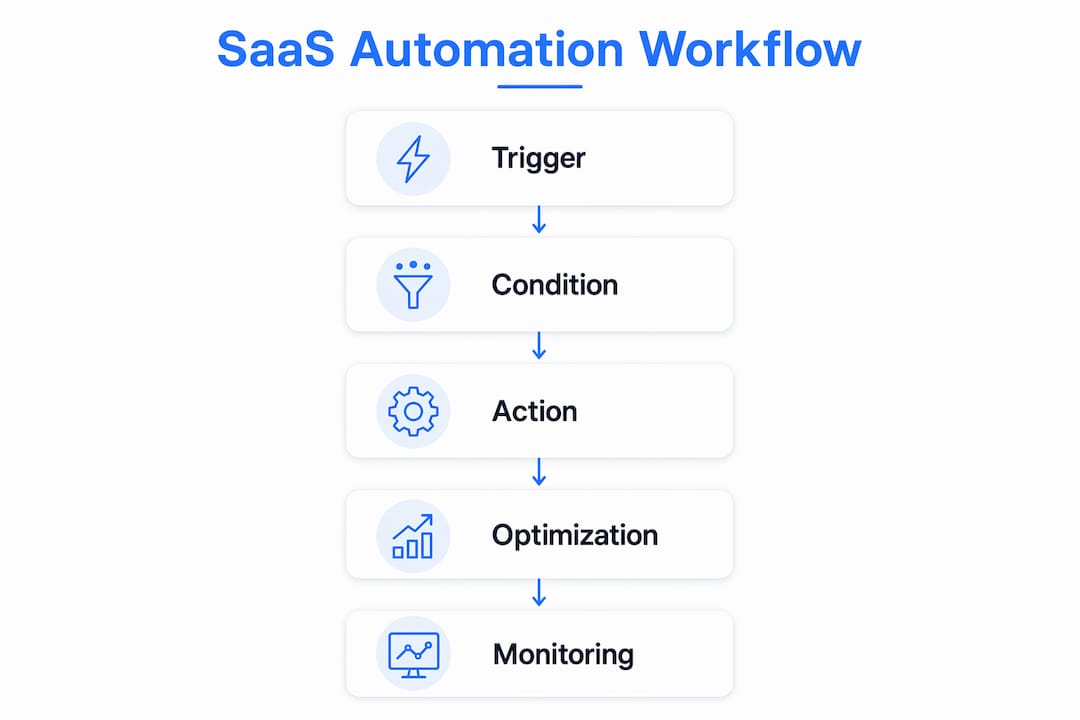
A SaaS automation tool is cloud-based software that executes repetitive tasks across multiple applications automatically, without manual intervention between each step. The industry term for this category is "workflow automation," and platforms like Zapier, Salesforce, and Zendesk have made it accessible to businesses of every size. At its core, every SaaS automation tool operates on the same logic: a trigger fires, conditions are checked, and an action executes. For small and medium-sized businesses, this means fewer hours spent on data entry, follow-up emails, and ticket routing, and more time focused on work that actually grows revenue.
What is a SaaS automation tool and how does it work?
A SaaS automation tool connects multiple cloud apps through a workflow engine that reads triggers, evaluates conditions, and fires actions across systems. Think of it as a set of standing instructions your software follows every time a specific event occurs, whether a customer signs up, a payment fails, or a support ticket goes unanswered for 24 hours.
Triggers fall into three main categories:
- Event-based triggers: Something happens in one app, such as a new lead entering Salesforce or a subscription starting in Stripe, and the workflow begins immediately.
- Time-based triggers: The system checks a condition on a schedule, for example, sending a payment reminder three days before an invoice is due.
- Behavior-based triggers: A user action, like clicking a link in an email or completing an onboarding step in your product, starts the next workflow step.
Once a trigger fires, the automation platform acts as a mediator. It checks any conditions you have set, then executes actions: updating a CRM record, sending an email through ActiveCampaign, creating a task in Asana, or routing a ticket in Zendesk. No-code and low-code builders let non-technical business owners configure these workflows visually, without writing a single line of code.
AI and machine learning are extending what these tools can do. Rather than just sending a fixed message when a trigger fires, AI-enhanced automation can analyze behavioral signals and make decisions, such as which customers need a personal call versus an automated email sequence.

Pro Tip: Before you build any automation, write out the workflow in plain English first. "When X happens, check Y, then do Z." If you cannot state it clearly in one sentence, the automation will be unreliable.
What are the key benefits of SaaS automation for SMBs?
The most direct benefit of SaaS automation is consistency. A human following a manual process makes mistakes, forgets steps, or skips tasks during busy periods. An automated workflow reduces manual work and executes the same steps in the same order every single time, regardless of how busy your team is.
Here is what that consistency translates to in practice for small and medium-sized businesses:
- Time savings: Employees stop spending hours on repetitive tasks like copying data between apps, sending follow-up emails, or manually updating spreadsheets. That time shifts to customer relationships and strategic decisions.
- Error reduction: Automated data transfers between Stripe and your accounting software eliminate the transcription errors that create billing disputes and reconciliation headaches.
- Cost control: Fewer manual steps means you handle more volume without adding headcount. For SMBs watching payroll costs closely, this is a direct financial benefit.
- Improved customer experience: Timely, consistent communication, such as onboarding sequences, payment confirmations, and support acknowledgments, makes your business feel professional even when your team is small.
- Revenue retention: Automated dunning sequences in billing platforms like Stripe or Chargify recover failed payments before they become cancellations, protecting recurring revenue without anyone lifting a finger.
"Automation does not replace your team. It removes the work that was never worth their time in the first place."
For businesses managing overdue payments or collections, this point is especially relevant. Consistent, automated follow-up outperforms sporadic manual outreach every time. Silence reads as permission to wait, and automation removes that silence from your process.
What are common SaaS automation use cases and examples?
The range of SaaS automation use cases is broad, but most SMB applications fall into five clear categories. The table below maps each category to its most common tools and specific examples.
| Category | Common tools | Automation examples |
|---|---|---|
| Marketing automation | ActiveCampaign, HubSpot | Email drip campaigns, lead nurturing sequences, list segmentation |
| Sales automation | Salesforce, Pipedrive | Lead scoring, pipeline stage updates, follow-up task creation |
| Customer support | Zendesk, Intercom | Ticket routing by topic, auto-responses, escalation triggers |
| Billing and revenue ops | Stripe, Chargify | Subscription renewals, failed payment retries, invoice generation |
| IT and workflow ops | Zapier, BetterCloud | Cross-app data sync, employee onboarding, app access provisioning |
Each of these categories solves a specific operational problem. A marketing team using HubSpot can set a workflow that moves a lead from "new contact" to "sales-ready" based on email opens and page visits, without a human reviewing each record. A support team using Zendesk can route every ticket tagged "billing" directly to the finance team, cutting response time without a manager manually sorting the queue.
Billing automation deserves special attention for SMBs. Failed payments are one of the most common causes of involuntary churn, and most businesses handle them manually, which means slowly. Platforms like Stripe allow you to configure automatic retry logic, customer notification emails, and account suspension rules, all without staff involvement. For businesses with recurring revenue models, this single automation use case can recover thousands of dollars per month.
Workflow-centric automation reduces tool-switching and manual reconciliation by orchestrating tasks end to end. Rather than automating one step in isolation, the most effective setups connect the entire process from trigger to final outcome across every app involved.
How to choose the right SaaS automation tool for your business
Choosing the wrong tool wastes time and money. Use this process to make a confident decision.
-
Map your most painful manual workflows first. List the five tasks your team repeats most often. Prioritize the ones that are time-consuming, error-prone, or directly tied to revenue. Billing follow-ups, lead assignment, and customer onboarding are common starting points for SMBs.
-
Check integration compatibility before anything else. The best automation tool is useless if it does not connect to the apps you already use. Verify that your CRM, billing platform, email tool, and support system are all supported. Zapier connects over 6,000 apps, making it a strong default for businesses with mixed tech stacks.
-
Prioritize no-code builders if you lack developer resources. Most SMBs do not have engineers available to build and maintain custom integrations. No-code platforms combined with AI allow you to build sophisticated workflows without technical teams. Look for drag-and-drop workflow editors and pre-built templates.
-
Evaluate AI and analytics features for advanced needs. Basic automation handles fixed rules. If your workflows require dynamic decisions, such as adjusting outreach timing based on customer behavior, look for tools with built-in AI capabilities. Platforms like Salesforce and HubSpot include these features natively.
-
Compare pricing against your actual usage patterns. Most automation platforms charge by the number of tasks or "zaps" executed per month. Estimate your workflow volume before committing to a plan. A tool that is affordable at 1,000 tasks per month may become expensive at 50,000.
-
Watch for disconnected systems. Disconnected SaaS apps limit the value of automation. If your billing tool does not talk to your CRM, you will still need manual steps to reconcile data. End-to-end connection is what makes automation genuinely replace manual work rather than just shift it.
Pro Tip: Start with one workflow, run it for 30 days, and measure the time saved before expanding. SMBs that try to automate everything at once often end up with a tangle of overlapping triggers and inconsistent data.
For businesses managing payroll and compliance, automating payroll processes follows the same selection logic: map the process, check integrations, and start with one workflow before scaling.
Key takeaways
SaaS automation tools deliver the most value when workflows are mapped end to end, triggers are precise, and tools are chosen based on integration fit rather than feature lists.
| Point | Details |
|---|---|
| Core mechanism | Every automation runs on triggers, conditions, and actions connected across apps via APIs. |
| SMB priority | No-code builders make automation accessible without developer resources or technical teams. |
| Highest-impact use cases | Billing follow-up, lead assignment, and customer onboarding deliver the fastest measurable ROI. |
| Biggest pitfall | Disconnected systems create manual reconciliation work that cancels out automation gains. |
| Reliability requirement | Trigger precision and idempotency prevent duplicate actions and ensure consistent execution. |
Why I think most SMBs automate the wrong things first
Here is what I have seen consistently: businesses get excited about automation and immediately build a complex 12-step onboarding email sequence. Meanwhile, their billing team is still manually chasing overdue invoices by phone, and their sales reps are copying lead data from a web form into a CRM by hand.
The highest-value automations are almost always the unglamorous ones. Failed payment recovery, overdue invoice follow-up, and lead routing are repetitive, time-sensitive, and directly tied to revenue. A missed follow-up on a failed payment is money that does not come back. An email drip campaign that fires two days late loses a lead to a competitor who responded in minutes.
Deterministic workflows improve reliability by saving each step explicitly, so the automation runs the same way every time. I advocate for this approach over AI-only workflows for anything revenue-critical. Use AI to enhance decisions, but keep the core process deterministic so you can audit it, replay it, and trust it.
My practical advice: pick the workflow where a human mistake or delay costs you money, automate that one first, and measure the result. The ROI will justify the next automation, and the one after that.
— Tyler
How Interval-ai helps SMBs automate payment follow-up

If overdue payments are eating your team's time, Interval-ai is built specifically for that problem. Interval-ai uses a data-driven approach to automate collections outreach across multiple channels, tailoring communication based on historical payment behavior so your follow-up feels professional rather than generic. Clients report reducing days to payment by over 30 days and recovering substantial revenue without adding staff. You get the consistency of automated follow-up with the personalization of a human touch, all without building the workflow yourself. Explore Interval-ai to see how it fits your collections process.
FAQ
What is a SaaS automation tool in simple terms?
A SaaS automation tool is cloud-based software that connects your business apps and executes tasks automatically based on triggers you define, such as sending an email when a payment fails or updating a CRM record when a lead fills out a form.
How does SaaS automation work without coding?
No-code automation platforms provide visual workflow builders where you select a trigger, set conditions, and choose actions using dropdown menus and templates, with no programming required.
What are the top SaaS automation tools for small businesses?
Zapier, HubSpot, ActiveCampaign, Salesforce, and Zendesk are widely used by SMBs for cross-app workflow automation, each covering different use cases from marketing to billing to customer support.
What is the biggest risk when implementing SaaS automation?
Disconnected systems are the most common failure point. If your apps do not share data end to end, automation shifts manual work rather than eliminating it.
How do I know if my business is ready for SaaS automation?
If your team repeats the same task more than five times per week, or if a delayed follow-up has ever cost you a customer or payment, your business is ready. Start with one workflow, measure the time saved, and expand from there.
