
What Is Automated Invoice Delivery for Businesses
Published: July 6, 2026 · 9–10 min read
TL;DR:
- Automated invoice delivery generates and sends invoices automatically based on business triggers, reducing manual work. It improves cash flow by decreasing the average days-sales-outstanding from 42 to 27 days and minimizes errors through draft reviews and real-time payment checks. Implementing automation enhances efficiency, accuracy, and consistency in billing processes across various industries.
Automated invoice delivery is defined as a software-driven process that generates, sends, and manages invoices without manual intervention. The industry term for this practice is "invoice delivery automation," and it covers everything from triggering an invoice at a billing milestone to reconciling payment in your accounting system. Automated invoicing systems reduce manual work by 5–13 hours weekly, and North American B2B days-sales-outstanding averages 42 days but drops to 27 days with automation in place. For any business losing time to billing admin or chasing overdue payments, this process is the most direct fix available.
What is automated invoice delivery and how does it work?
Automated invoice delivery works through a chain of connected steps, each triggered by a business event rather than a human action. The process starts when a data trigger fires. That trigger could be the end of a billing period, the completion of a project milestone, or a logged time entry crossing a threshold. Once the trigger fires, the system pulls client data, line items, and pricing from your CRM or ERP and builds a draft invoice automatically.

The draft stage is where most well-designed workflows pause briefly. Automated invoicing is most effective when invoices start as drafts, giving you a quick manual check before final delivery. This one-click approval step catches formatting errors or wrong amounts before they reach your client. After approval, the system schedules delivery based on client preferences, sending a PDF by email, pushing an invoice through a client portal, or both.
Payment options embed directly into the invoice. Clients can pay by credit card, ACH transfer, or other methods without leaving the email or portal. After payment, the system logs the transaction and reconciles it against your accounting software, whether that is QuickBooks, Xero, or another platform. Workflow tools like Zapier connect these platforms when native integrations are not available.
Pro Tip: Set your delivery schedule to match each client's accounts payable cycle. Enterprise clients often process payments on specific days, so sending invoices three days before their AP run improves your odds of getting paid on time.
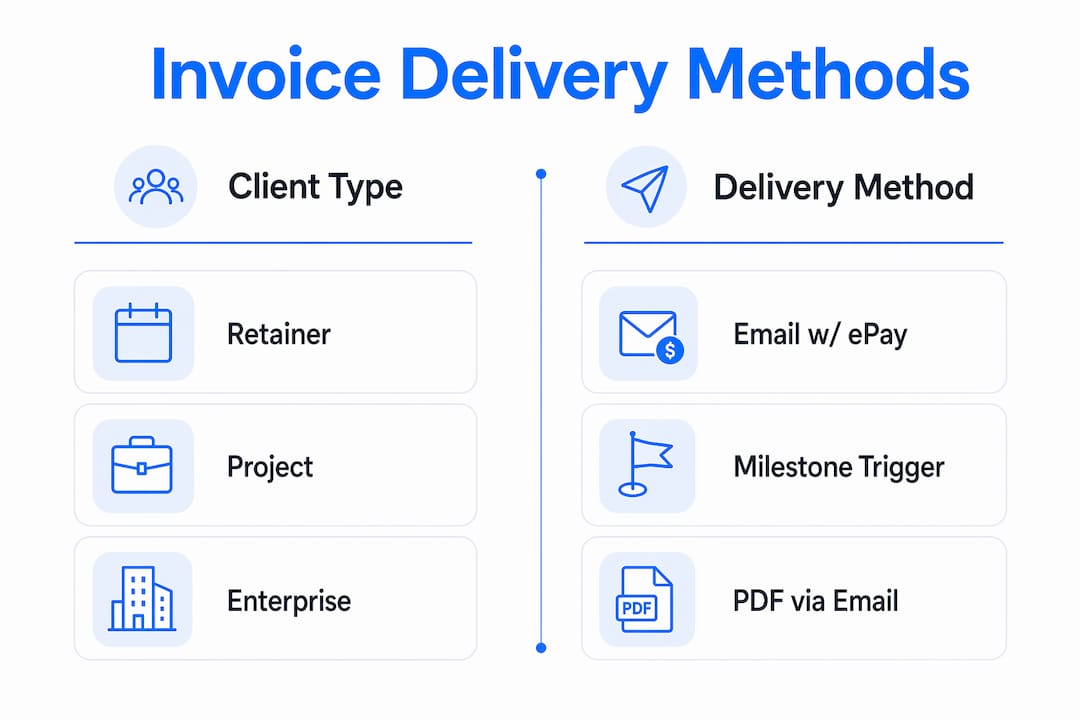
The table below shows how delivery method and timing vary by client type.
| Client type | Preferred delivery method | Typical send timing |
|---|---|---|
| Retainer clients | Email with embedded payment link | First day of billing period |
| Project clients | PDF via email, triggered by milestone | Within 24 hours of completion |
| Enterprise clients | PDF plus CC to finance contact | Net-30 terms, sent on contract date |
| High-volume clients | Portal upload with auto-notification | Batch or always-on, per contract |
What are the key benefits of invoice delivery automation?
Automation removes the two biggest drags on billing efficiency: manual data entry and inconsistent follow-up. Manual invoice processing consumes up to 70% of staff time on repetitive tasks. Automation cuts that load sharply by pulling data directly from your CRM or ERP, verifying it against purchase orders, and delivering invoices in the client's preferred format without anyone touching a keyboard.
The financial impact is measurable. Automated invoicing reduces days-sales-outstanding from an average of 42 days to 27 days. That 15-day improvement means cash arrives faster, which directly affects your ability to cover payroll, pay vendors, and plan for growth. Tool costs for automated billing solutions typically run $50–$150 per month, making the return on investment clear within the first billing cycle.
The benefits extend beyond speed. Automation improves invoice accuracy, accelerates invoice-to-cash timelines, and gives you richer visibility into cash flow. Your finance team spends less time correcting errors and more time on work that requires judgment.
Key benefits for businesses and finance teams include:
- Fewer billing errors from eliminated manual data entry
- Consistent, on-time invoice delivery regardless of staff availability
- Faster payment cycles through embedded payment options
- Automated reminder sequences that reduce overdue balances
- Real-time cash flow visibility through accounting software integration
- Lower administrative cost per invoice processed
Pro Tip: Build a three-step reminder sequence: a friendly reminder three days before the due date, a direct notice on the due date, and a firm follow-up seven days after. Silence reads as permission to wait, so consistent automated follow-up closes that gap without awkward manual calls.
What challenges come with implementing automated invoice delivery?
The biggest technical risk in automated invoice delivery is duplicate invoices. When a network glitch or workflow error fires the same trigger twice, your client receives two invoices for one job. Idempotency keys prevent this by assigning a unique identifier to each invoice based on the customer and billing period. If the system tries to generate a second invoice with the same key, it stops the process automatically.
Reconciliation is the hardest step to automate correctly. A reminder sequence that fires without checking payment status first will send an overdue notice to a client who paid hours earlier. Real-time checks against payment gateways immediately before sending reminders prevent this. Building stop-logic into your reminder workflow protects client relationships and reduces friction.
Choosing between batch billing and always-on billing also matters more than most businesses realize. Batch systems process invoices at set intervals, which works for simple, predictable billing. An always-on automated billing system continuously updates invoices and billing data, preventing end-of-month errors and reducing operational risk as transaction volume grows.
Common implementation pitfalls to avoid:
- Skipping the draft approval step during initial rollout
- Failing to configure conditional sending rules for different client types
- Using a batch system when your billing model is event-driven or usage-based
- Not testing idempotency logic before going live
- Sending reminders without a real-time payment status check
Pro Tip: Run your first month of automated invoices in parallel with your manual process. Compare outputs before switching fully. This catches configuration errors before they reach clients.
How do businesses apply automated invoice delivery across industries?
The practical value of invoice delivery automation becomes clearest when you look at specific billing models. Retainer clients are the easiest starting point. The system triggers on the first of each month, pulls the agreed retainer amount, generates the invoice, and sends it with a payment link. No one on your team touches it.
Project-based billing requires milestone triggers. When a project phase closes in your project management tool, the system generates an invoice for that phase and delivers it within hours. This removes the common delay where invoices sit unsent for days after work is complete because no one got around to billing.
Enterprise clients often require more complex delivery. They may need a PDF sent to a primary contact with a copy to their finance department, net-30 payment terms, and a specific purchase order number on the invoice. Automation handles all of this through conditional sending rules configured once and applied consistently.
Converged billing consolidates invoices across multiple providers, business units, or product lines into a single statement. This matters when a client buys multiple services from you. Instead of receiving three separate invoices, they receive one unified statement. That reduces their processing time and your payment delays.
Businesses operating across borders benefit from automation that handles multiple currencies and local tax formats. The payment automation benefits for businesses managing international clients include reduced manual currency conversion errors and faster settlement. For businesses with complex pricing, API-first platforms handle usage-based billing, tiered pricing, and volume discounts without manual calculation.
| Billing model | Trigger event | Delivery format | Payment terms |
|---|---|---|---|
| Retainer | Billing period start | Email with payment link | Due on receipt |
| Milestone-based | Project phase completion | PDF via email | Net-15 |
| Enterprise | Contract date | PDF plus CC to finance | Net-30 |
| Usage-based | Monthly usage report | Portal upload | Net-30 |
| Multi-currency | Billing period end | PDF with local tax format | Per agreement |
Invoice management systems automate both accounts payable and accounts receivable, giving you control over incoming bills and outgoing invoices from one platform. That dual coverage provides a complete picture of cash flow rather than just one side of the ledger.
Key Takeaways
Automated invoice delivery reduces days-sales-outstanding from 42 days to 27 days by removing manual steps, enforcing consistent follow-up, and integrating payment directly into the invoice.
| Point | Details |
|---|---|
| Core definition | Automated invoice delivery uses software triggers to generate and send invoices without manual work. |
| DSO improvement | Automation cuts average payment time from 42 days to 27 days, improving cash flow directly. |
| Error prevention | Idempotency keys and real-time payment checks stop duplicate invoices and misfired reminders. |
| Human oversight | A draft approval step during rollout catches errors before they reach clients. |
| Converged billing | Unifying multiple invoices into one statement reduces client confusion and speeds payment. |
Why I think most businesses underestimate this shift
Most businesses treat invoice delivery as an afterthought. They focus on doing the work, then scramble to bill for it. That gap between completion and payment is where cash flow problems start, and it is almost entirely avoidable.
What I have seen consistently is that the businesses most resistant to automation are also the ones spending the most time on billing. They have built workarounds into their manual process and mistake familiarity for efficiency. The setup cost of automation feels large upfront. The ongoing cost of manual billing is invisible because it hides in staff hours and delayed payments.
The part most articles skip is the reconciliation problem. Automating invoice generation is straightforward. Automating the follow-up without embarrassing clients who already paid requires real engineering. That is where the quality gap between basic tools and well-configured platforms shows up. If you are evaluating automated billing solutions, test the reminder logic first. Ask specifically how the system checks payment status before firing a reminder. That answer tells you more about the platform's maturity than any feature list.
The future of this space is AI-enhanced invoice optimization, where systems learn from payment behavior to adjust timing, format, and follow-up sequences per client. That is already happening. Businesses that build on API-first platforms now will adapt to those changes without rebuilding from scratch.
— Tyler
How Interval-ai helps businesses reduce payment delays
Overdue invoices are a billing problem and a collections problem. Interval-ai addresses both sides by combining automated invoice follow-up with AI-driven collections outreach tailored to your brand identity.

Interval-ai uses historical payment data to determine the right channel, timing, and message for each client. The result is a collections process that feels consistent and professional rather than aggressive. Clients report reducing days to payment by over 30 days and recovering significant revenue without adding staff. If your billing process is already automated but overdue balances are still climbing, Interval-ai fills the gap between invoice delivery and actual payment. Review Interval-ai pricing to see which plan fits your billing volume and recovery goals.
FAQ
What is automated invoice delivery in simple terms?
Automated invoice delivery is a software process that generates and sends invoices to clients automatically based on triggers like billing dates or project milestones. No manual steps are required after initial setup.
How does automation reduce days-sales-outstanding?
Automated invoicing reduces North American B2B days-sales-outstanding from an average of 42 days to 27 days by eliminating delivery delays, embedding payment options, and sending consistent follow-up reminders.
What is an idempotency key and why does it matter?
An idempotency key is a unique identifier assigned to each invoice that prevents the system from generating duplicate invoices if a network glitch or workflow error fires the same trigger twice.
How do I automate invoices without losing accuracy?
Set invoices to draft status first, review them with a one-click approval step, then allow the system to send. This human-in-the-loop approach catches errors before they reach clients while preserving the speed benefits of automation.
What is converged billing in automated invoice delivery?
Converged billing consolidates invoices from multiple business units or product lines into a single client statement. It reduces client confusion, speeds up their payment processing, and lowers your days-sales-outstanding.
