
What Is Task Automation Software? A 2026 Business Guide
Published: June 10, 2026 · 11–12 min read
TL;DR:
- Task automation software connects systems and executes rule-based tasks automatically, saving time on repetitive work. It operates through triggers, rules, and integrations, enabling workflows from simple reminders to complex end-to-end processes. Successful implementation requires standardizing processes, clear ownership, and careful scalability planning to maximize benefits and avoid pitfalls.
Task automation software is technology that executes repetitive, rule-based tasks automatically, without human intervention, by connecting systems like CRM, ERP, and email platforms to trigger predefined actions. If you run a business and your team spends hours on data entry, invoice follow-ups, or routing customer requests, that time is recoverable. Tools like Zapier, UiPath, and Make have made automation accessible to businesses of every size, not just enterprises with dedicated IT departments. The core promise is straightforward: remove the manual, repetitive work so your people can focus on decisions, relationships, and growth.
What is task automation software and how does it work?
Task automation software operates through a simple but powerful logic: when a specific event occurs, a predefined action runs automatically. This is called a trigger-action model. A new customer submits a form, and the software immediately creates a contact record in your CRM, sends a welcome email, and notifies your sales team, all without anyone touching a keyboard.
The mechanics rely on three core components.
- Triggers are the starting conditions. A new invoice uploaded, a payment missed, a support ticket created, or a scheduled time reaching a threshold all qualify as triggers.
- Rules and logic define what happens next. These can be simple (if X, do Y) or conditional (if X and Z, do Y but not W).
- Integrations connect the software to your existing tools. Most modern platforms use API-driven connections to link dozens or hundreds of applications, from Salesforce and QuickBooks to Slack and Gmail.
The distinction between task automation, workflow automation, and process automation matters here. Task automation handles a single, discrete action, such as sending a reminder email. Workflow automation chains multiple tasks together across a sequence. Process automation, often called BPA or business process automation, covers end-to-end operations like employee onboarding or order fulfillment. Understanding where your problem sits on that spectrum helps you choose the right tool.
Integration-led automation platforms go further by enabling automation across ERP, CRM, eCommerce, and billing systems with centralized monitoring. This means one platform can govern dozens of automated workflows rather than managing each connection separately. AI is now enhancing this further, with tools capable of making routing decisions, detecting anomalies, and adapting workflows based on historical patterns rather than fixed rules.

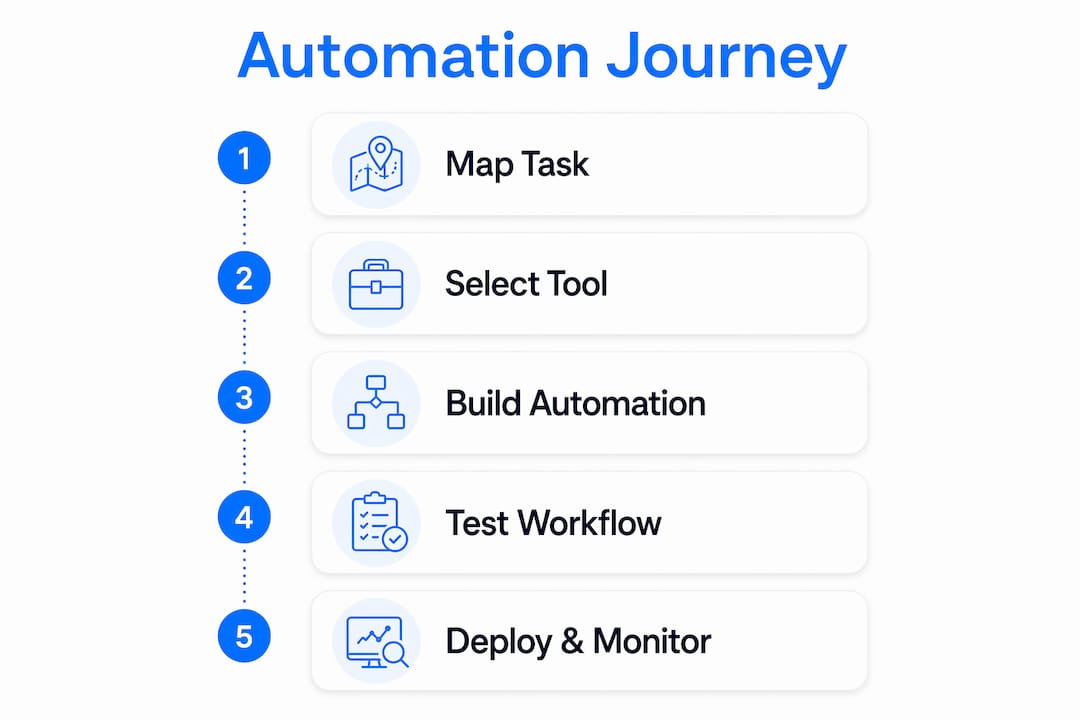
Pro Tip: Before you build any automation, map the task on paper first. If you cannot describe the trigger, the rule, and the expected output in plain language, the automation will not work reliably either.
What types of task automation tools are available?
Not all automation platforms are built for the same buyer. The market divides into three broad categories, each with different technical requirements, pricing structures, and scalability ceilings.
No-code and low-code visual platforms are designed for business users who want to build automations without writing code. Zapier and Make are the most widely used examples. You connect apps through a visual interface, set your triggers and actions, and deploy in hours. These tools are ideal for small to mid-sized businesses automating marketing, sales, and administrative tasks.
Developer-grade and integration platforms like Celigo or Boomi require more technical knowledge but offer deeper customization and more reliable handling of complex data transformations. They suit businesses with a dedicated operations or IT function.
Enterprise automation suites like UiPath and Automation Anywhere add robotic process automation (RPA), which automates tasks inside desktop applications that lack APIs, such as legacy accounting software or government portals. These platforms take longer to implement and cost more, but they handle complexity that lighter tools cannot.
Implementation timelines vary widely: simple no-code automations deploy in days, while enterprise solutions integrating legacy systems can take three to six months. Plan your timeline accordingly before committing to a vendor.
Pricing models differ just as much as the tools themselves. Zapier charges per completed task, while Make charges per module step, meaning each action inside a scenario counts separately. At low volumes, Zapier's per-task model is predictable. At high volumes, Make's modular pricing often works out cheaper. Understanding this before you scale prevents a surprise billing shock.
| Platform | Type | Pricing model | Best for |
|---|---|---|---|
| Zapier | No-code | Per task completed | Small business, marketing teams |
| Make | No-code/visual | Per module step | SMBs needing flexible logic |
| Celigo | Integration platform | Per integration flow | Mid-market, ERP/CRM-heavy stacks |
| UiPath | Enterprise RPA | Per bot/license | Large enterprise, legacy systems |
| Automation Anywhere | Enterprise RPA | Per bot/license | Large enterprise, compliance-heavy industries |
Pro Tip: Run a volume estimate before choosing a pricing model. Count how many times your target task runs per month, multiply by your growth rate, and compare costs at 3x your current volume. The cheapest tool today may not be the cheapest tool in 18 months.
What are the main benefits of task automation for businesses?
The primary goal of automation is to reallocate human talent to higher-value, strategic work that requires judgment, not merely to reduce headcount. That distinction matters. Businesses that frame automation as a cost-cutting exercise often miss the larger opportunity: giving skilled employees back the time to solve problems, serve customers, and grow revenue.
The practical benefits show up across every department.
- Operations and IT: Automated ticketing systems route support requests to the right team member based on issue type, urgency, and availability, cutting response times without adding staff.
- Finance: Invoice generation, payment reminders, and reconciliation tasks run on schedule without manual input, reducing errors and improving cash flow visibility.
- HR: Employee onboarding workflows trigger account creation, equipment requests, and training assignments the moment a new hire record is created in your HRIS.
- Sales and marketing: Lead scoring, follow-up email sequences, and CRM updates happen automatically based on prospect behavior, keeping your pipeline moving without manual data entry.
"Removing mundane, rule-based work enables employees to focus on creative, strategic tasks — the work that actually differentiates a business in its market."
Consistency is another underrated benefit. A human following a 12-step process will occasionally skip step 7 when they are tired or rushed. An automated workflow does not. For businesses where compliance, accuracy, or customer experience depends on consistent execution, automation is not a convenience. It is a control mechanism.
Common pitfalls to avoid when implementing automation
The most common mistake businesses make is automating a broken process. Automating an inefficient process does not fix it. It locks in the inefficiency and makes it faster. If your invoice approval process involves three unnecessary sign-offs, automating those sign-offs just accelerates the waste.
Here are the implementation pitfalls that cost businesses the most time and money.
- Automating before standardizing. Document and clean up the process first. Every exception, edge case, and manual workaround needs to be resolved before you build automation around it.
- Skipping the pilot phase. Starting with pilot projects on high-frequency, low-risk tasks, like email notifications or data syncing, builds confidence and demonstrates ROI before you commit to complex builds.
- Ignoring governance. Successful automation requires error handling, centralized monitoring, and ownership. Someone needs to be responsible for each automated workflow, or failures go unnoticed.
- Underestimating cost at scale. Pricing models differ greatly, and a tool that costs $50 per month at your current volume may cost $800 per month after growth. Model your costs at scale before signing a contract.
- Treating automation as a one-time project. Processes change, systems update, and APIs break. Automation requires ongoing maintenance, not a set-and-forget mindset.
Pro Tip: Assign a named owner to every automated workflow in your system. That person is responsible for monitoring it, updating it when upstream processes change, and flagging failures. Ownerless automations become invisible liabilities.
How to choose the right task automation software for your needs
Choosing the right platform comes down to matching the tool to your team's technical maturity, your existing tech stack, and the complexity of the tasks you want to automate. The best automation tools depend on the team's skill level and current systems. A non-technical operations team will get more value from Zapier or Make than from a developer-grade integration platform that requires scripting knowledge.
Work through these decision criteria before evaluating vendors.
- Integration compatibility: Does the platform connect natively to the tools you already use? Check for pre-built connectors to your CRM, accounting software, and communication tools.
- Ease of use: Can your team build and modify automations without filing an IT ticket? No-code platforms reduce dependency on technical staff.
- Monitoring and error handling: Does the platform alert you when an automation fails? Can you see a log of every task that ran, and what the outcome was?
- Scalability: Will the pricing and performance hold up as your task volume grows? Test this with a volume projection, not just current usage.
- Support quality: When something breaks at 9 PM before a payroll run, how fast does the vendor respond? Check support tier availability before you commit.
Single-application automation, such as using the built-in automation features inside HubSpot or QuickBooks, works well when your workflow stays within one tool. Integration-led automation becomes necessary when tasks cross multiple systems, which is the case for most operational workflows in a growing business.
Key takeaways
Task automation software delivers the most value when it is applied to well-defined, high-frequency processes with clear triggers, reliable integrations, and active governance.
| Point | Details |
|---|---|
| Define before you automate | Document and standardize every process before building automation around it. |
| Match tool to team maturity | Non-technical teams should start with no-code platforms like Zapier or Make. |
| Model costs at scale | Compare pricing at 3x your current volume to avoid expensive surprises later. |
| Start with pilot projects | High-frequency, low-risk tasks build confidence and prove ROI quickly. |
| Assign workflow ownership | Every automated process needs a named owner responsible for monitoring and updates. |
Why automation strategy matters more than automation tools in 2026
I have seen businesses spend months evaluating platforms and then deploy automations that break within 90 days. The tool was not the problem. The process underneath it was undocumented, inconsistent, and owned by no one. The automation just made that visible faster.
What I find more interesting about where automation is heading in 2026 is the shift from rule-based triggers to AI-driven orchestration. Platforms are moving beyond "if this, then that" logic toward systems that can interpret context, handle exceptions, and make routing decisions based on patterns in historical data. That is a meaningful change. It means automation can now handle tasks that previously required human judgment, not just tasks that required human hands.
The businesses getting the most from automation right now are not the ones with the most automations. They are the ones with the clearest processes, the most disciplined governance, and the most honest assessment of where human judgment still adds value. Automation is not a replacement for thinking. It is a way to protect your team's thinking time from being consumed by tasks that do not require it.
If you are just starting out, pick one process that runs more than 20 times per week, document it completely, and automate it with the simplest tool that connects your existing systems. That single win will teach you more than any vendor demo.
— Tyler
See how Interval-ai puts automation to work for your business

If recovering overdue payments is one of the manual, time-consuming processes your team handles today, Interval-ai is built specifically for that problem. Interval-ai uses AI-driven automation to manage collections outreach across multiple channels, tailoring communication strategies to each customer's payment history and behavior. The platform reduces days to payment by over 30 days on average and handles the entire follow-up sequence without adding headcount. Clients report saving thousands in payroll costs while recovering more revenue than manual processes delivered. If you are ready to put a high-frequency, high-value process on autopilot, explore Interval-ai and see what automated collections looks like for your business.
FAQ
What is task automation software in simple terms?
Task automation software is a tool that performs repetitive, rule-based tasks automatically by connecting your existing apps and triggering predefined actions when specific conditions are met. It removes the need for manual input on routine work like data entry, notifications, and follow-ups.
How does task automation differ from process automation?
Task automation handles a single discrete action, such as sending an email or updating a record. Process automation covers end-to-end workflows that span multiple systems and steps, such as employee onboarding or order fulfillment from start to finish.
What are the best task automation tools for small businesses?
Zapier and Make are the most widely used no-code platforms for small businesses because they offer visual workflow builders, broad app integrations, and accessible pricing. The right choice depends on your task volume and the complexity of logic your workflows require.
How long does it take to implement task automation software?
Simple no-code automations deploy in days, while enterprise solutions that integrate legacy systems typically take three to six months. Starting with a focused pilot project on a single, well-defined process is the fastest path to a working automation.
What is the biggest risk when automating business tasks?
The biggest risk is automating a process that is not yet standardized. Automating an undocumented or inconsistent process produces faster errors, not faster results. Define and document the process completely before building automation around it.
