
Why Automating Collections Saves Headcount and Costs

Published: July 18, 2026 · 10–11 min read
TL;DR:
- Automating collections replaces manual tasks with software-driven workflows, reducing staffing needs. It speeds up processes, cuts errors, and enables existing staff to focus on higher-value activities. Automation allows businesses to handle volume increases without hiring, improving cash flow and operational resilience.
Automating collections is defined as replacing manual accounts receivable tasks with software-driven workflows that send reminders, process payments, and manage follow-ups without human intervention. This shift directly explains why automating collections saves headcount: one automated workflow handles the volume that previously required multiple staff members. McKinsey's automation research shows staffing cost reductions of 20–35% within one year in departments with repetitive tasks like collections. That figure means a business spending $200,000 annually on collections staff could realistically recover $40,000–$70,000 in payroll. Interval-ai clients report saving thousands in payroll costs while simultaneously cutting days to payment by over 30 days.
Why automating collections saves headcount: the core mechanics
The collections function inside most small and medium businesses runs on repetitive, time-consuming tasks. Your team manually logs payment statuses, drafts reminder emails, makes follow-up calls, and tracks disputes in spreadsheets. Each of those actions is a candidate for automation.

Most businesses find 5–10 workflows suitable for automation, with the highest-impact ones covering data extraction, invoice processing, and payment follow-ups. That concentration matters because it means you do not need to automate everything to see real headcount relief. You target the tasks that consume the most hours first.
Automated collections workflows handle these functions faster and with fewer errors than manual processes:
- Payment reminders: Scheduled emails and SMS messages go out automatically based on invoice due dates, with no staff involvement.
- Follow-up sequences: If a customer does not respond to the first reminder, the system escalates to a second or third touchpoint without anyone on your team lifting a finger.
- Invoice processing: Automated tools extract data from invoices, match them to purchase orders, and flag exceptions for human review only when needed.
- Dispute routing: When a customer disputes a charge, the system logs it, categorizes it, and routes it to the right person without manual triage.
- Payment reconciliation: Payments received are matched to open invoices automatically, keeping your books current without daily manual entry.
The result is that your team stops being a processing engine and starts being a decision-making team. Backlogs shrink because the system works around the clock. Volume growth no longer automatically triggers a hiring conversation.
Pro Tip: Start by auditing which collections tasks your team repeats daily. Those are your highest-priority automation targets. Even automating two or three of them can free up meaningful hours within the first month.
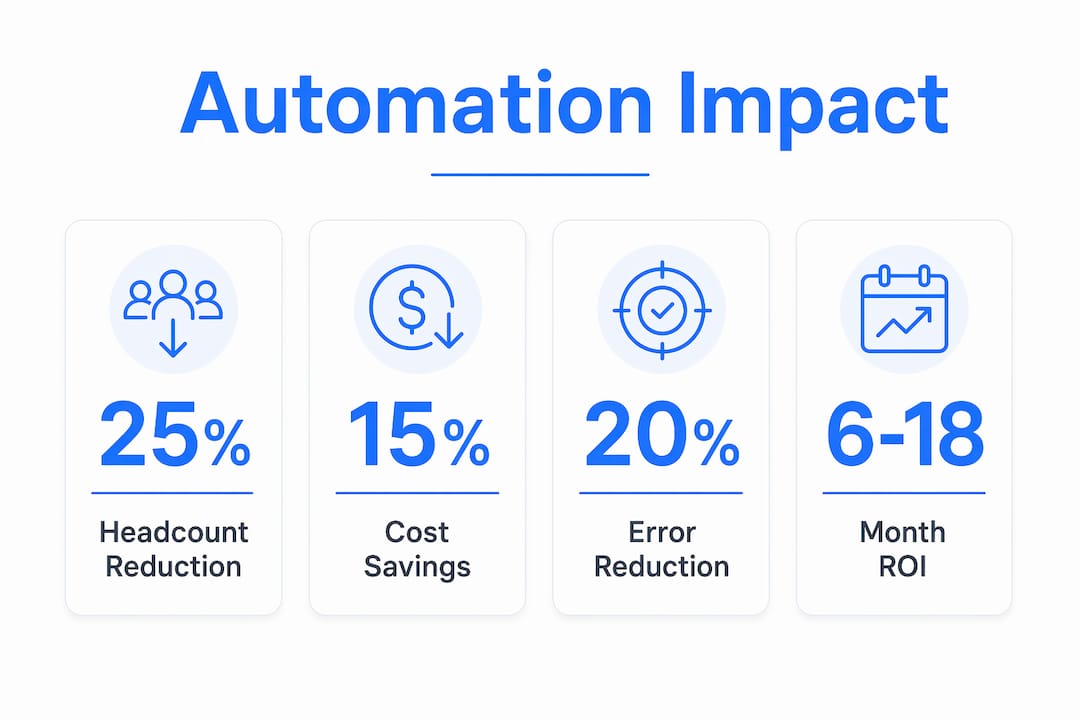
How automation in accounts receivable cuts payroll costs
The financial case for automating debt collection is direct. Fewer manual hours means lower payroll costs. Faster payment cycles mean better cash flow. Fewer errors mean fewer overdue accounts and less revenue at risk.
Digital debt collection reduces operating costs by at least 15% while maintaining recovery rates. That reduction comes from eliminating the labor hours tied to outreach, logging, and reconciliation. When you remove those hours from your payroll, you either reduce headcount or redeploy staff to higher-value work without adding new hires.
Automation also reduces error rates significantly. Companies using automation report more than 15% reductions in collection cycle times and error-related costs. Fewer errors mean fewer disputed invoices, fewer write-offs, and more predictable cash flow. That predictability is worth real money to a business managing tight margins.
The cost structure also shifts in your favor over time. Fixed salaries and benefits give way to technology subscription costs, which are typically lower and more predictable. The table below shows how that shift plays out in practical terms.
| Cost Category | Manual Collections | Automated Collections |
|---|---|---|
| Staff hours per 100 invoices | High (manual entry, follow-up) | Low (exceptions only) |
| Error rate | Higher (human data entry) | Lower (automated matching) |
| Cost per resolved account | Higher (labor intensive) | Lower (software handles volume) |
| Scalability | Requires new hires | Handles volume growth flat |
| Cash flow predictability | Variable | More consistent |
Pro Tip: Track your cost per resolved account before and after automation. That single metric tells you more about ROI than any other number. If it drops, your automation is working.
How employee roles evolve when collections automation reshapes staffing
Automation does not eliminate your collections team. It changes what they do. The shift is from data entry clerk to strategic advisor, and that change benefits both your business and your employees.
Industry analysts confirm that automation leads to job evolution rather than outright job loss in accounts receivable. Your staff move from processing transactions to managing exceptions, building customer relationships, and analyzing payment trends. Those are higher-value activities that contribute more to your business than manual data entry ever did.
"Automation in collections is not about replacing employees but elevating their roles to deliver greater strategic value and improve employee retention. When staff spend less time on repetitive tasks, they engage more deeply with customers and contribute more meaningfully to business outcomes."
The capacity absorption concept reinforces this point. When your business grows and invoice volume increases, automation absorbs that growth without requiring new hires. Your existing team handles the exceptions and relationships while the system handles the volume. That is how you scale without a proportional increase in payroll.
The practical benefits of this role evolution include:
- Higher retention: Employees who spend less time on repetitive tasks report greater job satisfaction.
- Better customer relationships: Staff freed from manual processing have time to call customers proactively, resolve disputes faster, and build goodwill.
- Stronger oversight: Team members shift to monitoring system performance, catching edge cases, and refining workflows.
- Reskilling opportunities: Staff develop technical skills in managing automation tools, making them more valuable to your organization.
The businesses that get this right treat automation as a workforce upgrade, not a workforce reduction. That framing also makes it easier to communicate the change to your team without creating anxiety.
What does implementing collections automation actually require?
Getting the headcount savings from automation requires upfront investment and careful planning. The savings are real, but they do not arrive automatically on day one.
Upfront implementation costs typically run 40–60% of total investment, covering software licensing, systems integration, training, and change management. That is a meaningful number for a small or medium business. The payback window typically runs 6–24 months, depending on your starting volume and how well you define your workflows before launch.
Here is a practical implementation sequence that reduces risk and accelerates results:
- Map your current workflows. Document every step your team takes to process an invoice from issuance to payment. Identify where hours are concentrated.
- Define your KPIs before you start. Projects that measure outcomes consistently exceed planned savings. Choose metrics like hours saved per week, days to cash, and cost per resolved account.
- Run a phased pilot. Start with your highest-volume, most repetitive workflow. Prove the ROI on one process before expanding to others.
- Integrate with your existing systems. Automation tools need to connect to your accounting software, CRM, and payment processor. Poor integration creates new manual work instead of eliminating it.
- Train your team on the new workflow. Staff need to understand what the system handles and what requires human judgment. Clear boundaries prevent confusion and errors.
- Review and refine after 90 days. Check your KPIs against your baseline. Adjust the automation rules based on what the data shows.
Underestimating ongoing vendor and maintenance costs is the most common mistake businesses make after launch. Budget for software updates, integration maintenance, and periodic workflow reviews. Those costs are still far lower than the payroll they replace, but they are real.
Pro Tip: Set a realistic ROI timeline of 6–18 months before you evaluate success. Automation delivers compounding returns as volume grows, so the savings in month 18 are typically much larger than in month three.
How does automation handle volume spikes without adding staff?
Manual collections break down under pressure. When invoice volume spikes because of a seasonal rush, a new client, or business growth, your team falls behind. Reminders go out late. Follow-ups get missed. Overdue accounts accumulate. The only traditional fix is hiring, which takes time and adds permanent payroll costs.
Automated workflows do not have that problem. Automation allows collections teams to absorb volume increases without adding headcount, preventing backlogs and maintaining recovery rates during delinquency surges. The system sends the same number of reminders per invoice whether you have 100 accounts or 1,000. Speed and consistency do not degrade as volume grows.
The practical advantages during volume spikes include:
- No overtime costs: Automated systems work at full capacity without overtime pay or burnout.
- Consistent follow-up timing: Every invoice gets the same follow-up sequence regardless of how busy your team is.
- Compliance consistency: Automated outreach follows the same rules every time, reducing the risk of regulatory errors that manual processes introduce under pressure.
- Faster recovery: Accounts that might wait days for a manual follow-up receive automated contact within hours of a missed payment.
The AI payment trends shaping fintech confirm that businesses using automated outreach recover payments faster and with less staff involvement than those relying on manual processes. That speed advantage compounds over time. Faster recovery means better cash flow, which means less reliance on credit lines or factoring to cover operating costs.
Key Takeaways
Automating collections reduces headcount costs by replacing manual tasks with consistent, scalable workflows that handle volume growth without proportional staffing increases.
| Point | Details |
|---|---|
| Headcount reduction is real | Automation cuts staffing costs by 20–35% within one year in collections-heavy departments. |
| Cash flow improves measurably | Automated collections reduce cycle times and error costs by more than 15%, improving payment predictability. |
| Roles evolve, not disappear | Staff shift from data entry to relationship management and exception handling, improving retention. |
| Implementation needs a plan | Define KPIs before launch and expect a 6–24 month payback window for full ROI. |
| Volume spikes no longer require hiring | Automated workflows absorb growth and maintain recovery rates without overtime or new headcount. |
The real reason most businesses wait too long on this
I have talked with dozens of small business owners who knew they needed to automate their collections but kept putting it off. The reason is almost always the same: they were worried about what it would mean for their team. Nobody wants to be the person who automates someone's job away.
Here is what I have learned. The businesses that frame automation as a replacement tool create exactly the anxiety they were trying to avoid. Staff disengage, resist the new system, and the implementation struggles. The businesses that frame it as a capacity tool, meaning "we are not cutting anyone, we are giving you better tools so you can focus on work that actually matters," get faster adoption and better results.
The other thing I would push back on is the idea that you need to automate everything at once. The invoice automation approach that works best for most small and medium businesses starts with one workflow, proves the ROI, and then expands. That approach also gives your team time to adapt and build confidence in the system.
Automation should make your collections function more consistent, more professional, and more resilient. If it is doing that, your team will see it as a tool that helps them, not a threat to their jobs. That mindset shift is what separates businesses that get lasting headcount savings from those that spend money on software and see no real change.
— Tyler
How Interval-ai fits into your collections strategy
If you are ready to reduce the manual workload in your collections process, Interval-ai is built specifically for businesses like yours.

Interval-ai uses AI to tailor outreach strategies based on your customers' historical payment behavior, managing communications across email, SMS, and other channels automatically. Clients report cutting days to payment by over 30 days and recovering substantial amounts without adding staff. The platform handles the volume so your team can focus on relationships and exceptions. Visit Interval-ai's collections platform to see how it fits your business, or book a consultation to walk through your current workflow and identify where automation delivers the fastest results.
FAQ
Why does automating collections reduce headcount?
Automation replaces repetitive manual tasks like reminders, follow-ups, and data entry, so fewer staff members are needed to manage the same invoice volume. Staffing cost reductions of 20–35% within one year are documented in departments with high volumes of repetitive collections work.
How long does it take to see ROI from collections automation?
The typical payback window runs 6–24 months, depending on your starting volume and how well you define workflows before launch. Businesses that set clear KPIs before implementation consistently exceed their planned savings targets.
Will automation eliminate my collections staff entirely?
Automation shifts roles rather than eliminating them. Staff move from manual processing to managing exceptions, customer relationships, and system oversight, which are higher-value activities that improve retention and business outcomes.
What collections tasks are best suited for automation?
The highest-impact workflows include payment reminders, follow-up sequences, invoice data extraction, and payment reconciliation. Most businesses find 5–10 workflows suitable for automation, with those four covering the majority of manual hours.
How does automation handle a sudden increase in invoice volume?
Automated workflows absorb volume growth without additional headcount, maintaining consistent follow-up timing and recovery rates even during delinquency surges or seasonal spikes.
